If you run a B2B sales team and you have not committed to a CRM yet, you are managing deals in a way that costs you money every quarter. Opportunities fall through email threads. Follow-ups are missed. Nobody can tell you why a deal went cold six weeks ago.
The problem is not a lack of options. The problem is too many options, most of which are built for organizations with a dedicated CRM administrator, a six-figure implementation budget, and a tolerance for change management projects that last six months.
This guide is not for those organizations. It is for B2B teams of 5 to 200 people who need a CRM that their sales reps will actually use, that does not require a consultant to configure, and that fits a real budget.
We looked at the CRM software that serious B2B sales teams are actively using in 2026 and narrowed the field to platforms that represent distinct approaches to the same problem.
What makes a CRM genuinely useful for B2B sales teams
Before the best CRM software recommendations, a framework. The CRM market has converged on a set of features that every platform now claims to offer. The real differentiators are narrower than the marketing suggests.
Data entry burden. The single biggest reason CRM adoption fails is that reps hate logging activity. The best CRMs in 2026 minimize or eliminate manual data entry by pulling information from email, calendar, calls, and LinkedIn automatically. If your reps have to spend 20 minutes a day logging calls and updating contact records, they will route around the system.
Pipeline visibility that matches your sales motion. A visual pipeline with drag-and-drop deals works for a straightforward B2B sale. A more complex enterprise motion needs weighted forecasting, multiple pipeline stages, and the ability to flag deals that have gone stale. Choosing the wrong model for your actual sales cycle is a common and expensive mistake.
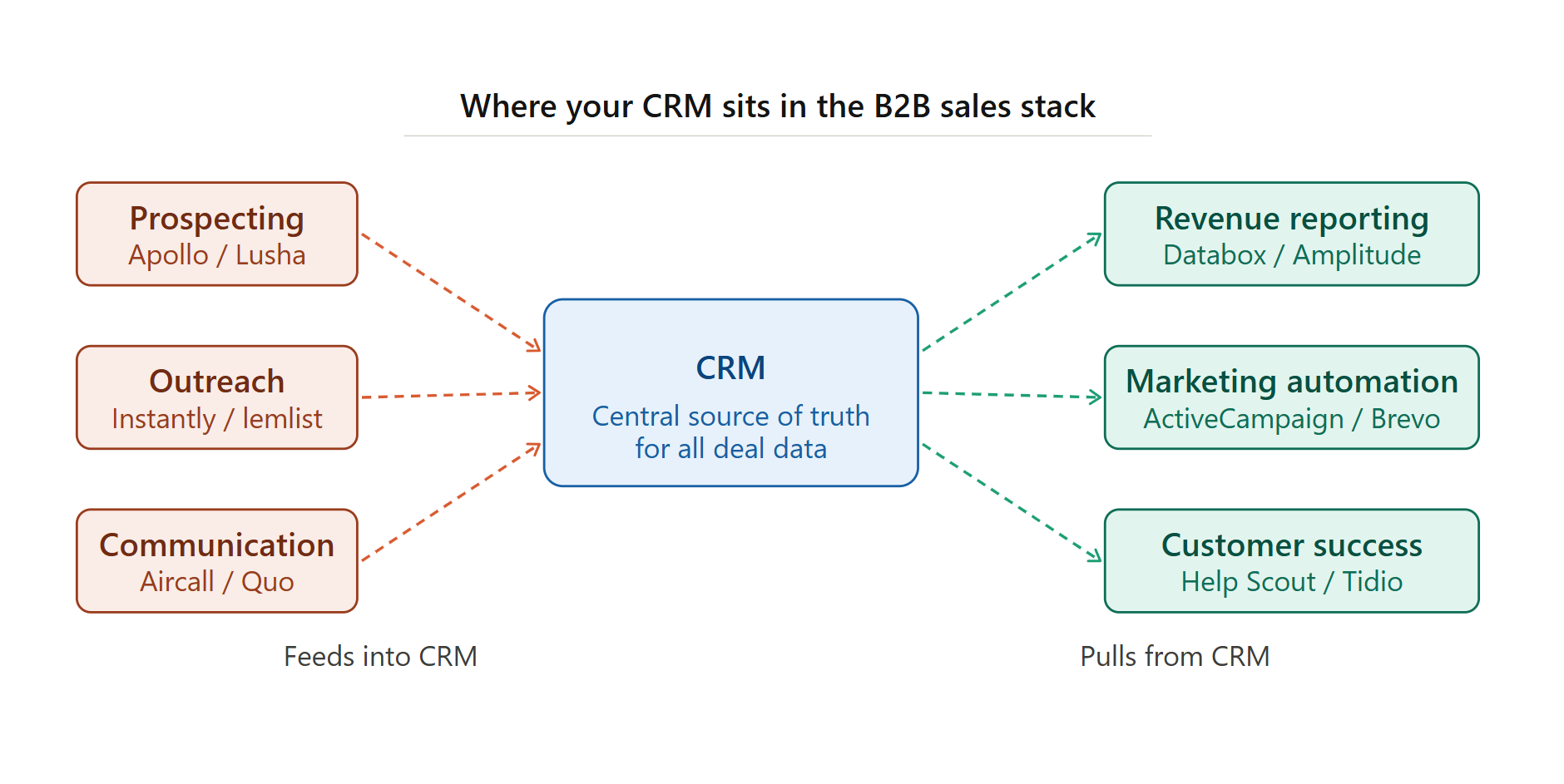
Integration depth with your existing stack. Your CRM does not work in isolation. It needs to talk to your email platform, your outreach tool, your calendar, and ideally your analytics dashboard. A CRM with shallow integrations creates data silos, which is the exact problem you were trying to solve.
The AI question. Every CRM vendor added AI features in 2024 and 2025. Some of them are genuinely useful: call transcription, deal health scoring, and email drafting assistance have real productivity value. Others are window dressing. We have noted where AI features are substantive versus cosmetic for each platform below.
The best CRM software for B2B teams in 2026
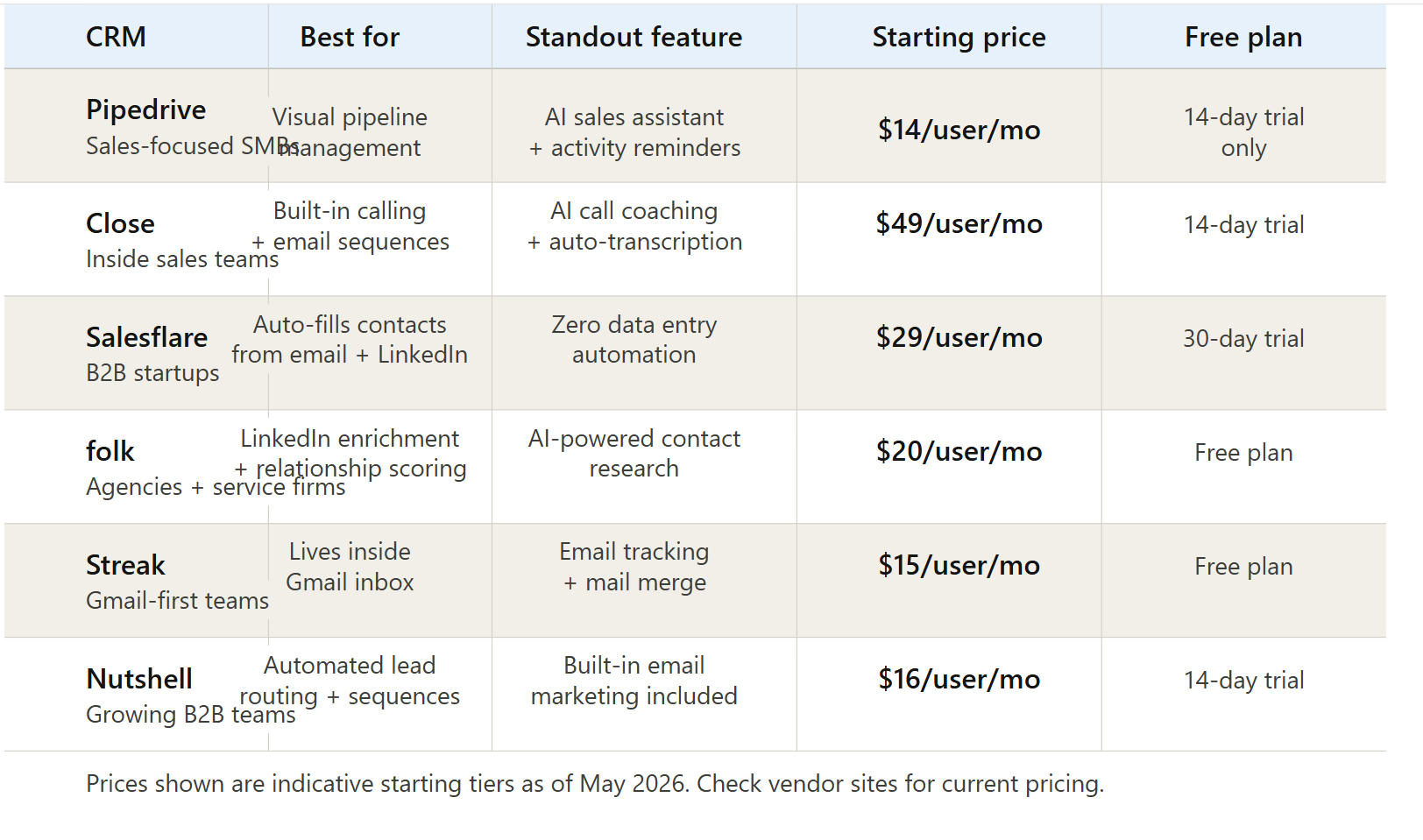
1. Pipedrive (best for sales-focused SMBs who want a clean pipeline view)
Pipedrive has been the default recommendation for small B2B sales teams for years, and it has maintained that position by doing one thing exceptionally well: making the pipeline the center of the experience.
The interface is organized around deals moving through stages. Adding a deal takes seconds. The activity reminders are reliable. And the reporting, while not the deepest in its category, gives a sales manager a clear view of where things stand without a spreadsheet.
In 2025 and into 2026, Pipedrive expanded its AI capabilities with an AI sales assistant that surfaces recommendations based on deal activity and flags deals that are at risk of going cold. The feature is genuinely useful rather than decorative.
Where Pipedrive works well: Teams with a defined sales process and a predictable cycle. Companies where reps are primarily managing a large volume of smaller deals rather than a handful of high-value enterprise relationships.
Where it falls short: The marketing automation is basic and requires integration with third-party tools for anything sophisticated. The reporting at lower tiers is limited. If you need deep revenue forecasting, you will need to step up to a higher pricing tier or look elsewhere.
Pricing: Starts at $14 per user per month on the Essential plan. The AI features that matter most are available from the Advanced plan at $29 per user per month.
2. Close (best for inside sales teams doing high-volume outreach)
Close is built around a simple insight: inside sales teams spend most of their time on the phone and in email, so the CRM should make those activities frictionless rather than treated as data entry chores.
The platform has calling, SMS, and email sequences built in natively, meaning your reps do not need a separate dialer or outreach tool for most workflows. You call from within Close, the call is logged automatically, and the transcript is available immediately. The activity timeline for each contact is populated without anyone typing anything.
The AI coaching features released in late 2024 added real-time call analysis and automated deal health scoring based on communication patterns. For an inside sales team running 50 to 100 outbound touches per day, this is material.
Where Close works well: B2B teams doing outbound sales at volume. Companies where calling is a primary channel and reps need to move fast between contacts without context-switching between tools.
Where it falls short: Close is not built for relationship-driven sales with long cycles and multiple stakeholders. The pipeline management is functional but not as visual or intuitive as Pipedrive. At $49 per user per month to start, it is the most expensive entry point on this list.
Pricing: Starts at $49 per user per month, which is steep for small teams but justifiable if it replaces a separate calling tool.
3. Salesflare (best for B2B startups that want zero data entry)
Salesflare’s core proposition is automation of everything that other CRMs ask sales reps to do manually. It pulls contact information, company data, and communication history from your email, calendar, and LinkedIn activity and builds contact records automatically.
For a small team without a sales operations function, this is significant. There is no onboarding period where reps resist adopting the system because it creates work. The system does the work.
The interface is clean, and the pipeline view is straightforward. Salesflare also has a genuinely useful LinkedIn sidebar that lets you manage relationships from within LinkedIn without switching tabs.
Where Salesflare works well: Early-stage B2B companies where the founders or a small sales team are managing relationships across many channels and cannot afford the overhead of manual CRM hygiene.
Where it falls short: The reporting and forecasting capabilities are lighter than Pipedrive or Close. For teams that need detailed pipeline analytics or territory management, it will feel underpowered as they grow past 20 or 30 users.
Pricing: Starts at $29 per user per month. A 30-day free trial is available.
4. folk (best for agencies and service firms managing relationship networks)
folk takes a different approach from the transactional sales pipeline tools above. It is designed for teams that manage ongoing relationships rather than linear sales funnels. The typical folk user is an agency, a consulting firm, or a founder managing a network of partners, investors, and clients.
The platform’s LinkedIn enrichment is particularly strong: it can pull detailed profile data and surface relationship context that other CRMs miss. The AI-powered contact research feature generates summaries of who someone is and what you have discussed, which is useful before a call or meeting.
Where folk works well: Professional services firms, agencies, investment teams, and any organization where relationships are the primary asset and relationship intelligence matters more than pipeline velocity.
Where it falls short: It is not a fit for transactional B2B sales with defined stages and quota tracking. The reporting is minimal compared to purpose-built sales CRMs.
Pricing: A free plan is available for small teams. Paid plans start at $20 per user per month.
5. Streak (best for teams that live inside Gmail and do not want to leave)
Streak sits entirely within Gmail. There is no separate application to open, no separate login, and no separate interface to learn. Your CRM pipeline lives in a panel inside your inbox, and contact records appear when you open emails.
For teams that are already managing their business from Gmail and resist adopting new software, Streak removes the adoption barrier entirely. Mail merge, email tracking, and pipeline management all work without leaving the inbox.
Where Streak works well: Small B2B teams where Gmail is already the operational center of the business. Founders doing early sales who want pipeline visibility without overhead. Teams that have tried and abandoned conventional CRMs due to adoption failure.
Where it falls short: If your team does not live in Gmail, Streak has no value. The mobile experience is limited compared to standalone CRMs. Advanced automation and reporting are shallow.
Pricing: A free plan is available. Paid plans start at $15 per user per month.
6. Nutshell (best for growing B2B teams that want CRM and email marketing in one place)
Nutshell occupies an interesting position in the market: it includes built-in email marketing alongside CRM functionality, which means growing teams do not need a separate email platform for lead nurturing.
The pipeline management is solid, the automated lead routing works reliably, and the interface is genuinely easy to learn. The reporting gives managers a clear view of rep activity and pipeline health without requiring custom configuration.
The integrated email marketing is the real differentiator. For a 10 to 30-person B2B team that does not yet have a dedicated marketing stack, Nutshell’s combined approach reduces tool sprawl and keeps sales and marketing data in one place.
Where Nutshell works well: Teams at the growth stage where sales and marketing are still handled by the same people or in close coordination. Companies that want to avoid paying for both a CRM and a separate email marketing platform.
Where it falls short: As organizations grow and marketing becomes its own function with more sophisticated needs, the built-in email marketing will likely not scale. At that point, a migration to a dedicated email platform becomes necessary.
Pricing: Starts at $16 per user per month.
What about Salesforce and HubSpot?
They are conspicuously absent from this list. That is intentional.
Salesforce is genuinely powerful software, but it is not designed for teams under 100 people without a dedicated administrator. The configuration overhead, the learning curve, and the total cost of ownership are real barriers that mid-size B2B teams consistently underestimate.
HubSpot’s CRM is free at the entry level, which makes it attractive on paper. But the free tier is a funnel into a platform where meaningful features require the Sales Hub Professional tier, which runs $90 per user per month as of 2026. For teams evaluating HubSpot honestly against the options above, the cost comparison is rarely as favorable as the free plan implies.
If your team is currently using either platform and finding it too heavy, too expensive, or too poorly adopted, the tools above have been built explicitly with that migration audience in mind.
The CRM features that actually matter in 2026
The feature arms race in CRM software has produced a lot of noise. Here is a shorter, more honest list of what separates useful from decorative in 2026.
1. Call recording and AI transcription.
Close has this natively. Pipedrive integrates with tools like Aircall. If your team does meaningful business over the phone, this is now a baseline requirement, not a premium feature.
2. Automated email and activity logging.
Any CRM that requires manual email logging in 2026 is asking your reps to do work that software should handle. Salesflare automates this entirely. Pipedrive and Close handle it well through Gmail and Outlook integrations.
3. Deal health scoring.
AI-driven deal scoring that flags deals going stale or at risk based on communication patterns and deal age has moved from experimental to genuinely reliable. Close and Pipedrive both implement this credibly.
4. LinkedIn data enrichment.
For B2B sales, LinkedIn context is as important as email. folk and Salesflare both pull LinkedIn data into the CRM without requiring manual copy-paste.
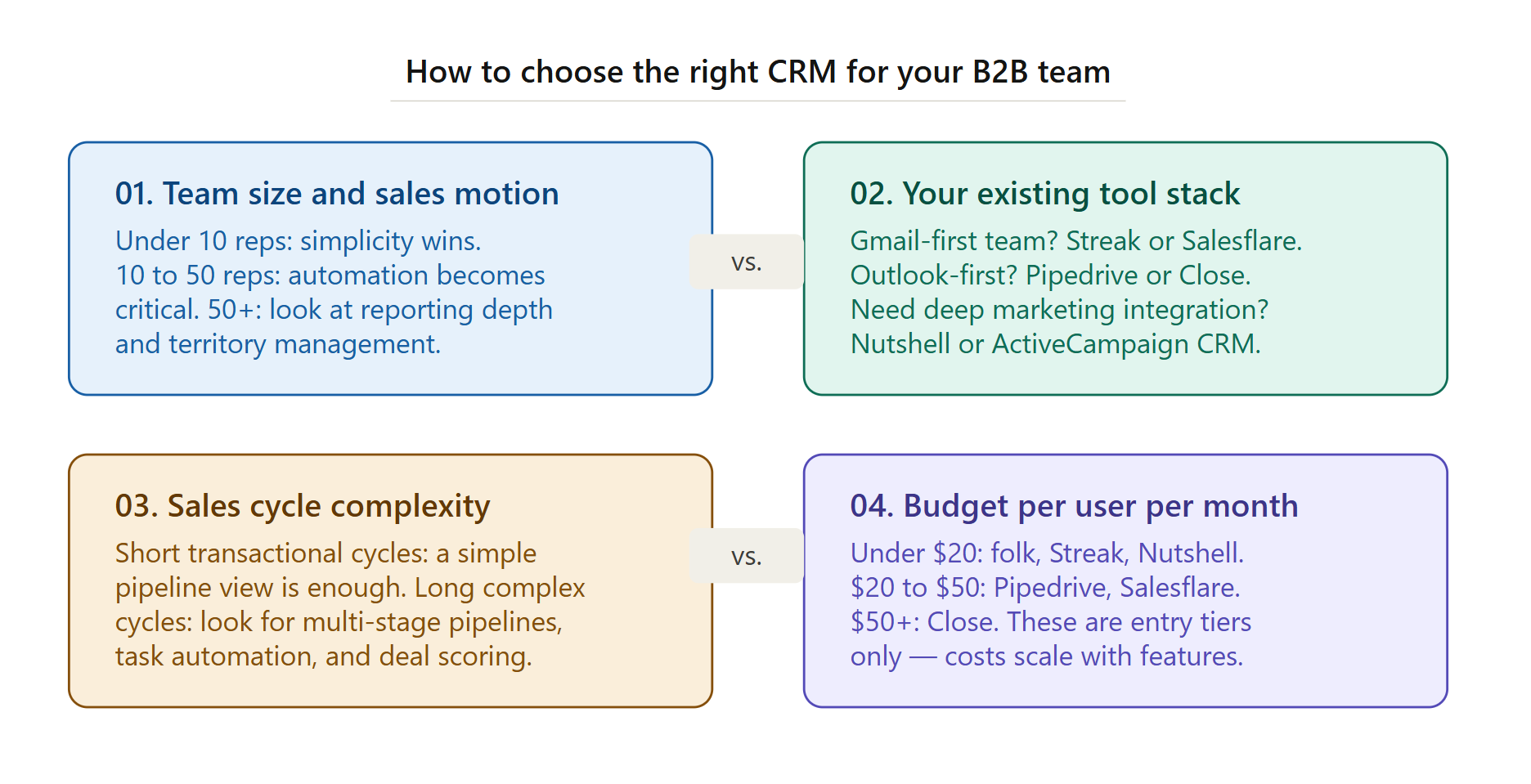
How to choose: A straightforward decision guide
You should choose Pipedrive if: You have a defined sales process, deal volume is the primary challenge, and you want a clean visual pipeline without complexity.
You should choose Close if: Your team does outbound calling at volume, and you want calling, email sequences, and CRM management in one place without stitching tools together.
You should choose Salesflare if: You are a small B2B startup that needs pipeline visibility without asking reps to do data entry.
You should choose folk if: You are in a service business or agency, and relationship intelligence matters more than pipeline velocity.
You should choose Streak if: Your team operates entirely from Gmail, and every previous CRM adoption attempt has failed because people would not leave their inbox.
You should choose Nutshell if: You are at the growth stage and want sales and email marketing in one place without buying two separate platforms.
The CRM that you do not implement is worse than the CRM that is imperfect
The most common CRM mistake mid-size B2B teams make is spending six months evaluating options and then choosing a platform that is 20% better on paper but 60% harder to get adopted.
Adoption beats features. A CRM that your team uses every day with 80% of the ideal functionality is worth more than one they avoid because it is too complex.
Every platform on this list offers a free trial. The most useful thing you can do is pick the one that fits your team’s workflow closest, run a 30-day live trial with two or three reps, and make a decision based on what they actually use rather than what a demo showed.

Adeyemi Adetilewa is a digital marketing specialist focused on SaaS, marketing, and online business. He leads the editorial direction at SaaSXtra.com and has driven over 10M+ content views through strategic content marketing. His work has been published and trusted by platforms including HackerNoon, HuffPost, Addicted2Success, and others.