Running a freelance business in 2026 means wearing a lot of hats. You are the service provider, the project manager, the accountant, the sales rep, and the IT department. The right SaaS tools do not just save you time. They determine whether your business looks professional, gets paid on time, and scales without burning you out.
The problem is that the market is noisier than ever. There are hundreds of SaaS tools competing for your subscription budget, and plenty of “best tools” lists that were last updated in 2023 or quietly recommend whatever pays the highest affiliate commission.
This guide is different. It covers every core category a freelancer needs in 2026, with honest picks, updated pricing, free tier details, and a clear view of what each tool actually does for your day-to-day work.
What counts as a “core” SaaS stack for freelancers?
Before the list, a definition. A core tool earns its place in your stack if it touches one of four things:
- Getting work done and delivered
- Getting paid reliably and on time
- Finding and keeping clients
- Keeping your business organized without manual overhead
Anything outside those four categories is optional. You do not need a dedicated SEO tool, a social media scheduler, or an email marketing platform on day one. Those are growth-layer tools. This guide focuses on the foundation.
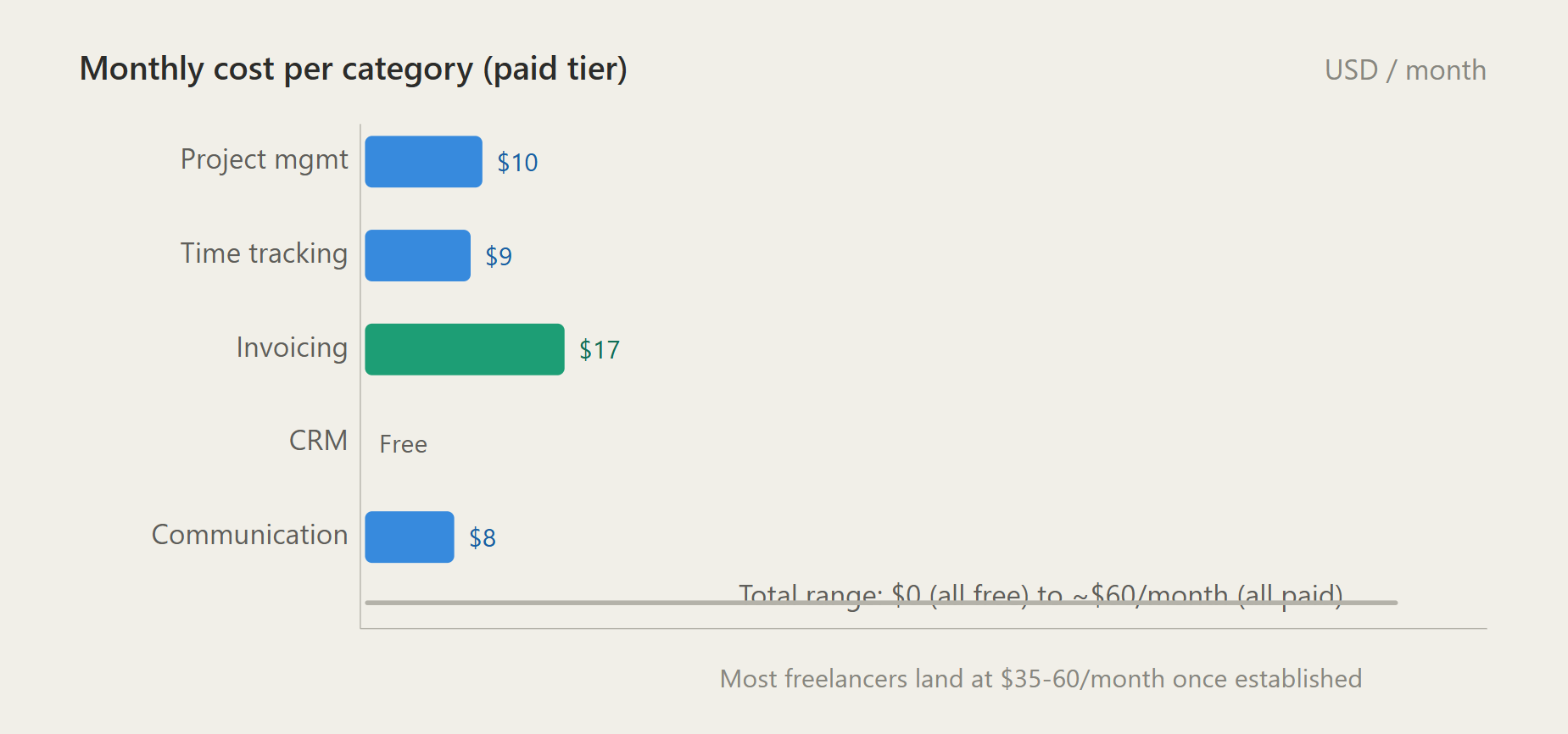
The full stack below costs between $0 and $120 per month, depending on which tiers you choose. Most freelancers land around $40 to $60 per month once they settle on their setup.
SaaS Stack For Freelancers in 2026
1. Project management
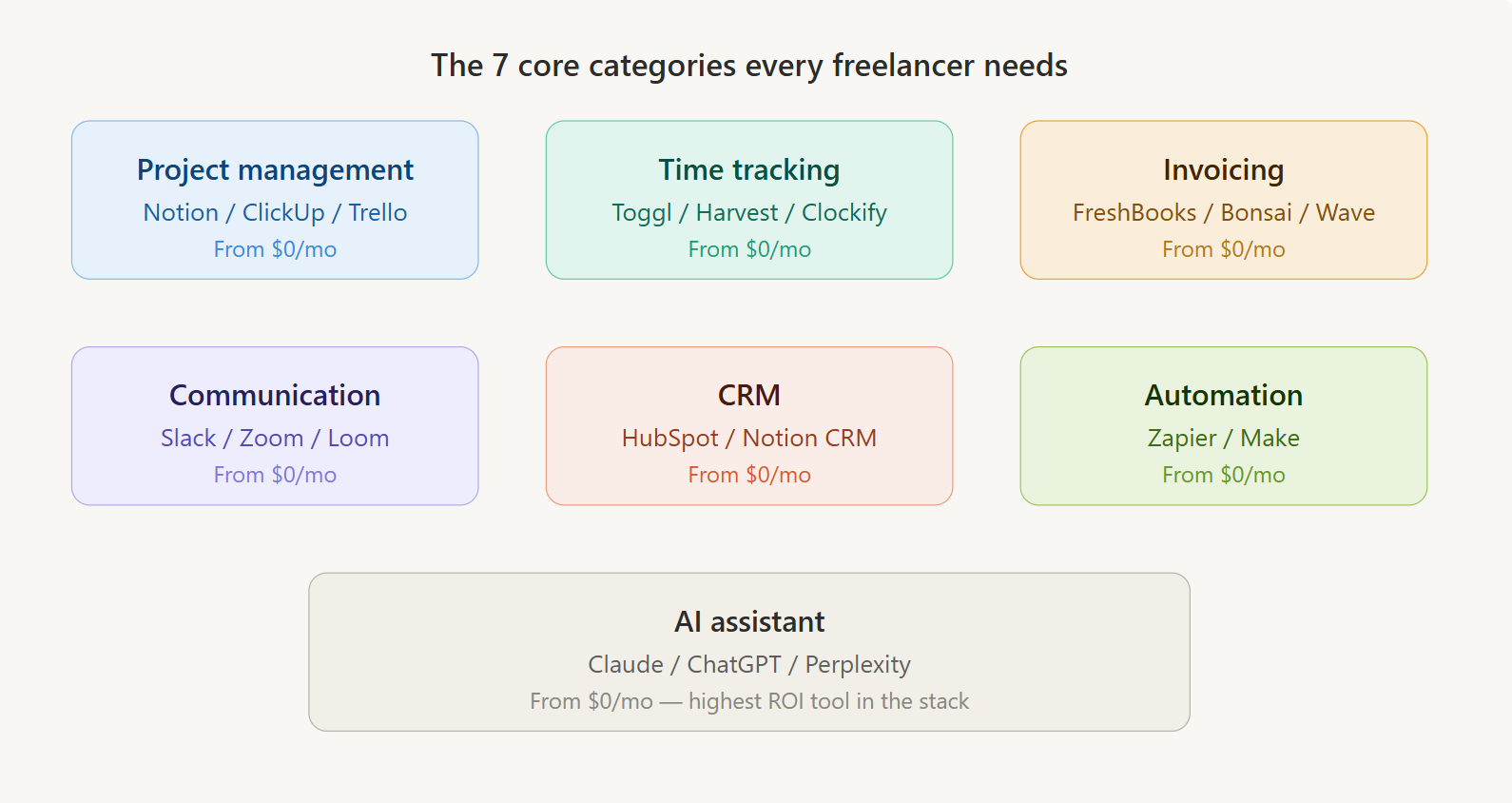
Every freelancer needs a place where client work lives, deadlines are tracked, and nothing falls through the cracks. In 2026, the top three tools for this are Notion, ClickUp, and Trello. Each one fits a different working style.
Notion
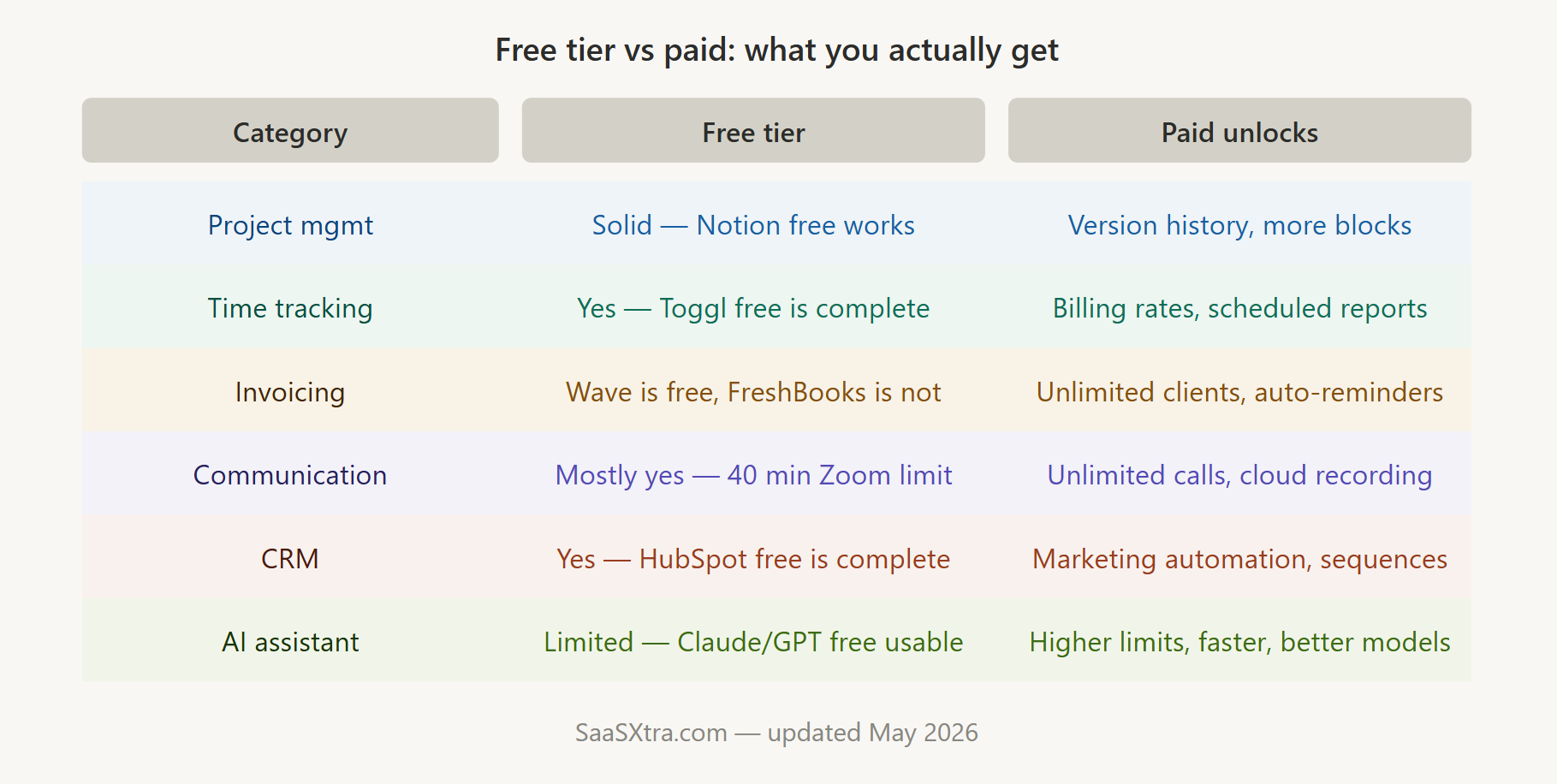
Notion is the most flexible option available. It functions as a project tracker, client CRM, document workspace, and knowledge base all in one. The free plan is genuinely usable for solo freelancers. The Plus plan at $10 per month per user adds unlimited blocks and a better version history, which becomes worth it once you start managing four or more active clients simultaneously.
ClickUp
ClickUp is better suited for freelancers who manage complex, multi-phase projects with hard dependencies. Its learning curve is steeper than Notion’s, but the automation features are more powerful out of the box. The free plan allows unlimited tasks on up to five projects. Paid plans start at $7 per month.
Trello
Trello remains the simplest option. If you are a single-service freelancer with a predictable workflow, a Trello board with columns like “In progress,” “In review,” and “Delivered” may be all you need. The free plan is generous. The standard plan is $5 per month.
Our pick
Notion for most freelancers. The combination of project tracking, note-taking, and client management in one workspace reduces tool sprawl significantly.
2. Time tracking
Accurate time tracking does three things: it keeps you honest about your actual hourly rate, it makes billing easy, and it gives you data to raise your prices over time.
Toggl Track
Toggle Track is the most widely used time tracking tool among freelancers for good reason. The interface is clean, the mobile app is reliable, and the reporting is clear enough to drop into a client invoice without editing. Free plan supports unlimited projects and clients. Paid plans start at $9 per month per user and add billing rates, time rounding, and scheduled reports.
Harvest
Harvest combines time tracking with invoicing, which makes it useful if you want fewer tools overall. The free plan is limited to one seat and two active projects. Paid plans start at $12 per month per seat.
Clockify
Clockify is the free alternative. The core time tracking features are free with no project or user limits. The interface is less polished than Toggl, but for budget-conscious freelancers just starting, it covers everything needed.
Our pick
Toggl Track. The free plan handles the needs of most solo freelancers, and the paid tier is reasonably priced when you start billing multiple clients regularly.
3. Invoicing and payments
Getting paid is the job. Everything else in your stack supports it. Your invoicing tool needs to be fast to use, professional-looking, and reliable with payment processing.
FreshBooks
FreshBooks is the most polished invoicing and accounting tool aimed specifically at freelancers and small service businesses. It handles recurring invoices, automatic payment reminders, expense tracking, and basic reporting. Pricing starts at $17 per month for the Lite plan, which covers up to five active clients. The Plus plan at $30 per month removes the client limit and adds more advanced reporting.
Bonsai
Bonsai packages invoicing alongside contracts, proposals, time tracking, and a basic CRM. If you want everything client-related in one place, Bonsai is worth the $21 per month starting price. It is especially popular with designers and creative freelancers who handle a lot of contract work.
HoneyBook
HoneyBook serves a similar all-in-one role but leans more toward client experience, with polished proposal templates and an automated client onboarding workflow. Pricing starts at $19 per month.
Wave
Wave remains the best free invoicing option in 2026 for freelancers who are just starting out or who invoice infrequently. Invoicing and accounting features are free. Payment processing fees apply when clients pay online.
Our pick
FreshBooks for established freelancers who want clean accounting and professional invoices. Wave for anyone starting out who needs zero upfront cost.
4. Client communication
Where you communicate with clients matters more than most freelancers realize. Scattered communication across email, WhatsApp, Instagram DMs, and random file-sharing links is one of the fastest ways to look unprofessional and lose track of what was agreed.
Slack
Slack is the standard for async client communication when a client’s team uses it. Most agencies and larger clients will already be on Slack and will add you as a guest. The free plan limits message history to 90 days, which is generally enough for freelance project threads. Paid plans start at $8 per month per user if you need to run your own Slack workspace with clients.
Zoom
Zoom remains the default for video calls. The free plan limits meetings to 40 minutes for groups of three or more, which is tight for detailed client sessions. The Pro plan at $15 per month per user removes that limit and adds cloud recording.
Loom
Loom fills the gap between synchronous calls and back-and-forth email. Recording a quick video to walk a client through a deliverable, explain a design decision, or give feedback on a brief saves enormous amounts of time. The free plan allows 25 videos of up to five minutes each. Paid plans start at $15 per month.
Our pick
Use whatever channel your client is already on for day-to-day communication. Add Loom to your stack immediately if you do not already use it. The time savings on client feedback loops alone justify the free plan.
5. Client and lead management (CRM)
A CRM sounds like an enterprise tool, but every freelancer managing more than a handful of client relationships needs one. Without it, follow-ups fall through the cracks, warm leads go cold, and you forget what you discussed on the last call.
HubSpot CRM
HubSpot CRM is free at a level that covers everything most freelancers need. You get a contact database, deal pipeline, email logging, and task reminders at no cost. The interface is clean, and the mobile app is solid. The free tier is not a crippled trial. It works.
Notion
Notion can serve as a lightweight CRM if you have already committed to Notion as your workspace. Building a simple client database with fields for contact info, project status, billing notes, and last contact date takes about 30 minutes to set up. It is not as powerful as a dedicated CRM, but it eliminates an extra tool.
Our pick
HubSpot CRM free tier for anyone who wants a proper CRM without paying for it. Notion CRM for minimalists who want fewer tools overall.
6. Automation
The difference between a freelancer who works 50 hours a week and one who works 35 is often not the number of clients. It is how much of their administrative work runs on autopilot.
Zapier
Zapier is the most widely known automation tool and connects more apps than any competitor. The free plan allows five automations (Zaps) with single-step actions. Paid plans start at $20 per month for 20 multi-step Zaps.
Useful automations for freelancers include: sending a Slack notification when a new lead fills out your contact form, adding a new invoice to a Google Sheet automatically, and creating a Notion task when a client emails a specific phrase.
Make.com
Make.com is more powerful than Zapier for complex workflows and significantly cheaper. The free plan allows 1,000 operations per month across unlimited scenarios. Paid plans start at $9 per month.
If you are comfortable with a slightly more visual, flowchart-style interface, Make.com offers considerably more for less money.
Our pick
Make.com is for freelancers comfortable with a modest learning curve. Zapier for those who want the simplest possible setup and already use tools with native Zapier integrations.
7. AI assistant
By 2026, an AI assistant will not be a bonus tool. It is a core part of how efficient freelancers work. The right AI tool handles first drafts of client emails, research, proposal copy, summarizing long documents, and generating outlines for deliverables.
Claude (from Anthropic)
Claude AI (from Anthropic) is particularly strong for writing-heavy work, nuanced client communication, and tasks requiring careful reasoning. The free tier is available and usable. Claude Pro at $20 per month unlocks more capacity and faster response times.
ChatGPT
ChatGPT (from OpenAI) remains the most widely recognized tool and the most capable for coding-adjacent tasks. The free tier covers basic usage. ChatGPT Plus at $20 per month adds GPT-4o access and better performance on complex tasks.
Perplexity
Perplexity fills a different niche. It is best used as a real-time research tool rather than a content or writing assistant. Free plan is solid. Pro plan at $20 per month adds higher query limits and access to more powerful models.
Most freelancers end up with one primary AI assistant and occasionally use a second for a specific task type.
Our pick
Claude or ChatGPT as your primary. Add Perplexity if you do a lot of research-heavy work. You do not need all three.
The minimum viable SaaS stack for freelancers in 2026
If you are just starting and want to spend as close to zero as possible while still looking professional, here is the minimum viable stack:
- Notion (free) for project tracking and notes
- Toggl Track (free) for time tracking
- Wave (free) for invoicing
- HubSpot CRM (free) for contact and lead management
- Zoom (free) for client calls, accepting the 40-minute limit
- Claude or ChatGPT (free tier) for writing and research tasks
Total monthly cost: $0.
This stack has real limits. Wave’s invoicing is functional but plain. Zoom’s 40-minute cap is awkward. The AI free tiers have usage limits. But for a freelancer in the first three to six months of their business, this covers everything needed to find clients, do the work, and get paid.
The recommended full SaaS stack for established freelancers
Once you are billing regularly and your time has a clear dollar value, here is the stack worth paying for:
- Notion Plus ($10/month) for workspace
- Toggl Track Starter ($9/month) for time tracking with billing rates
- FreshBooks Lite ($17/month) for professional invoicing and accounting
- HubSpot CRM (free) for client management
- Loom Starter ($15/month) for async client communication
- Make.com free plan for basic automations
- Claude Pro or ChatGPT Plus ($20/month) for your primary AI assistant
Total: approximately $71 per month. If you bill $75 to $150 per hour and this stack saves you even two hours of administrative time per month, it pays for itself.
What this SaaS stack for freelancers does not include
A few categories are intentionally left out of the core stack:
Contract management becomes important once you start handling multiple clients with varied scopes. Tools like Bonsai, DocuSign, and PandaDoc handle this well, but are not necessary when you are starting.
Cloud storage is handled by whatever you already use. Google Drive (free with 15GB) or Dropbox (free with 2GB, $12/month for 2TB) should be layered in based on file size needs.
Password management is overlooked by most freelancers, but it becomes critical once you manage logins for 20 or more client tools and services. Bitwarden is free and excellent. 1Password is $3 per month and adds family sharing and better enterprise integrations.
These tools belong in a second layer of your stack rather than the core foundation.
How to build your SaaS stack without tool creep
The biggest mistake freelancers make with SaaS tools is signing up for too many at once. Every tool you add creates a small ongoing maintenance burden. You need to check it, learn its updates, pay for it, and integrate it mentally into your workflow.
The better approach is to add tools sequentially. Start with the minimum viable stack. Add one tool when you feel a specific pain point clearly enough that you can articulate what problem it solves. Do not add tools speculatively.
Revisit your stack every six months. Tools that sounded useful but have not been opened in three months should be cancelled. Pricing changes, better alternatives emerge, and your workflow evolves.
The goal is not the largest stack. It is the most effective one.
Final word
The freelance SaaS market in 2026 offers more capable tools at lower prices than at any point before. The combination of generous free tiers and AI-powered features that used to require specialist knowledge means a solo freelancer can now operate with the systems quality of a small agency.
The SaaS tools in this guide are not theoretical. They are what working freelancers across writing, design, development, marketing, and video production are actually using to run lean, profitable businesses.
Start with the free stack. Upgrade category by category as your revenue grows. Keep what earns its place, and cut what does not.

Adeyemi Adetilewa is a digital marketing specialist focused on SaaS, marketing, and online business. He leads the editorial direction at SaaSXtra.com and has driven over 10M+ content views through strategic content marketing. His work has been published and trusted by platforms including HackerNoon, HuffPost, Addicted2Success, and others.