Freelance writing in 2026 is not the same business it was three years ago. AI has reshaped what clients expect, compressed timelines, and raised the bar for research quality and voice.
Writers who are thriving right now are not the ones who resisted these changes. They are the ones who built a SaaS tool stack that handles the administrative weight of their business, supports their research process, and lets them spend the maximum amount of time doing the work only they can do.
This guide covers the exact SaaS stack for freelance writers in 2026, organized by category. Every SaaS tool listed is one that working writers actually use. Pricing is current as of May 2026. Free tier details are accurate. This is not a list padded with tools because they have high affiliate payouts.
SaaS Stack for Freelance Writers
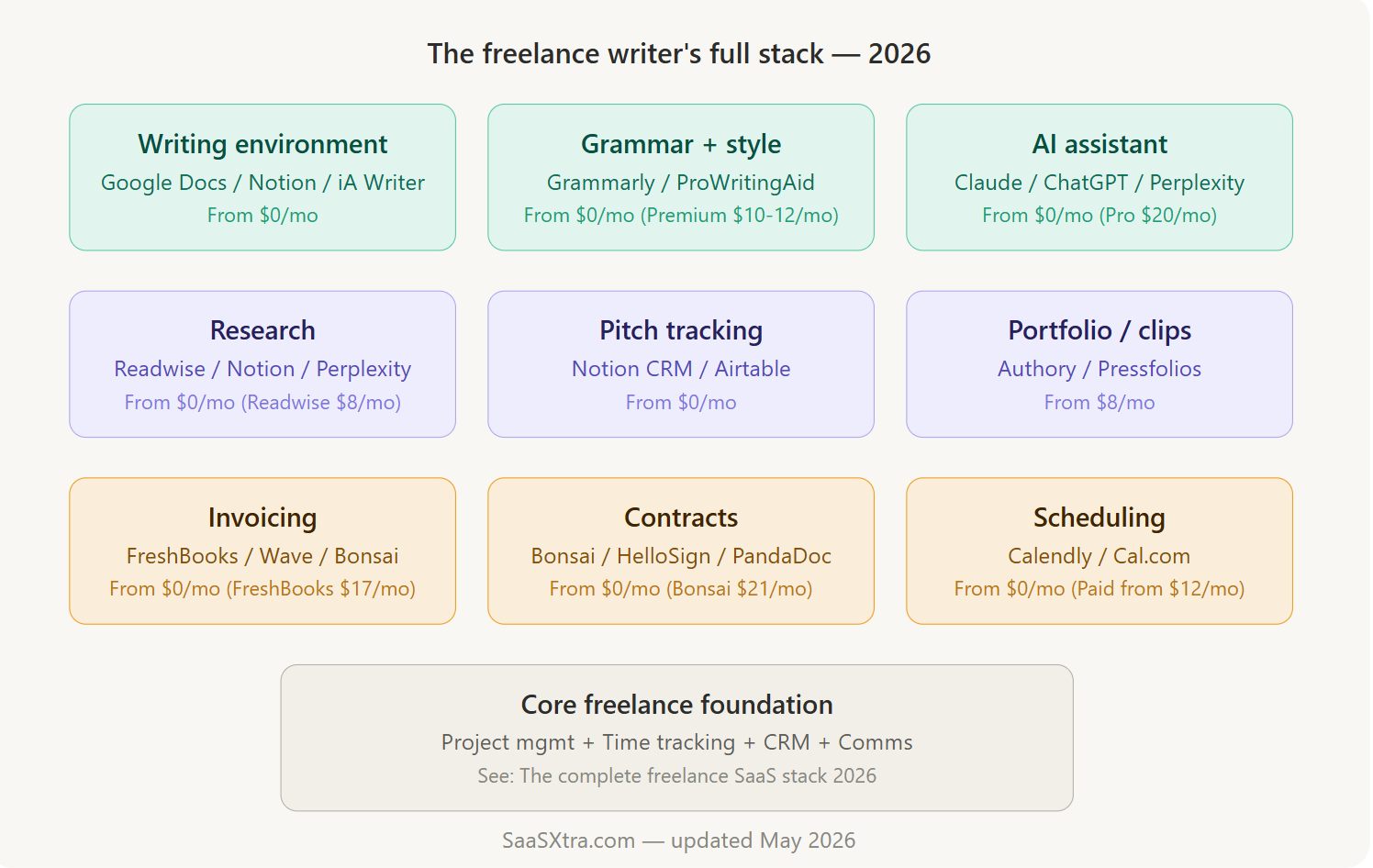
One thing worth stating upfront: the writer-specific stack sits on top of the general freelance foundation.
If you have not already set up project management, time tracking, invoicing, and a CRM, start with the core freelance stack guide first. This article covers everything writers need beyond that foundation.
1. The writing environment
Where you actually put words matters more than most writers admit. A good writing environment removes friction between thinking and typing. A bad one adds dozens of small interruptions every hour.
Google Docs
Google Docs remains the default for most client work because clients expect it. Collaboration, comments, and version history work reliably. Sharing a link is frictionless.
The limitations are real: the interface is cluttered, the offline mode is less reliable than it should be, and there is no useful focus mode. But for client-facing work, Google Docs is not going anywhere. It is free.
Notion
Notion works well as a writing environment for drafts, notes, research, and editorial calendars. Many freelance writers keep their first drafts and working notes in Notion, then copy the finished piece to Google Docs for client delivery.
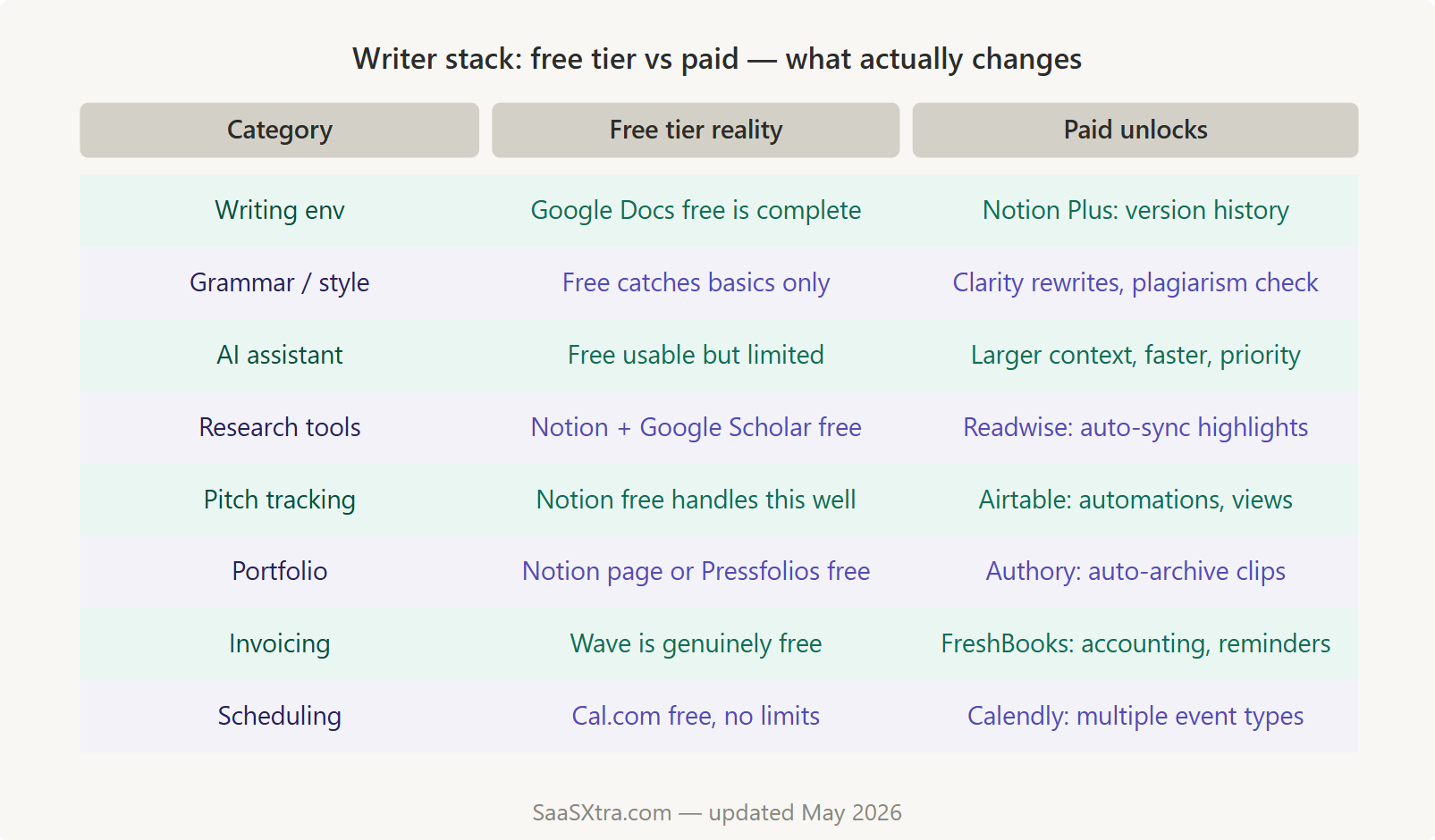
The free plan is solid. Notion Plus at $10 per month adds version history that goes back 30 days, which matters if you accidentally delete something significant.
iA Writer
iA Writer is the focused writing environment for writers who want zero distractions. The interface is stripped of everything except text. Markdown is the formatting language.
Exports to Word, PDF, and HTML are clean. It is a one-time purchase of around $30, depending on your platform, not a subscription. It does not replace Google Docs for client collaboration, but it is genuinely better for getting a first draft done without interruption.
Hemingway Editor
Hemingway Editor is a web-based tool that highlights complex sentences, passive voice, adverb overuse, and readability grade. It is useful for self-editing passes before submitting client work. The web version is free. The desktop app is a one-time $19.99 purchase and works offline.
Our pick for a writing environment
Google Docs for client-facing work (mandatory). Notion for your own research and drafting. Add iA Writer if you struggle with distraction during the writing process.
2. Grammar, style, and editing tools
Every freelance writer needs a grammar and style layer, but the right tool depends heavily on the type of writing you do.
Grammarly
Grammarly is the most widely used tool in this category. The free tier catches spelling errors, basic grammar mistakes, and punctuation issues.
Grammarly Premium, at $12 per month on an annual plan, adds style suggestions, tone detection, clarity rewrites, and a plagiarism checker. For writers producing high volumes of content for clients, the Premium tier is worth evaluating.
The key question is whether the suggestions align with your voice or fight it. Some writers find the rewrites useful. Others find them homogenizing.
ProWritingAid
ProWritingAid is the stronger option for long-form and fiction writers. It goes deeper into structural issues: sentence variety, pacing, repeated words and phrases, and overused expressions. Annual pricing lands around $10 per month. It integrates with Scrivener, which matters for book-length projects.
LanguageTool
LanguageTool is the open-source alternative. The free browser extension covers basic grammar and style for most languages.
Premium at $5 per month per user adds more advanced style rules and a larger database of style errors. For writers working in multiple languages, LanguageTool is the clear choice.
Our pick
Grammarly Premium for content writers producing web copy, articles, and marketing material. ProWritingAid for long-form and narrative writers. LanguageTool for multilingual writers or anyone who wants a capable free option.
3. AI writing assistants
This is the category that has changed most dramatically for freelance writers. In 2024, most writers were cautiously experimenting with AI tools. In 2026, the writers who do not use them are working harder for the same output.
The important distinction is how AI fits into your process. The best writers are not using AI to generate finished copy. They are using it to accelerate research, break through first-draft paralysis, generate structural options before picking one, and handle the mechanical parts of writing like summarizing a long source document or rephrasing a sentence that is not landing.
Claude (from Anthropic)
Claude (from Anthropic) handles long-form writing tasks exceptionally well. It can hold a consistent tone across a lengthy draft, follow nuanced style instructions, and produce research summaries that hold up to scrutiny.
Claude’s context window is large enough to work with a full long-form article at once. Free tier available. Claude Pro at $20 per month is worth it for writers using it heavily across multiple client projects.
ChatGPT
ChatGPT remains the most versatile general-purpose tool. Its strength for writers is breadth: it handles ideation, outline generation, research queries, rephrasing, and SEO meta descriptions equally well. ChatGPT Plus at $20 per month adds GPT-4o access and is the version worth paying for.
Perplexity AI
Perplexity AI functions best as a research tool rather than a writing tool. It searches the web in real time, cites sources, and produces factual summaries.
For writers covering news, finance, technology, or any topic where accuracy and recency matter, Perplexity is more useful during the research phase than a general AI chatbot. The free plan covers most use cases. Pro at $20 per month adds higher query limits.
Jasper
Jasper is built specifically for marketing copy and content marketing. It has templates for blog posts, product descriptions, email sequences, and social content.
For writers who do primarily brand and marketing work, Jasper’s structured approach is useful. It starts at $39 per month, which is harder to justify unless your client mix is heavily marketing-focused.
Our pick
Claude or ChatGPT as your primary AI assistant. Add Perplexity for research-heavy work. Skip Jasper unless marketing copy is your main service.
4. Research tools
Good research is what separates average freelance writing from writing that earns repeat clients and referrals. The tools in this category help you find credible sources faster, organize what you find, and pull quotes and data without losing track of where they came from.
Notion
Notion doubles as a research repository for many writers. A dedicated research database in Notion, with fields for source URL, key quotes, topic tags, and article notes, keeps everything in one place. No additional cost if you are already using Notion for project management.
Readwise Reader
Readwise Reader is the most useful reading and research tool for writers who consume large volumes of content.
It aggregates newsletters, articles, PDFs, and RSS feeds in one reader, lets you highlight and annotate as you read, and syncs highlights to Notion or Obsidian automatically. Pricing is $8 per month. For writers who research seriously, the time savings on note organization alone make this worth it.
Perplexity AI
Perplexity AI (covered in the AI section above) deserves a mention here too.
For quick factual research during the writing process, asking Perplexity a specific question and getting a cited answer is faster than a traditional Google search and more reliable than asking a general AI tool that might fabricate citations.
Google Scholar
Google Scholar is free and remains the best starting point for academic and scientific research. No tool replaces it for peer-reviewed sources.
Our pick
Notion for organizing the research you have already gathered. Readwise Reader for managing ongoing reading and highlighting. Perplexity for in-the-moment factual queries.
5. Pitch tracking and editorial management
Writers who pitch publications need a system for tracking where pitches are, which editors they have worked with, and which ideas have been sent where. Without one, you will accidentally pitch the same idea to competing outlets, lose track of follow-up timing, and have no clear picture of your pipeline.
Notion
Notion handles pitch tracking well as a custom database.
You can build a table with columns for pitch title, publication, editor contact, date sent, status (sent, followed up, accepted, rejected), and notes. It takes about an hour to set up, and no additional cost if you are already on Notion.
Airtable
Airtable is more powerful than Notion for complex editorial tracking, but it has a steeper learning curve.
The free plan allows 1,200 records and five editors per base, which is enough for most freelancers starting. Paid plans start at $20 per month and add more records, automations, and views.
Pressfolios and Authory
Pressfolios and Authory are portfolio tools that also help writers organize their published clips.
Authory at $8 per month automatically imports and archives your published work from across the web, which is genuinely useful when a byline goes dead or a publication deletes old content. Your clips are safe regardless of what the publication does.
Our pick
Notion pitch tracker for most writers. Authory if protecting and showcasing your clip archive is a priority.
6. Invoicing and contracts for writers
Freelance writers are among the most likely to skip proper contracts and send informal invoices.
This is a mistake that becomes expensive over time. A client who disputes a revision scope, delays payment, or requests rights they were never granted is a much bigger problem without a signed contract on file.
Bonsai
Bonsai is the closest thing to an all-in-one solution for freelance writers who want contracts, proposals, and invoicing in one place. It has contract templates built specifically for writing and content work, including rights licensing language and revision scope definitions.
The workflow goes: send proposal, client approves, contract generates automatically, project kicks off, invoice on completion. Starting at $21 per month, it handles the entire client lifecycle. Particularly useful for writers who work with multiple clients simultaneously and want every engagement documented cleanly.
FreshBooks
FreshBooks is the better choice if invoicing and accounting are your priority over contract management. It connects directly with Stripe and PayPal, generates professional invoices, and handles expense tracking for tax time.
Writers who handle contracts separately through a simpler tool and want strong accounting will prefer FreshBooks. Lite plan starts at $17 per month for up to five active clients. Plus plan at $30 per month removes the client cap.
Wave
Wave covers invoicing for free. The invoice templates are clean enough, payment processing works, and the accounting dashboard handles basic income and expense tracking. For writers who are early in their business and not yet billing regularly, Wave is the right starting point.
HelloSign (now Dropbox Sign)
HelloSign (now Dropbox Sign) handles contract signing without the full Bonsai overhead.
If you have your own contract template and simply need an e-signature tool, HelloSign’s free plan allows three signature requests per month, which is enough for a writer with a small number of ongoing client relationships. Paid plans start at $15 per month for unlimited requests.
Our pick
Bonsai for writers who want one tool handling proposals, contracts, and invoices. FreshBooks plus a separate signing tool for writers who prioritize accounting depth. Wave for anyone starting.
7. Scheduling tools
Scheduling client calls without a dedicated tool involves more back-and-forth than it should. A scheduling link eliminates that friction.
Calendly
Calendly is the standard. You set your available hours, share a link, and clients book directly into your calendar without email negotiation. The free plan covers one event type and one calendar connection, which is enough for most freelance writers.
The standard plan at $10 per month adds multiple event types, which matters if you offer different kinds of calls: discovery calls, editorial check-ins, and revision walkthroughs. Each benefits from different durations and booking questions.
Cal.com
Cal.com is the open-source alternative. It is free for individuals with no event type limits, connects to Google Calendar and Outlook, and offers the same core booking functionality as Calendly. The interface is slightly less polished but entirely functional. For budget-conscious writers, Cal.com is the obvious choice.
Our pick
Cal.com is for writers who want a capable free tool. Calendly Standard if you run multiple types of client calls and want a more refined experience.
8. Portfolio tools
Your portfolio is a sales tool. It needs to load fast, display your best work cleanly, and make it easy for a potential client to understand what you write and who you write for.
Authory
Authory is the best portfolio tool for working writers in 2026 for one important reason: it automatically imports and archives your published work from across the web.
When a publication redesigns its site, deletes old content, or goes offline entirely, your clips remain safe in your Authory archive. At $8 per month, it also generates a clean public-facing portfolio page. For writers with a meaningful body of published work, the archiving feature alone justifies the cost.
Pressfolios
Pressfolios offers similar functionality. The free plan allows up to 30 clips and one portfolio page, which is enough to get started. Paid plans start at $9 per month and add unlimited clips and a custom domain.
Journo Portfolio
Journo Portfolio is another solid option. Clean templates, custom domain support, and a free plan that allows up to 10 portfolio items. Paid plans from $7 per month remove the item limit.
A Notion portfolio page
A simple Notion portfolio page works as a portfolio for writers who prefer to keep everything in one workspace.
A public Notion page with embedded links to published work, a short bio, service descriptions, and a contact link is a functional portfolio. It is not as polished as a dedicated portfolio tool, but it costs nothing extra if you are already on Notion.
Our pick
Authory if protecting and showcasing a large body of published work is the priority. A Notion portfolio page for writers who are just getting started and want zero additional cost.
The minimum viable SaaS stack for freelance writers
If you are starting and want to spend nothing while still running a professional writing business, this covers everything:
- Google Docs (free) for writing and client delivery
- Grammarly free tier for basic editing passes
- Claude or ChatGPT free tier for research and drafting support
- Notion is free for project tracking, pitch tracking, and research notes
- Wave (free) for invoicing
- Cal.com (free) for scheduling client calls
- A Notion public page (free) as your portfolio
- HubSpot CRM (free) for client and lead tracking
Total monthly cost: $0.
This is a fully functional writing business stack. It is not missing anything critical. The free tools in each category are genuinely capable, not crippled trials.
The recommended full SaaS stack for established freelance writers
Once you are billing consistently and your time has a clear dollar value, here is the upgrade path worth taking:
- Notion Plus ($10 per month) for version history and expanded workspace
- Grammarly Premium ($12 per month) for deeper editing and plagiarism checking
- Claude Pro or ChatGPT Plus ($20 per month) as your primary AI assistant
- Readwise Reader ($8 per month) for organized research and highlight syncing
- Authory ($8 per month) for clip archiving and portfolio
- Bonsai ($21 per month) for contracts, proposals, and invoicing in one place
- Calendly Standard ($10 per month) for multiple client call types
- Perplexity Pro ($20 per month) if research is central to your work
Total: approximately $109 per month fully loaded, or around $79 per month with a lighter AI and research layer.
If you bill $75 per hour or more and this stack saves you three hours of administrative work per month, it pays for itself before the end of the first week.
SaaS tools freelance writers do not need
A few things get recommended to writers that rarely earn their place:
Dedicated SEO tools like Ahrefs or Semrush are only worth it if SEO writing is a core service you sell. At $99 to $129 per month, they are hard to justify unless you are doing keyword research for clients regularly. Free tools like Google Search Console, Ubersuggest’s free tier, and Ahrefs’ free keyword explorer cover the basics for most writers.
Social media management tools are a distraction for most freelance writers. Your business grows through great work and word of mouth, not through scheduling LinkedIn posts.
Dedicated note-taking apps beyond Notion are usually unnecessary. Apple Notes, Bear, and Obsidian all have devoted followings among writers, but unless you have a specific workflow that demands them, adding another notes tool to a stack that already includes Notion creates redundancy rather than capability.
What makes the SaaS stack for freelance writers different from others?
Two things set the writer’s stack apart from the general freelance stack.
First, the writing environment itself is a professional tool, not just an app. Writers need to think carefully about where they write, because the environment shapes the quality of the output. This is why the writing tools category is more crowded and more opinionated than equivalent categories for other freelance types.
Second, research and knowledge management are core workflows for writers in a way that they are not for most other freelancers. A designer needs to organize files. A developer needs to manage code.
A writer needs to manage information: what they have read, what they have found, what they might use, and where it came from. The research and pitch-tracking tools in this stack serve that function directly.
Everything else connects back to the same foundation: running a professional, organized, well-paid freelance business.

Adeyemi Adetilewa is a digital marketing specialist focused on SaaS, marketing, and online business. He leads the editorial direction at SaaSXtra.com and has driven over 10M+ content views through strategic content marketing. His work has been published and trusted by platforms including HackerNoon, HuffPost, Addicted2Success, and others.