The best AI web design tools in 2026 let you go from a blank screen to a live, professional website in minutes, not months. Whether you are a solo founder validating an idea, a designer who wants to ship faster, or an agency running 20 client sites simultaneously, there is a purpose-built AI tool for your exact situation.
This guide covers the best AI web design tools tested and evaluated across four categories: no-code AI site builders, designer-grade platforms, code-first generators, and AI design assistants. Every entry includes verified 2026 pricing, real limitations, and a clear recommendation on who should use it. No filler tools added to hit a number.
How We Evaluated These Best AI Web Design Tools
Not every web design tool in this category earns its “AI” label. Many platforms slap the term onto a basic template selector and call it intelligent design.
The web design tools on this list demonstrate genuine AI involvement in at least one of the following: layout generation from natural language prompts, intelligent content creation, adaptive design suggestions, or code generation from text descriptions.
Evaluation criteria:
- Output quality on the first generation without heavy prompt engineering
- Customization depth after AI generates the initial result
- Honest 2026 pricing, including credit limits and renewal costs
- Whether you own your output (code export availability)
- Specific use cases each tool genuinely excels at
The AI web design tools market split definitively in 2025, and that divide has deepened in 2026.
Marketing site builders (Framer, Wix, Squarespace, Durable) and full-stack application generators (Lovable, Bolt, v0) are now distinct product categories with different buyers, different workflows, and different total costs of ownership. Picking the wrong category for your project costs more than money; it costs weeks.
Category 1: No-Code AI Site Builders
These AI web design tools are for people who want a live website without touching code. Describe what you need, the AI builds it, you customize it, and you publish.
1. Framer AI
Best for: Designers, agencies, and creative professionals who refuse to ship ugly websites.
Framer remains the highest-design-ceiling AI website builder in 2026 after a significant pricing restructure in October 2025 that simplified its tiers and, notably in May 2026, cut editor seat costs from $40 to $20 per month across Pro and Scale plans.
When you prompt Framer, it considers visual hierarchy, whitespace, typographic rhythm, and interaction design in ways other no-code builders do not attempt.
The AI Wireframer generates structured page sections from short prompts. Type “pricing page for a B2B SaaS product with three tiers” and you get a production-ready layout with proper visual weight and component spacing. Full control over every spacing value, animation timing, and typography setting remains after generation.
Key features:
- AI layout generation from natural language
- Built-in CMS with AI content population
- Motion and interaction design tools with no animation plugins needed
- Content Editor seats ($10/mo) for marketing teams who only need CMS access
- Localization support for multilingual sites
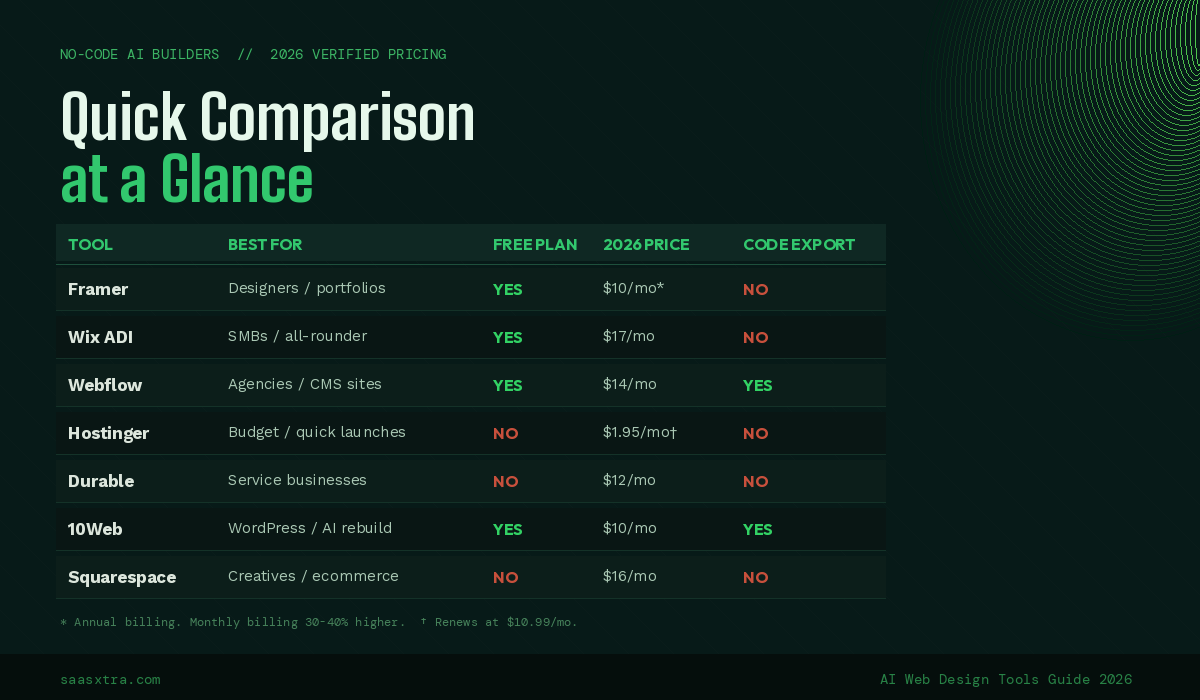
Pricing (2026, annual billing): Free plan available with Framer subdomain. Basic at $10/month for portfolios and personal sites. Pro at $30/month for businesses requiring CMS and forms. Scale from $100/month for high-traffic sites. Editor seats are $20/month per person on all paid plans. Monthly billing runs 30 to 40% higher than annual rates.
One thing competitors do not tell you: Framer counts AI crawler traffic (GPTBot, ClaudeBot, Perplexity) toward your bandwidth limit just like human visitors. A well-ranked site getting cited in LLM answers will push Basic plan bandwidth limits faster than expected.
Honest limitation: Framer has a real learning curve. The interface rewards designers who understand layout principles. If you have never thought about grid systems or visual hierarchy, the additional control becomes noise rather than power. For pure beginners, Wix or Hostinger will get you live faster.
2. Webflow + Webflow AI
Best for: Agencies and professional web developers building complex, CMS-heavy client sites.
Webflow restructured its pricing in 2026, merging the old CMS and Business plans into a new Premium plan while expanding CMS limits and adding native AI credits. The platform remains the most technically powerful visual website builder available.
The AI features accelerate work that Webflow users were already doing manually. This is not a tool for generating a site from a blank prompt; it multiplies output for people who already know how to build.
Webflow AI assists with copywriting inside the editor, generates CSS animations from text descriptions, suggests component variations, and populates CMS collections with AI-written content. The underlying platform generates clean semantic HTML/CSS, meaning AI output is production-grade and exportable.
Key features:
- Visual CSS/HTML editor with clean, exportable code output
- AI copywriting and content generation inside the editor
- Full CMS with AI-assisted content population
- Advanced interactions and scroll animations
- E-commerce with complete product management
Pricing (2026): The free plan allows two projects. Basic site plan starts at $14/month. Premium plan (the former CMS tier) at $23/month is where most serious users land. Workspace plans for agencies start separately. E-commerce plans from $29/month.
Honest limitation: Webflow is not a beginner tool, and AI features do not change that. The platform has a documented learning curve of 20 to 40 hours before users feel productive. If you want a site live this afternoon, look at the tools lower on this list.
3. Wix ADI (Artificial Design Intelligence)
Best for: Small business owners and freelancers who want a reliable all-purpose solution without trade-offs.
Wix ADI has been generating websites from questionnaire answers since 2016, making it the most iterated AI site builder in terms of raw improvement cycles.
The 2026 version goes significantly further: it generates layouts, writes copy, sources relevant stock imagery, and configures SEO settings based on your business description. Whatever your site needs (booking, ecommerce, blog, membership, events), it exists natively, and ADI provisions it during setup.
Key features:
- Full business website generation from a brief description
- Native booking, e-commerce, events, and membership tools
- AI SEO assistant with structured data support
- 300+ app integrations
- Wix Studio for more advanced design control
Pricing (2026): Free plan available with a Wix-branded domain. Light plan at $17/month with a free domain for one year. Core at $29/month, Business at $36/month, Business Elite at $159/month.
Honest limitation: Wix sites are hosted on Wix with no code export. Platform lock-in is a real strategic consideration. If you build a serious content operation on Wix and want to migrate later, you are starting over.
4. Squarespace Blueprint AI
Best for: Creatives, photographers, restaurants, and product businesses that need design quality and e-commerce in one place.
Squarespace’s Blueprint AI onboarding generates a full site from your goals and style preferences, writes initial copy across your entire site, and selects typography and color palettes matched to your brand inputs.
The 2026 Blueprint system has noticeably improved the first-generation output quality compared to 2024. What it does not do is let you fight the design system — Squarespace templates are deliberately constrained, and that constraint is why they consistently look good.
Key features:
- Blueprint AI for full site generation from style and goal inputs
- AI copy generation across all page types
- Native e-commerce with subscription and digital product support
- Acuity Scheduling integration for service businesses
- Built-in email marketing
Pricing (2026): No free plan. 14-day trial available. Personal plan at $16/month, Business at $18/month, Basic Commerce at $26/month, Advanced Commerce at $52/month. All prices annual billing.
Honest limitation: Squarespace AI-generated copy is generic on the first pass. The AI handles structure and length well, but brand messaging and voice require your rewrite. Budget time for that.
5. Hostinger AI Website Builder
Best for: Anyone who needs a functional, professional website at the lowest possible monthly cost.
Hostinger generates a complete website, including SEO-friendly copy, a contact form, and a gallery, in under 45 seconds. At under $2/month on introductory pricing, it is the most affordable AI website builder on this list that produces a genuinely usable result.
The AI Writer creates page copy, an AI Logo Maker handles brand assets, and an AI Image Generator produces custom visuals, all under one login. The credit system for AI image generation was removed in September 2025, meaning images are now unlimited on paid plans.
Key features:
- Full site generation in under two minutes
- AI Writer for ongoing page and blog content
- AI Logo Maker included
- Unlimited AI image generation on paid plans (as of September 2025)
- Free domain and SSL on all paid plans
Pricing (2026): Promotional pricing from $1.95/month. The renewal price is $10.99/month, the single most important number to know before signing up. No free plan, but a free trial is available.
Honest limitation: The renewal price gap between $1.95 and $10.99 per month is significant for budget buyers. Factor the renewal rate, not the promotional rate, into your long-term cost calculation.
6. Durable
Best for: Service business owners who need a credible web presence and live within an hour.
Durable generates a complete website in under 30 seconds. The AI is specifically trained on service business patterns, producing relevant output for contractors, consultants, therapists, agencies, and similar businesses without industry explanation.
Design quality is higher than you would expect from a 30-second generator. Layouts are clean, imagery is contextually appropriate, and typography is professional. Higher tiers include an AI-powered CRM, email marketing, and invoicing tools, making Durable a lightweight business operations suite beyond just website building.
Key features:
- Full website generation in under 30 seconds
- AI-written business-specific copy
- Built-in CRM and client management
- AI business name generator and domain search
- Invoicing and payment tools on higher tiers
Pricing (2026): Starts at $12/month. No free plan. Business plan with CRM at $20/month.
Honest limitation: Durable is a 0-to-1 tool. It excels at simple service business sites. Complex page structures, a content-heavy blog, e-commerce, or membership areas push beyond what the platform’s intentional simplicity supports.
7. 10Web AI
Best for: WordPress users who want AI to generate, rebuild, or optimize their site without leaving the WordPress ecosystem.
10Web generates complete WordPress sites from a brief description, includes managed Google Cloud hosting, and runs a PageSpeed optimizer that targets 90+ Core Web Vitals scores automatically.
For businesses already committed to WordPress as their CMS, this is the fastest AI-powered entry point into a full WordPress installation. The AI website replication feature (paste a competitor’s URL, get an editable version of that design in WordPress format) is a standout capability no competing AI builder offers.
Key features:
- AI site generation that outputs real WordPress installs
- Managed Google Cloud hosting included
- Automatic PageSpeed optimization targeting 90+ scores
- AI Website Replication from any live URL
- Elementor-based page editor for post-generation customization
Pricing (2026): Free plan with 10Web branding. Personal plan starts at $10/month for one site. Agency plans from $30/month covering unlimited sites. Hosting is bundled in all plans.
Honest limitation: 10Web assumes WordPress compatibility. If you have never used WordPress and are not planning to learn it, the platform’s power is invisible. Choose a simpler builder instead.
Category 2: Designer-Grade AI Tools
These are platforms for people who already have design knowledge and want AI to accelerate workflow, not replace judgment.
8. Relume
Best for: Agencies and freelancers who want AI to handle site architecture and wireframing before they build in Webflow or Figma.
Relume solves the blank-page problem for professional web designers. Input a brief site description, and Relume generates a complete sitemap and component-level wireframes in under 20 minutes. Not rough sketches. Proper content hierarchy, navigation logic, and section layouts.
The output exports directly into Figma or Webflow, feeding straight into your existing production workflow. For agencies building multiple client sites per month, this represents 10 to 15 hours of saved architecture work per project.
Key features:
- AI sitemap generation from a text brief
- High-fidelity wireframe generation from sitemap
- Direct Figma and Webflow export
- 1,000+ prebuilt component library across all platforms
- AI copywriting for wireframe content
Pricing (2026): Free plan for one project with limited pages. Starter at $26/month for one project with five pages and full export. Pro at $58/month for unlimited projects and pages. Team plan at $52/month per person (minimum three people).
Honest limitation: Relume does not publish sites. If you are not already working in Webflow or Figma as part of your production process, Relume does not slot neatly into your workflow.
9. Figma AI + Figma Sites + Figma Make
Best for: Product design teams who want to design, prototype, and now publish websites without leaving Figma.
This entry has changed substantially since 2025. Figma is no longer purely a prototyping tool that requires a developer handoff. Two major capabilities launched: Figma Sites (launched Config 2025, CMS added November 2025) lets you publish designed pages directly to the web. Figma Make generates functional interactive prototypes and web apps from text prompts, with Supabase database integration available.
Figma Sites added CMS collections, CMS pages, and dynamic URL support in late 2025, closing its biggest gap against Webflow. The “Check Designs” AI linter recommends design tokens and variables from your system. For teams that already live in Figma, the platform now covers design, prototyping, publishing, and basic app generation in a single workspace.
Key features:
- Figma Sites for publishing designed pages directly to the web
- CMS collections and dynamic pages (as of November 2025)
- Figma Make for functional prototype and web app generation from text
- Supabase integration for database-backed Make projects
- AI design linter enforcing design system consistency
Pricing (2026): Starter plan is free with limited files. Professional at $12/month per editor (annual) or $15/month monthly. Publishing via Figma Sites requires a paid seat. Full seat on Professional is $16/month, including Sites hosting. Figma Make in beta is available on paid plans.
Honest limitation: Figma Sites is genuinely new and has meaningful gaps versus Webflow: no nested URL structures, no API, no content staging as of mid-2026. For production websites with complex SEO requirements or advanced animations, Webflow remains the stronger choice. Figma Sites wins on learning curve and integration with design workflow.
10. Uizard
Best for: Product managers, startup founders, and non-designers who need to prototype UI quickly before handing off to a developer.
Uizard converts rough sketches, screenshots, and text descriptions into editable UI mockups. The Screenshot Scanner feature converts any existing website screenshot into an editable design file.
Autodesigner generates multi-screen UI flows from a product description. These capabilities make Uizard the fastest path from concept to stakeholder-presentable prototype for non-designers.
Key features:
- Sketch-to-UI conversion for hand-drawn or digital sketches
- Screenshot Scanner for converting existing designs to editable files
- Autodesigner for full multi-screen UI generation from text
- Export to HTML/CSS and Figma
- Collaborative editing for distributed teams
Pricing (2026): Free plan with limited projects. Pro at $12/month. Business at $39/month with advanced AI features and unlimited projects.
Honest limitation: Uizard is a prototyping tool, not a site publisher. The output is a design artifact for stakeholder review, not a live site. A development step or separate publishing tool is required to go live.
11. Khroma
Best for: Designers who want AI-generated color palettes calibrated to their personal aesthetic, not generic suggestions.
Khroma learns your color preferences by having you select 50 colors you are drawn to, then generates an effectively infinite palette system calibrated to your taste. Every combination is searchable, saveable, and filterable by type: gradient, image, typography, poster. The scope is intentionally narrow, and the execution within that scope is excellent.
Key features:
- Personalized AI palette generation based on individual taste profile
- Multiple palette view modes
- Hex, RGB, and SCSS export
- Searchable and filterable palette library
- Completely free
Pricing (2026): Free. No paid tier.
Honest limitation: Google Fonts only. No integration with Fontspring, Adobe Fonts, or premium type foundries. Hex values are copied manually into your design tool.
Category 3: Code-First AI Website Generators
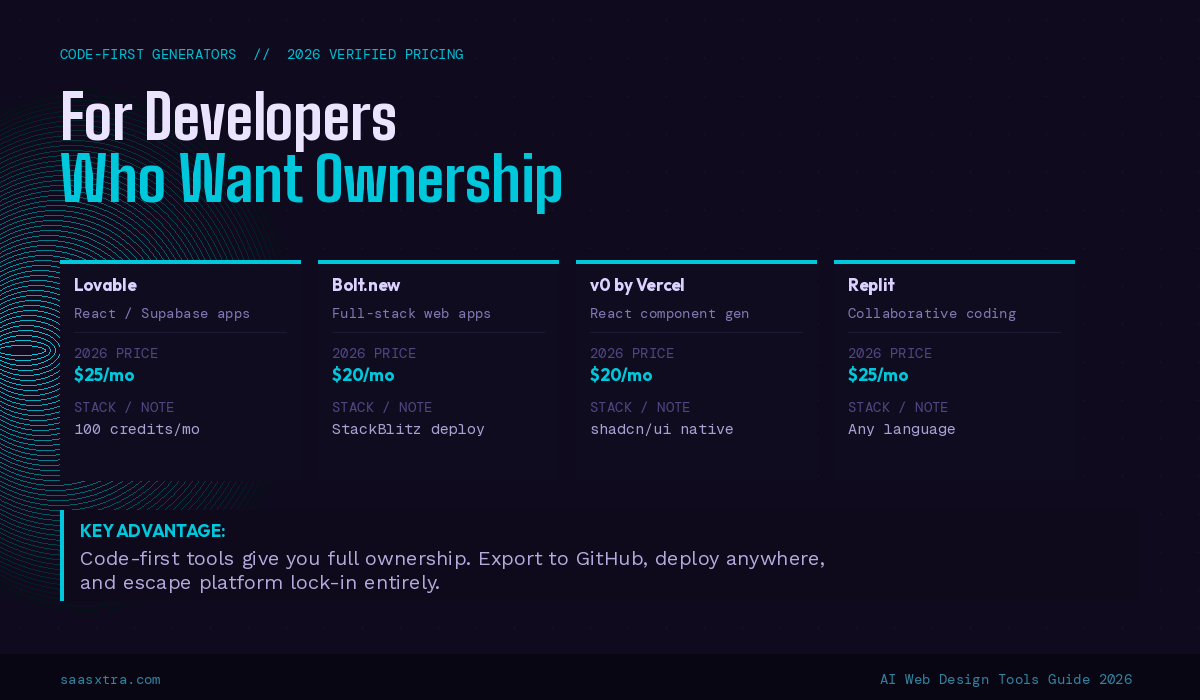
These tools output actual code you own. Build your site or app with AI, export to GitHub, deploy wherever you want.
12. Lovable
Best for: Founders and developers who want to generate a complete full-stack web application with a polished, conversion-optimized frontend.
Lovable generates a React frontend with Supabase backend integration (authentication, database, and API logic) from plain language prompts. The output is real, production-ready code synced to a GitHub repository you control.
For web design specifically, Lovable produces some of the most conversion-optimized layouts among code-first generators. The AI is trained on high-performing SaaS and startup design patterns, meaning generated marketing pages and dashboards arrive with proper visual hierarchy already built in.
Key features:
- Full-stack React + Supabase generation from text prompts
- GitHub sync for code ownership and version control
- Visual editor for post-generation adjustments without re-prompting
- One-click deployment to Lovable hosting
- Stripe payment integration available out of the box
Pricing (2026): Starter at $25/month for 100 credits, roughly 20 to 30 meaningful prompts before hitting the limit. Pro at $50/month. Credit consumption is the key variable. Complex features exhaust credits faster than simple pages.
Honest limitation: Lovable’s credit system burns faster than expected on serious builds. A full-stack application with auth, payments, and multiple views can exhaust a monthly Starter plan within a week. Budget for Pro or manage prompt efficiency deliberately.
13. Bolt.new
Best for: Developers who want to generate complete web applications with full framework flexibility and no local setup.
Bolt.new runs a complete development environment inside your browser using StackBlitz’s WebContainers technology. Describe what you want, and Bolt generates the project structure, installs dependencies, runs the code, and presents a live preview, all without any local configuration.
Output is real code across any framework (React, Vue, Svelte, Next.js, plain HTML). Bolt handles backend logic, API integrations, and database connections as well.
Key features:
- Browser-based full-stack development environment
- Framework-agnostic code generation
- Live preview with hot reload
- npm package installation inside the browser
- Export to StackBlitz or local download
Pricing (2026): Free tier with 10M token monthly limit. Pro at $20/month significantly expands token allowance.
Honest limitation: There is no visual editor. Everything happens through prompts or direct code edits. Large or complex projects exhaust tokens quickly on the free tier. Unlike Lovable, non-developers will hit a ceiling when the generated code needs debugging.
14. v0 by Vercel
Best for: Frontend developers building React components and UI systems that need to slot into an existing Next.js codebase.
v0 generates React components using shadcn/ui and Tailwind CSS from text descriptions. You copy the output directly into your project. The generated code matches Next.js conventions developers already use, making integration frictionless.
For web design, v0 excels at generating specific UI patterns: pricing tables, feature grids, navigation systems, dashboards, and form layouts. The design quality reflects shadcn/ui’s clean, modern aesthetic, which is production-appropriate for SaaS products and marketing sites.
Key features:
- React component generation with shadcn/ui and Tailwind CSS
- Next. js-native output that integrates cleanly into existing projects
- One-click deployment to Vercel
- Iterative editing via follow-up prompts
- Generous free tier
Pricing (2026): Free tier with monthly generation limits. Plus at $20/month. The free tier is sufficient for most individual developers doing occasional component work.
Honest limitation: v0 generates components, not complete websites. Assembling components into a coherent multi-page site with navigation, routing, and consistent layout requires significant additional work. It is a component library accelerator, not a site builder.
15. Replit
Best for: Developers and teams who want collaborative AI-assisted coding with deployment built into the same environment.
Replit is a cloud-based IDE whose AI agent understands project context, installs dependencies, writes tests, and iterates on a codebase based on natural language instructions. Any programming language or framework works because the environment is a full cloud computer, not a sandboxed subset.
For web design and development, Replit handles the full lifecycle, from initial AI generation through hosting and custom domain configuration.
Key features:
- Full cloud development environment with context-aware AI agent
- Support for any programming language or framework
- Built-in deployment and hosting
- Real-time multiplayer collaboration
- AI-powered code generation, debugging, and refactoring
Pricing (2026): Free tier available. Core at $25/month for the full AI agent and more compute. Teams at $40/month per user.
Honest limitation: Replit hosting performance is inconsistent on lower-tier plans. For production sites with real traffic, deploy from Replit to a dedicated provider rather than relying on Replit’s built-in hosting.
Category 4: AI Design Assistants
These tools do not build full websites. They assist specific parts of the design workflow where AI adds focused value.
16. Midjourney (for web design assets)
Best for: Designers who need high-quality, stylized visual assets for hero images, backgrounds, and custom illustration content.
Midjourney is not a web design tool in the traditional sense, but it belongs on this list because professional web designers use it as a production asset generator. The output quality for stylized visuals, backgrounds, hero images, and abstract design elements is meaningfully better than stock photography for brands that need visual distinctiveness.
Using Midjourney effectively for web requires learning prompt construction; prompts specifying aspect ratio, style reference, color palette, and composition intent produce professional results. Generic prompts produce generic output.
Key features:
- High-quality image generation from text descriptions
- Style reference images for visual consistency across brand assets
- Aspect ratio control for web-specific formats
- Variation generation for iterative refinement
- Commercial usage permitted on paid plans
Pricing (2026): Basic at $10/month for 200 image generations. Standard at $30/month with unlimited relaxed generations. Pro at $60/month with faster generation and stealth mode.
Honest limitation: No direct integration with web design tools. Every asset requires download, format conversion, and manual upload. For high-volume design work, this friction adds meaningful time.
17. Fontjoy
Best for: Anyone who spends more time than they should scrolling through Google Fonts looking for a pairing that works.
Fontjoy uses machine learning trained on font characteristics to suggest typeface pairings that balance visual contrast with stylistic coherence. Pick a starting font, set a contrast preference, and Fontjoy generates heading, subheading, and body font combinations.
Lock any font you want to keep and regenerate the others. Single-purpose, genuinely intelligent within that scope, no subscription required.
Key features:
- AI font pairing based on visual characteristics
- Adjustable contrast control from low to high
- Lock/unlock individual font roles
- Google Fonts integration with all generated suggestions is free to use
- Live typographic preview
Pricing (2026): Free. No paid tier, no account required.
Honest limitation: Google Fonts only. Premium typefaces from Fontspring, Adobe Fonts, or type foundries are not supported.
The Buyer’s Guide: Which AI Web Design Tool Is Right For Your Situation?
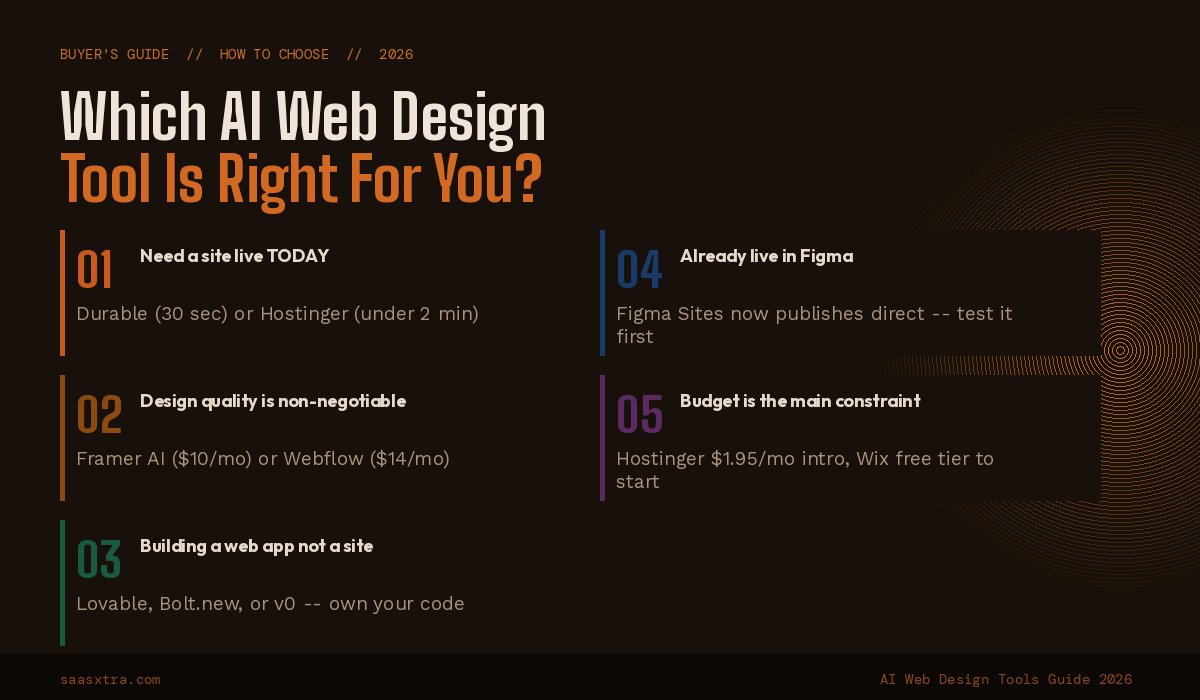
1. You need a site live today
Durable (30 seconds) or Hostinger (under 2 minutes). Neither is the most visually distinctive option, but both produce functional, professional results immediately.
2. Design quality is your primary requirement
Framer AI produces the highest-design-ceiling output of any no-code AI builder. For agency-quality work with full CMS support, Webflow is the better long-term choice despite its steeper learning curve.
3. You are building a web application, not a marketing site
Lovable for an opinionated full-stack setup with Supabase and Stripe ready to go. Bolt.new for framework flexibility. v0 if you are already in a Next.js codebase and need components, not a full app.
4. You are already a Figma-native designer
The Figma AI + Figma Sites stack now covers design, CMS, and publishing inside one tool. For simpler sites and portfolios, this eliminates the need for Webflow or Framer.
5. You run a WordPress-based agency
10Web is the only AI-powered WordPress builder with managed hosting included. The URL replication feature alone justifies the subscription for agencies rebuilding client sites.
6. Budget is the primary constraint
Hostinger, at under $2/month introductory pricing, is the best value on this list. Factor in the $10.99/month renewal rate when calculating annual cost.
Full Comparison Table: All 17 Best AI Web Design Tools (2026 Pricing)
| Tool | Category | Free Plan | Starting Price | Code Export | Best For |
|---|---|---|---|---|---|
| Framer AI | No-code builder | YES | $10/mo (annual) | NO | Designers, portfolios |
| Webflow AI | No-code builder | YES | $14/mo | YES | Agencies, CMS sites |
| Wix ADI | No-code builder | YES | $17/mo | NO | SMBs, all-purpose |
| Squarespace Blueprint | No-code builder | NO | $16/mo | NO | Creatives, e-commerce |
| Hostinger AI | No-code builder | NO | $1.95/mo* | NO | Budget, quick launch |
| Durable | No-code builder | NO | $12/mo | NO | Service businesses |
| 10Web AI | No-code builder | YES | $10/mo | YES** | WordPress users |
| Relume | Designer tool | YES | $26/mo | YES | Agency wireframing |
| Figma AI + Sites | Designer tool | YES | $12/mo/editor | YES | Product designers |
| Uizard | Designer tool | YES | $12/mo | YES | Prototyping |
| Khroma | Designer tool | YES | Free | N/A | Color palettes |
| Lovable | Code-first | NO | $25/mo | YES | Full-stack apps |
| Bolt.new | Code-first | YES | $20/mo | YES | Framework-flexible apps |
| v0 by Vercel | Code-first | YES | $20/mo | YES | React components |
| Replit | Code-first | YES | $25/mo | YES | Collaborative dev |
| Midjourney | AI assistant | NO | $10/mo | N/A | Visual asset generation |
| Fontjoy | AI assistant | YES | Free | N/A | Font pairing |
*Hostinger introductory price. Renews at $10.99/month. **10Web exports standard WordPress installs, which are portable.
What the AI Web Design Tools Market Looks Like in 2026
The no-code builder category is converging on similar AI output quality. Differentiation increasingly comes from CMS capability, e-commerce depth, and post-generation customization control rather than generation quality alone.
The Figma Sites launch means the design-to-publish pipeline that previously required Figma plus Webflow or Framer can now be completed inside Figma for simpler sites.
The code-first category is evolving faster and in a more consequential direction. Lovable, Bolt, and v0 are adding database integrations, authentication systems, API management, and deployment pipelines at a pace that is compressing the traditional design-to-development handoff into a single tool and a single session.
For anyone building a SaaS product or web application, the choice between hiring a developer and using a code-first AI tool is a more serious strategic question in 2026 than it was 18 months ago.
The agentic AI builder is not here yet. Every tool on this list requires human prompts for every meaningful change post-launch. The next phase, AI that monitors conversion performance, identifies weak pages, and generates improvement proposals autonomously, is being built now. It will change this list materially by 2027.
Final Recommendation by User Type
1. Entrepreneur with no design background: Start with Durable for immediate launch, then migrate to Webflow or Framer once you understand your site’s content needs.
2. Freelance designer: Framer AI for client deliverables. Relume + Webflow for agencies doing high-volume work.
3. Figma-native designer: The Figma AI + Figma Sites stack now covers design through publishing for most portfolio and brochure sites. Test it before paying for Framer.
4. Developer building a product: Lovable or Bolt.new for full-stack apps. v0 for component-level UI inside an existing codebase.
5. WordPress agency: 10Web AI plus Elementor. No other AI tool integrates as cleanly into the WordPress production workflow.
6. Brand-focused creative business: Squarespace for physical or digital product sales. Framer, if your design is the product itself and you need maximum visual control.
7. Marketing team managing a company site: Webflow for full CMS and content operations control. Wix ADI if the team is non-technical and need to self-serve updates without developer support.

Adeyemi Adetilewa is a digital marketing specialist focused on SaaS, marketing, and online business. He leads the editorial direction at SaaSXtra.com and has driven over 10M+ content views through strategic content marketing. His work has been published and trusted by platforms including HackerNoon, HuffPost, Addicted2Success, and others.