The best AI grammar checker tools in 2026 do far more than catch typos. They fix sentence structure, flag tone inconsistencies, rewrite unclear phrasing, and catch context-level errors that a basic spellcheck misses entirely.
If your writing is client-facing, academic, or published anywhere online, the difference between a good AI grammar checker and a mediocre one is visible to every reader.
This guide covers the best AI grammar checker tools evaluated across four categories: pure grammar checkers, readability and style tools, multilingual checkers, and team or enterprise platforms. Every entry includes verified 2026 pricing, accuracy context, and a direct recommendation on who should use it. No padded entries, no tools included, just to hit a number.
What is a High-Accuracy AI Grammar Checker?
Not all grammar checkers are equal, and most comparison articles do not explain why. Accuracy in grammar checking depends on three distinct capabilities that tools handle with very different levels of sophistication.
Contextual error detection is the most important differentiator. Basic grammar checkers catch “their vs. there” errors. High-accuracy tools catch wrong word choices that are grammatically correct but semantically wrong in context. “The meeting was effective” is grammatically fine. If you meant “efficient,” only a context-aware AI catches that.
Style and clarity analysis goes beyond grammar rules. Tools like ProWritingAid and Hemingway Editor evaluate sentence variety, passive voice overuse, adverb density, and reading grade level. These dimensions matter more than comma placement for most professional writing.
Specialisation by domain is the third variable. A grammar checker optimised for business email performs differently on an academic paper. Trinka AI catches errors in research writing that Grammarly misses entirely. Matching the tool to the writing context is as important as picking a high-quality tool.
Pure AI Grammar Checkers
These tools are built primarily around grammar correction and writing quality improvement. They are the right starting point for most individual writers.
1. Grammarly
Best for: Business professionals, content creators, and everyday writers who need reliable grammar correction across every platform they use.
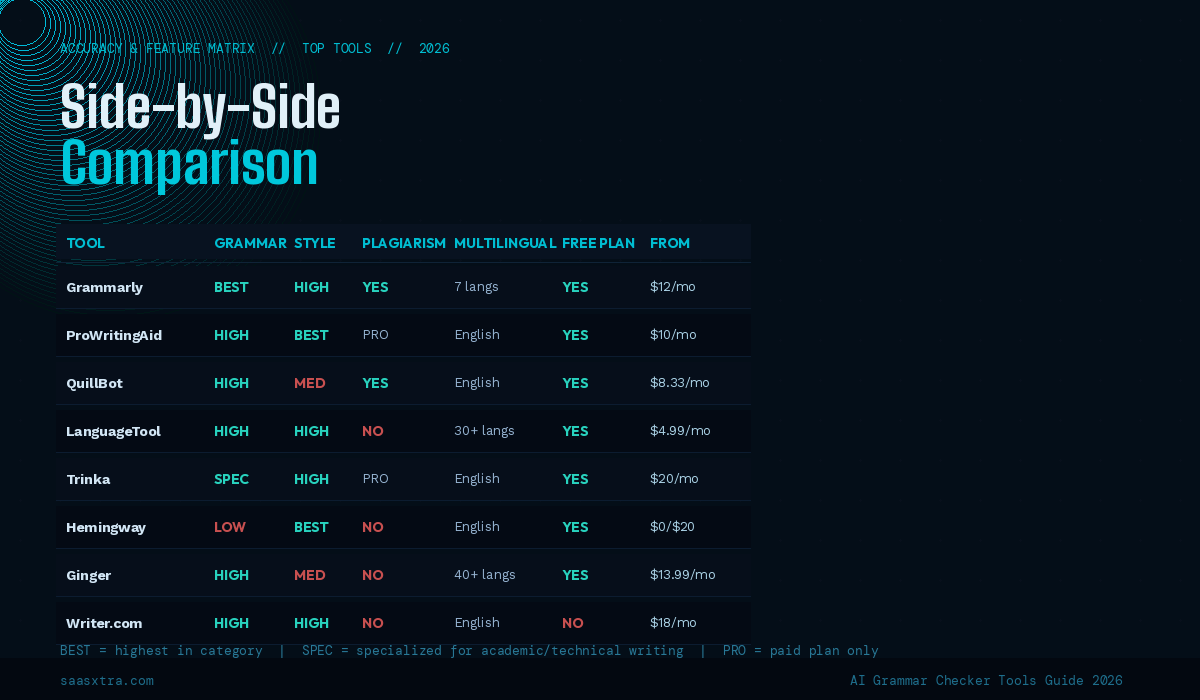
Grammarly remains the most widely used AI grammar checker in 2026, and its position is earned rather than purely brand-driven. The tool works consistently across more surfaces than any competitor: web browser extension, Google Docs, Microsoft Word, Outlook, Gmail, Slack, LinkedIn, and a desktop app for macOS and Windows. Wherever you write, Grammarly is already there.
The 2026 version operates under the Superhuman umbrella following the October 2025 acquisition, with the old “Grammarly Premium” plan renamed to “Grammarly Pro.” The feature set is unchanged, but the positioning has shifted toward Grammarly as the writing layer of a broader productivity suite. For individual users, the practical difference is minimal.
Grammarly’s real-time grammar suggestions are fast and accurate for English. The tone detection, sentence rewriting, and clarity scoring have all improved meaningfully through 2025. The free tier catches grammar and spelling errors but gates style, tone, and clarity suggestions behind the Pro plan.
Key features:
- Real-time grammar, spelling, punctuation, and style corrections
- Tone detection with suggestions to adjust formality and sentiment
- AI-powered sentence rewriting for clarity and conciseness
- Plagiarism detection against 16 billion web pages (Pro plan)
- 500,000+ integration surfaces, including all major writing platforms
Pricing (2026): Free plan available. Pro at $12/month (annual billing), $30/month (monthly billing). Enterprise plan with custom pricing requires a sales conversation; no published per-seat rates.
One thing most reviews skip: Grammarly’s annual billing auto-renews without a prominent warning. Multiple users report surprise charges on renewal. Set a calendar reminder 30 days before your annual renewal date if budget management matters to your team.
Honest limitation: Grammarly is English-first and supports only seven languages at a basic level (English, Spanish, French, German, Polish, Portuguese, Ukrainian). If multilingual writing is part of your workflow, LanguageTool covers your needs far better at a lower price point.
2. ProWritingAid
Best for: Authors, long-form bloggers, academics, and professional editors who need structural writing analysis, not just surface-level grammar fixes.
ProWritingAid is the most analytically deep grammar and style checker available. Where Grammarly gives you sentence-by-sentence suggestions, ProWritingAid gives you 25+ full document reports covering sentence length variation, dialogue pacing, repeated phrase detection, pacing analysis, and readability scores across multiple scoring systems simultaneously.
The 2026 version integrates directly with Scrivener, the manuscript software used by most serious fiction and nonfiction writers. That integration — unavailable in Grammarly — is a meaningful workflow advantage for anyone working on book-length projects. The Google Docs and Word integrations work reliably on both platforms.
The lifetime license is the pricing story no competitor offers. At approximately $399 one-time, it pays for itself in under three years versus Grammarly Pro’s $144/year recurring cost. For a writer who plans to use the tool for five or more years, the lifetime license is the clear financial decision.
Key features:
- 25+ writing style and structural reports for deep manuscript analysis
- Scrivener integration (unique among major grammar checkers)
- Lifetime license option eliminating recurring subscription fees
- Contextual thesaurus with usage frequency data
- Plagiarism checker included on Premium Pro plan
Pricing (2026): Free plan with 500-word check limit and basic grammar only. Premium at approximately $10/month (annual), $120/year. Premium Pro with plagiarism checking at approximately $12/month annually. Lifetime license approximately $399 one-time.
Honest limitation: ProWritingAid has no native mobile keyboard and no Android app, which is one of the two clearest advantages Grammarly holds over it. If you write significant amounts on mobile, this gap is real and practical, not theoretical.
3. QuillBot
Best for: Students, academic writers, and content creators who need grammar checking combined with paraphrasing and summarization in one affordable package.
QuillBot started as a paraphrasing tool and evolved into a comprehensive writing assistant. The free tier is more generous than Grammarly’s, making it the most popular choice among students doing high-volume writing under budget constraints. The seven paraphrasing modes (Standard, Fluency, Formal, Simple, Creative, Expand, Shorten) give it a capability set that no pure grammar checker matches.
The grammar checker component is genuinely accurate for English-language writing. It catches grammatical errors, punctuation issues, and sentence structure problems with reliability comparable to Grammarly on standard prose. Where QuillBot’s accuracy dips is on domain-specific writing — academic style, technical documentation, and legal language are better served by specialised tools.
The 2026 QuillBot suite also includes a citation generator, a summariser, and an AI detector. For students managing multiple writing tools, the consolidation value is real.
Key features:
- Grammar checker with real-time error correction
- Seven paraphrasing modes for sentence-level rewriting
- Summariser for condensing long documents
- Citation generator supporting APA, MLA, Chicago, and other formats
- AI content detector included on paid plans
Pricing (2026): Free plan available with limited paraphrasing and basic grammar. Premium at $8.33/month (annual billing). The free tier is functional enough for occasional grammar checking without upgrading.
Honest limitation: QuillBot’s grammar checker is strong, but its style and clarity analysis is significantly shallower than ProWritingAid or even the free tier of Grammarly. It is a paraphrasing tool with a grammar checker, not a grammar checker with paraphrasing added. That distinction matters when choosing between them.
4. LanguageTool
Best for: Multilingual writers, European professionals, and organisations that need grammar checking across more than seven languages at a lower price than Grammarly.
LanguageTool covers 30+ languages with genuine grammar rule depth in each. This is its core differentiator, and it is a substantial one. French, German, Spanish, Dutch, Italian, Russian, Polish, Catalan, and more are supported with language-specific grammar rules rather than English rules adapted for other languages. For non-English writers, the accuracy difference is meaningful.
The open-source foundation also enables a self-hosted deployment option for organisations that cannot send writing data to external servers. Law firms, healthcare organisations, and enterprises with data residency requirements use LanguageTool’s self-hosted version specifically because it is the only major grammar checker that offers this.
Key features:
- Grammar and style checking in 30+ languages with native rule sets
- Self-hosted deployment option for data-sensitive organisations
- Browser extension supporting Chrome, Firefox, Safari, and Edge
- Google Docs and Microsoft Word integration
- Team management features on the Premium for Organisations plan
Pricing (2026): Free plan available with basic grammar checking. Premium is $4.99/month (annual billing), making it the lowest-priced major grammar checker on this list. Premium for Teams with centralized management available. Check languagetool.org for current team pricing.
Honest limitation: LanguageTool’s English-language grammar suggestions are strong, but its style and clarity analysis in English is noticeably shallower than Grammarly or ProWritingAid. For pure English writing quality, it is not the top choice. For multilingual environments, it is the clear leader.
5. Trinka AI
Best for: Academic researchers, scientists, medical writers, and technical authors whose writing requires domain-specific grammar accuracy beyond standard business writing.
Trinka is the most specialised grammar checker on this list. It detects over 3,000 grammar and language errors specific to academic and technical writing, errors that Grammarly and ProWritingAid do not flag because they are correct in general prose but incorrect in formal academic style. The platform also handles subject-verb agreement in complex technical sentences, consistency in terminology across long documents, and publication-readiness checks aligned with journal submission standards.
The practical use case is specific, but the value within that use case is high. A researcher submitting to a peer-reviewed journal who uses Trinka will catch errors that every other tool on this list would pass. That specificity is not a limitation. It is exactly what the tool is designed to do.
Key features:
- Detection of 3,000+ grammar errors specific to academic and technical writing
- Publication-readiness checks aligned with journal submission standards
- APA, AMA, and ACS style compliance checking
- Personal dictionary for discipline-specific terminology
- Plagiarism checker integration on premium plans
Pricing (2026): Free plan available. Premium at $20/month. The free plan covers basic grammar with a limited monthly word count.
Honest limitation: Trinka’s accuracy advantage only activates in academic and technical writing contexts. For business emails, blog posts, and general professional writing, Grammarly or ProWritingAid produces equally good or better results. Paying for Trinka as a general-purpose grammar checker is the wrong application of the tool.
6. Sapling AI
Best for: Customer support teams, sales teams, and any organisation whose team writes high volumes of similar messages in customer-facing communication.
Sapling is purpose-built for business teams rather than individual writers. The core value proposition is speed and consistency in customer-facing communication: the tool provides autocomplete suggestions trained on your organisation’s previous responses, catches grammar errors in real time within CRM and helpdesk platforms, and maintains consistent tone across a team that may include dozens of writers with different individual styles.
The CRM integrations are what distinguish Sapling from general-purpose grammar checkers. Salesforce, HubSpot, Zendesk, Freshdesk, Intercom, and LinkedIn Sales Navigator are all supported natively. If your team lives in these tools, Sapling works inside them without copy-pasting into a separate browser tab.
Key features:
- Real-time grammar correction inside CRM and helpdesk platforms
- AI autocomplete trained on your team’s historical response patterns
- Snippet library for frequently used approved responses
- Team performance analytics showing error rates and response quality
- Tone consistency monitoring across team members
Pricing (2026): Free tier available with limited autocomplete. Pro at $25/month. Enterprise plan available with custom pricing and dedicated support.
Honest limitation: Sapling is the wrong tool for individual writers working outside a CRM context. Its pricing and feature set are calibrated for teams, not individuals. If you are a solo professional looking for a personal grammar checker, every other tool in this category offers better value at a lower cost.
7. WhiteSmoke
Best for: Business professionals who need a grammar checker with translation capabilities and prefer a one-time purchase over recurring subscriptions.
WhiteSmoke has been available since 2002, and its longevity reflects a consistent niche: grammar checking for formal business documents with translation across 55 languages. The interface looks dated by 2026 standards, and the AI capabilities are less sophisticated than Grammarly or ProWritingAid. The value proposition is the combination of grammar checking, style suggestions, plagiarism detection, and 55-language translation in a single tool with a one-time payment option.
For small businesses that communicate with international clients and need both grammar checking and translation in a budget-constrained environment, WhiteSmoke covers both without a second subscription.
Key features:
- Grammar, style, and punctuation checking for formal business writing
- Translation across 55 languages is included
- Plagiarism checking is included in premium tiers
- Business document templates library
- One-time purchase option available (perpetual license)
Pricing (2026): Monthly plans from approximately $5/month (annual billing). One-time purchase option available. Check whitesmoke.com for current 2026 pricing, as the perpetual license is periodically offered as a limited promotion.
Honest limitation: WhiteSmoke’s grammar checking AI feels behind the current state of the art. Grammarly, ProWritingAid, and QuillBot all produce more nuanced, context-aware suggestions. WhiteSmoke’s value is in the breadth of features at low cost, not in accuracy leadership.
8. Wordvice AI
Best for: Academic writers and students who need grammar checking combined with academic editing guidance and citation support.
Wordvice AI is the digital companion to Wordvice’s professional editing service, which has served academic writers for over a decade. The AI tool brings automated grammar checking alongside academic-specific style guidance: passive voice alerts calibrated for academic convention rather than business writing, consistency checking for research terminology, and formatting guidance for academic manuscripts.
The academic context matters. Most grammar checkers penalise passive voice as a rule. In research writing, passive voice is expected and correct in methodology sections. Wordvice AI understands this distinction in a way that general-purpose tools do not.
Key features:
- Grammar checking with academic writing conventions built in
- Research terminology consistency checking
- Academic sentence structure analysis beyond basic grammar rules
- APA and MLA formatting guidance
- The free plan covers the core grammar checking functionality meaningfully
Pricing (2026): Free plan available with basic grammar checking. Premium at $9.99/month.
Honest limitation: Wordvice AI’s brand recognition is lower than Grammarly or ProWritingAid, which means its community support, third-party integrations, and platform coverage are narrower. The tool excels in its academic niche but is not a strong choice for business writers who need broad integration coverage.
AI Readability and Style Tools
These tools take a different angle. Rather than catching errors, they improve the structural quality of your writing. Best used after a grammar checker pass or in combination with one.
9. Hemingway Editor
Best for: Business writers, bloggers, and content marketers who want a tool that forces clarity and cuts weak prose.
Hemingway Editor does not check grammar in the traditional sense. It does something more valuable for most professional writers: it identifies the structural weaknesses that make writing hard to read. Sentences that are too long and complex. Passive voice that softens assertions that should be direct. Adverbs that qualify statements unnecessarily. Words with shorter alternatives.
The colour-coded editing interface is immediate and visceral. Yellow highlights sentences that are hard to read. Red highlights sentences that are very hard to read. Blue highlights adverbs. Green highlights passive voice. Purple highlights words with simpler alternatives. You do not need a grammar explanation. You see the problem directly and fix it.
The free web version at hemingwayapp.com is fully functional for editing purposes. The desktop app adds offline capability and direct publishing integrations with WordPress and Medium.
Key features:
- Sentence complexity scoring with visual difficulty indicators
- Passive voice detection with direct highlighting
- Adverb and weak qualifier identification
- The reading grade-level score is updated in real time as you edit
- Readability optimisation without prescriptive grammar rules
Pricing (2026): Free web version at hemingwayapp.com with no word limit and no account required. Desktop app (macOS and Windows) at $19.99 for a one-time purchase.
Honest limitation: Hemingway Editor has no grammar checking capability. It will not catch a misplaced comma, a subject-verb disagreement, or a wrong word choice. It is a readability tool, not a grammar tool. Use it after your grammar checker pass, not instead of one. The combination of Hemingway plus Grammarly free tier is a powerful and essentially free editing stack for individual writers.
10. Wordtune
Best for: Writers who want AI-powered sentence rewriting to improve clarity, tone, and impact — not grammar correction.
Wordtune focuses on one capability: making your sentences better. You highlight a sentence; Wordtune offers multiple rewrite options across different tones (casual, formal) and intentions (shorten, expand). The suggestions are generated by AI trained specifically on rewriting quality rather than grammar rules. The results frequently produce sentences that are more direct and more readable than the original without changing the meaning.
The distinction from a grammar checker is important. Wordtune does not correct errors. It improves already-correct writing. A sentence can be grammatically perfect and still be weak, verbose, or tonally wrong. Wordtune addresses that specific gap.
Key features:
- AI sentence rewriting across casual, formal, shortened, and expanded modes
- Spices feature for adding specific rhetorical moves (give an example, emphasise, counter an argument)
- Chrome extension and Google Docs integration for in-context rewriting
- AI summarisation for condensing long documents into key points
- iOS app for mobile rewriting
Pricing (2026): Free plan with 10 rewrites per day and one sentence at a time. Advanced at $13.99/month. The free plan is meaningful for occasional use but limiting for daily professional writing.
Honest limitation: Wordtune is a rewriting tool, not a grammar checker. It will not flag an error you have not already identified. Writers who need grammar accuracy should use Wordtune as a complement to a grammar checker, not a replacement for one.
Multilingual AI Grammar Checkers
For writers working in more than one language, the tools in category one perform inconsistently at best. These tools are built for multilingual writing workflows.
11. Ginger Software
Best for: Non-native English speakers and ESL learners who want grammar correction combined with language learning support.
Ginger is the most ESL-focused grammar checker on this list. Its contextual grammar correction analyses the full sentence rather than individual words, which means it catches errors that result from direct translation from another language, constructions that are grammatically plausible in isolation but wrong in the English context. The text-to-speech feature lets writers hear their writing read aloud, which is a meaningful learning tool for non-native speakers calibrating their ear for natural English.
The translation engine (40+ languages) allows writers to draft in their native language and receive a corrected English version, with the ability to review the changes and understand why they were made. This learning loop is what distinguishes Ginger from general-purpose multilingual tools.
Key features:
- Context-aware grammar correction optimised for non-native English patterns
- Text-to-speech for hearing writing, read aloud
- Translation across 40+ languages with grammar correction applied
- Sentence rephrasing suggestions for more natural English expression
- Personal training mode tracking common errors by individual user
Pricing (2026): Free tier with basic grammar checking. Premium at $13.99/month with full correction depth and translation features.
Honest limitation: Ginger’s AI is specifically optimised for ESL corrections. Native English writers with advanced style needs will find its suggestions less useful than Grammarly or ProWritingAid. The tool is built for a specific audience and performs within that audience very well.
12. DeepL Write
Best for: European professionals, translators, and multilingual content teams who need grammar and style correction in German, French, Spanish, Italian, Portuguese, Dutch, Polish, or Japanese.
DeepL Write is the grammar and style companion to DeepL Translate, which is widely considered the most accurate neural machine translation service available. Where LanguageTool covers more languages at a surface level, DeepL Write covers eight languages with the same depth of natural language understanding that makes DeepL’s translation renowned. The suggested improvements feel native rather than mechanically corrected.
For German, French, or Spanish professionals writing in their primary language, DeepL Write produces noticeably more natural corrections than any English-first tool that extends multilingual support as a secondary feature. The tool understands register, formality level, and domain-specific phrasing in these languages in a way that Grammarly’s limited multilingual support does not.
Key features:
- Grammar and style improvement in eight languages with native-level quality
- Tone and register adjustment (formal vs. informal) in each supported language
- Alternative phrasing suggestions showing multiple correction options per sentence
- Deep integration with DeepL Translate for seamless translation and correction workflow
- Browser extension and desktop app available
Pricing (2026): Free tier available with limited improvements per day. DeepL Pro plans from $8.74/month (annual) include Write as part of the broader DeepL Pro suite.
Honest limitation: DeepL Write supports only eight languages. LanguageTool covers 30+. For languages outside DeepL Write’s current coverage, LanguageTool remains the more comprehensive multilingual option.
Team and Enterprise AI Grammar Tools
Individual grammar checkers are built for one writer. These platforms are built for teams, enforcing consistency across every piece of writing that leaves your organisation.
13. Writer.com
Best for: Content marketing teams, brand teams, and organisations that need grammar checking enforced against a specific style guide and brand voice.
Writer.com operates in a different category from individual grammar checkers. It is not trying to make one person’s writing better. It is trying to make an entire organisation’s writing consistent.
The platform lets you encode your brand’s style guide, terminology, and voice preferences into rules that are enforced in real time across every team member’s writing. “We capitalise Product but not feature” is a rule you can set and have automatically flagged whenever someone deviates.
The grammar checking component is strong. The style guide enforcement is the product’s actual differentiation. For marketing teams producing content at volume, the consistency value compounds significantly. Every piece of content that leaves your team sounds like it was written by the same person, because it was reviewed against the same rules.
Key features:
- Brand style guide encoding with automated compliance checking
- Real-time grammar and style suggestions in the Writer editor
- Terminology management prevents unapproved words across all team writing
- Google Docs and Microsoft Word plugins for in-context enforcement
- Team analytics showing compliance rates and common deviation patterns
Pricing (2026): Team plan at $18/month per user. Enterprise plan with custom pricing, advanced security, and dedicated implementation support.
Honest limitation: Writer.com’s pricing is calibrated for teams. At $18/month per user, it is significantly more expensive than individual grammar checkers for the same grammar correction functionality. The value proposition only materialises if you are enforcing brand consistency across multiple writers. Solo writers should start with Grammarly or ProWritingAid.
14. Microsoft Editor
Best for: Microsoft 365 subscribers who want a capable grammar checker at no additional cost, integrated directly into Word, Outlook, and the Edge browser.
Microsoft Editor is included with Microsoft 365 subscriptions, which means the effective cost for existing M365 users is zero. The grammar checking is genuinely capable for business writing: it catches grammar and spelling errors, offers clarity suggestions, and flags tone issues with a level of accuracy comparable to Grammarly’s free tier.
For organisations already running Microsoft 365, adding Microsoft Editor to the workflow requires no procurement decision and no integration work.
The Outlook integration is the standout feature for business writing. Email is where grammar errors cause the most professional damage, and Microsoft Editor works directly inside Outlook’s compose window rather than requiring text to be pasted into a separate tool.
Key features:
- Grammar, spelling, and clarity checking integrated into Word, Outlook, and Edge
- Real-time suggestions in the Microsoft 365 environment
- Tone and formality detection for professional writing contexts
- Similarity checker (plagiarism detection) on premium M365 plans
- Works across Windows, macOS, iOS, and Android within the M365 ecosystem
Pricing (2026): Free for basic grammar and spelling via the Edge browser extension. Full feature set included with Microsoft 365 Personal ($69.99/year) or Business plans. No standalone purchase option.
Honest limitation: Microsoft Editor’s suggestions are noticeably less nuanced than Grammarly Pro or ProWritingAid for style and clarity analysis. It is a strong free option for basic grammar correction but not a replacement for a dedicated writing quality tool if that level of analysis matters to your workflow.
15. Grammarly Enterprise
Best for: Enterprises that need organisation-wide grammar and style enforcement with centralized administration, security controls, and SAML SSO.
Grammarly Enterprise is the same grammar checking engine as Grammarly Pro with an organisational management layer added: centralized billing, admin console, SAML SSO, SCIM user provisioning, brand tone guidelines, and security controls designed to satisfy enterprise procurement requirements.
For organisations that have already standardized on Grammarly and want to scale it across 100+ users with proper IT governance, this is the appropriate tier.
The brand tone feature allows enterprise administrators to define the organisation’s writing voice and have it suggested across all users’ writing. “We are direct, not verbose” becomes an enforced suggestion rather than a style guide document that writers ignore.
Key features:
- All Grammarly Pro features with an enterprise administration layer
- SAML SSO and SCIM user provisioning for IT governance
- Brand tone and style guidelines are enforced across the organisation
- Centralized billing with admin dashboard
- Security review documentation for enterprise procurement processes
Pricing (2026): Custom pricing requiring a sales conversation. No published per-seat rates. Factor this into procurement planning — the lack of transparent pricing makes budget estimation difficult without direct vendor engagement.
Honest limitation: Grammarly Enterprise’s grammar accuracy is identical to Grammarly Pro’s. You are paying for administration, security, and management features, not better grammar checking. If you need organisational grammar enforcement without enterprise IT requirements, a team plan on Writer.com or LanguageTool Premium for Teams is worth evaluating before committing to an enterprise sales process.
16. LanguageTool Premium for Teams
Best for: Multilingual organisations, European companies, and teams with data residency requirements who need grammar checking without sending data to US-based servers.
LanguageTool’s team offering extends the tool’s core multilingual advantage into an organisational context. The self-hosted deployment option is the most significant enterprise differentiator: organisations in regulated industries (healthcare, legal, financial services) or subject to GDPR data residency requirements can run LanguageTool on their own infrastructure, meaning writing data never leaves their environment.
The 30+ language coverage at the team level is unmatched by any other grammar checker. A team in Amsterdam writing in Dutch and English, a firm in Barcelona working in Spanish and English, or a multinational operating across French, German, Spanish, and English all use a single tool rather than managing separate grammar checkers per language.
Key features:
- Grammar checking in 30+ languages with native rule sets
- Self-hosted deployment for data sovereignty and GDPR compliance
- Centralised team management with usage analytics
- API access for integrating grammar checking into proprietary tools and workflows
- Google Docs, Word, and browser extension coverage across all supported languages
Pricing (2026): Team Premium pricing based on seat count — check languagetool.org for current team pricing, as this tier has been actively updated through 2026. Individual Premium at $4.99/month (annual) as a baseline reference.
Honest limitation: LanguageTool’s English-language style and clarity analysis is less sophisticated than Grammarly or ProWritingAid. For organisations whose primary writing language is English, the depth of analysis per suggestion is noticeably shallower. The value proposition is multilingual coverage and data privacy, not English-language writing quality leadership.
Which AI Grammar Checker Fits Your Situation?
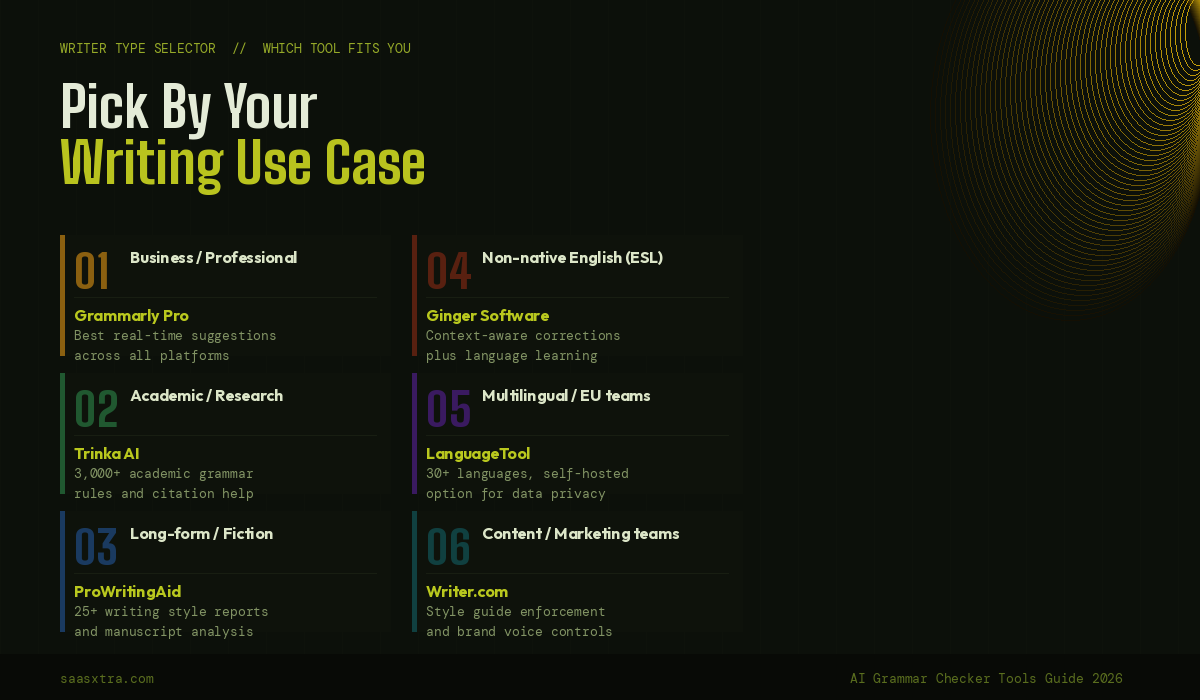
You write business content in English daily: Grammarly Pro at $12/month is the clearest recommendation. The platform coverage is unmatched, the accuracy is excellent for general professional writing, and the integration with every surface you already use eliminates friction.
You write long-form manuscripts, novels, or academic papers: ProWritingAid. The 25+ analytical reports and Scrivener integration are purpose-built for this use case. The lifetime license at $399 is the best long-term value on this entire list if you plan to use a grammar tool for three or more years.
You are a student or writing on a tight budget: QuillBot’s free tier is the most generous free grammar checker available. The paraphrasing, summarisation, and citation tools bundled with grammar checking make it the best single-tool value for academic writing under budget constraints.
You write in multiple languages: LanguageTool Premium at $4.99/month for 30+ language support is the obvious choice. DeepL Write if your languages fall within its eight-language coverage and you value natural-sounding corrections over breadth.
You are a non-native English speaker: Ginger Software’s context-aware ESL corrections and language learning integration serve this use case better than any tool designed primarily for native English writers.
You manage a content team: Writer.com for brand voice enforcement and style consistency across multiple writers. Grammarly Enterprise if the organisation is already standardised on Grammarly and need IT-level governance.
You already pay for Microsoft 365: Use Microsoft Editor. The grammar checking is capable of business writing, and the integration with Word and Outlook is immediate. Upgrade to Grammarly Pro only when you hit the ceiling of what Microsoft Editor provides.
You want to improve clarity, not just catch errors: Hemingway Editor (free web version) after your grammar checker pass. The combination of any grammar checker plus Hemingway covers both error correction and readability in a stack that costs between $0 and $12/month total.
Full Comparison: Best AI Grammar Checker Tools
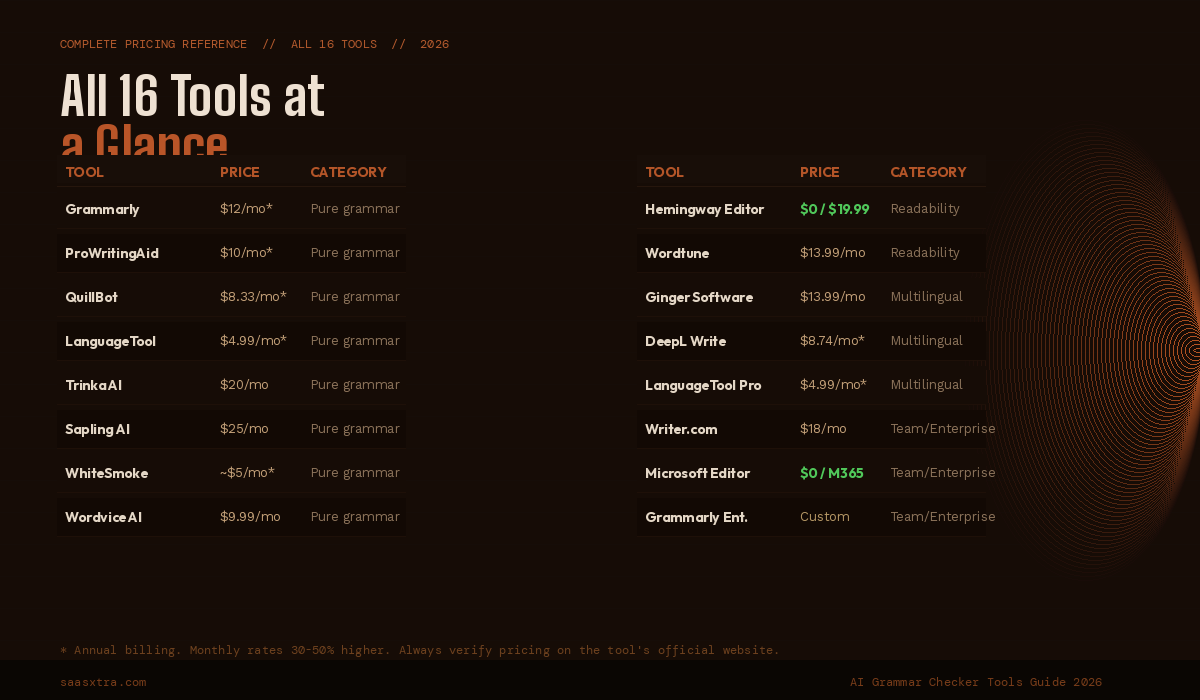
| Tool | Category | Free Plan | 2026 Price | Best For |
|---|---|---|---|---|
| Grammarly | Grammar | YES | $12/mo* | Business writers, all-purpose |
| ProWritingAid | Grammar | YES | $10/mo* | Authors, long-form, academics |
| QuillBot | Grammar | YES | $8.33/mo* | Students, paraphrasing + grammar |
| LanguageTool | Grammar | YES | $4.99/mo* | Multilingual writers |
| Trinka AI | Grammar | YES | $20/mo | Academic and technical writing |
| Sapling AI | Grammar | YES | $25/mo | Customer support teams |
| WhiteSmoke | Grammar | NO | ~$5/mo* | Business + translation budget |
| Wordvice AI | Grammar | YES | $9.99/mo | Academic writers |
| Hemingway Editor | Readability | YES | $0 / $19.99 | Clarity and conciseness |
| Wordtune | Readability | YES | $13.99/mo | Sentence rewriting |
| Ginger Software | Multilingual | YES | $13.99/mo | ESL / non-native speakers |
| DeepL Write | Multilingual | YES | $8.74/mo* | European professional writers |
| LanguageTool Teams | Multilingual | YES | Custom | Multilingual organisations |
| Writer.com | Team | NO | $18/mo/user | Brand voice enforcement |
| Microsoft Editor | Team | YES | $0 / M365 | Microsoft 365 subscribers |
| Grammarly Enterprise | Enterprise | NO | Custom | Large org governance |
*Annual billing. Monthly billing is 30 to 50% higher. Always verify pricing on each tool’s official website.
What Changes About AI Grammar Checking in 2026
The most significant structural shift in this market in 2026 is the convergence of grammar checking with broader AI writing capabilities. Grammarly’s Superhuman acquisition, QuillBot’s expansion from paraphrasing into a full writing suite, and LanguageTool’s continued investment in enterprise deployment all point in the same direction: standalone grammar checking is becoming a feature within a broader writing tool rather than a product category on its own.
For individual writers, this means the best free-tier grammar checking has improved materially. QuillBot and LanguageTool now offer free experiences that would have required a paid subscription two years ago.
For enterprise buyers, the grammar tool market is consolidating around platforms that can enforce brand standards across organisations rather than tools that just flag individual errors. Writer.com, Grammarly Enterprise, and LanguageTool for Teams are growing their enterprise footprints while single-user tools plateau in feature differentiation.
One capability to watch: real-time grammar checking inside AI writing tools. Claude, ChatGPT, and similar LLMs are increasingly used for first-draft writing. The grammar checking layer is moving earlier in the workflow as AI-generated text needs a different kind of review than human-written text.
Grammar tools that integrate into LLM workflows (Grammarly’s browser extension works inside Claude.ai and ChatGPT) will have a structural advantage as this shift accelerates through 2026 and 2027.

Adeyemi Adetilewa is a digital marketing specialist focused on SaaS, marketing, and online business. He leads the editorial direction at SaaSXtra.com and has driven over 10M+ content views through strategic content marketing. His work has been published and trusted by platforms including HackerNoon, HuffPost, Addicted2Success, and others.