The best web design tools for portfolio websites are not the same tools you would use to build an e-commerce store or a SaaS marketing site.
A portfolio has one job: make someone’s work impossible to ignore. The tools that do that well prioritize visual control, fast loading of image-heavy content, and a design ceiling high enough that your portfolio does not look like everyone else’s.
This guide covers the best web design tools for portfolio sites tested across five categories. No-code builders for those who want speed and simplicity. Designer platforms for those who need maximum visual control. Photography-first tools for image-heavy portfolios. Developer options for those who want full ownership. And discovery platforms that function as portfolio hosts in their own right.
Every entry includes verified 2026 pricing, honest limitations, and a direct recommendation on who should use it.
What Makes the Best Web Design Tool for Portfolio Sites?
Most “best web design tool” lists treat all sites the same. A portfolio is not the same as a business site. The priorities are different, and the tool choice should reflect that.
What the best web design tool for portfolio sites needs to do well:
- Load large, high-resolution images without degrading page speed
- Give enough visual control to let your work breathe rather than forcing it into rigid template boxes
- Make the first impression count on mobile, where most portfolio viewers land
- Do not get in the way of complex e-commerce or CRM features you will never use
- Present your contact information and call-to-action clearly without requiring a separate landing page tool
A tool that is excellent for a small business owner building a booking site may be actively wrong for a UX designer building a case study portfolio. This guide makes those distinctions explicit for every tool on the list.
Best No-Code Web Design Tools for Portfolio Sites
Fast to launch, no development skills required, and increasingly capable in 2026. These no-code web design tools are the right starting point for most creators who want a live portfolio within a weekend.
1. Wix ADI
Best for: Creatives who want a broad feature set, fast setup, and no technical headaches.
Wix remains the most feature-complete no-code website builder available, and the ADI (Artificial Design Intelligence) system has improved considerably through 2025 and into 2026.
For portfolio use, the AI generates a structured layout from your answers to a short questionnaire, then populates it with placeholder content matched to your creative field. A photographer gets a gallery-first layout. A UX designer gets a case study grid. A copywriter gets a text-forward structure.
The platform’s strength is coverage. If your portfolio evolves into something that needs booking functionality, a blog, a shop for prints, or a client management area, every one of those features exists natively inside Wix. You are not stitching together third-party tools as your needs grow.
Key features:
- AI-generated layout matched to your creative field and goals
- Native gallery, slideshow, and lightbox tools built for visual portfolios
- Wix Blog for thought leadership and writing samples
- Client invoicing and contract tools on Business plans
- 800+ designer-made templates as an alternative to ADI generation
Pricing (2026): Free plan available with a Wix-branded subdomain. Light plan at $17/month includes a free custom domain for the first year. Core at $29/month removes transaction fees if you sell work. Business at $36/month and Business Elite at $159/month for high-volume needs.
Honest limitation: Wix sites are hosted on Wix, and the code is not exportable. If you build a substantial portfolio there and want to migrate to a custom-coded site later, you start over. The platform lock-in is real and worth considering before you invest significant time in customising a layout.
2. Squarespace
Best for: Photographers, artists, designers, and anyone for whom visual polish on day one is non-negotiable.
Squarespace’s design quality is genuinely best-in-class for no-code builders. The templates are consistently beautiful, the grid system enforces visual discipline by design, and the image handling is excellent. Full-width hero images, edge-to-edge galleries, and smooth scroll animations all work without plugins or workarounds.
The Blueprint AI onboarding system, now matured through several iterations, generates a complete portfolio layout from your field, aesthetic preferences, and content goals. The generated structure is a strong starting point. Unlike some AI builders that require significant post-generation cleanup, Squarespace Blueprint output is usually close to publish-ready on initial generation.
Key features:
- Blueprint AI for full portfolio generation from style and goal inputs
- Best-in-class image and video handling for visual portfolios
- Fluid Engine drag-and-drop editor with genuine layout flexibility
- Integrated e-commerce for selling prints, downloads, and services
- Built-in analytics with traffic source and page performance data
Pricing (2026): No free plan. 14-day free trial. Personal plan at $16/month (annual) covers most portfolio use cases. Business at $18/month adds advanced analytics and e-commerce features. Basic Commerce at $26/month if selling is a priority.
Honest limitation: Squarespace’s design system is deliberately constrained. You cannot step outside the design grid the way you can in Framer or even Webflow. For most portfolio creators, that constraint produces a better result. For designers who need pixel-level control over every element, it becomes a ceiling.
3. Canva Sites
Best for: Designers already living in Canva who want a fast, visually consistent portfolio without learning a new tool.
Canva Sites lets you publish a Canva design directly as a live website. If you are already building presentation decks, brand kits, or case study documents in Canva, this is the lowest-friction path to a portfolio. The design tools are familiar, the output is visually strong, and the learning curve is effectively zero.
The limitation is depth. Canva Sites is excellent for single-page portfolios and simple multi-page structures. It is not the right tool for a portfolio that needs a CMS, password-protected client work, or complex navigation. But for a clean, fast-to-build portfolio that showcases your design sensibility, it is underrated.
Key features:
- Publish any Canva design as a live website with one click
- Full Canva design toolkit for visual creation (no new software to learn)
- Mobile-responsive output built into the publishing process
- Custom domain support on paid plans
- Canva Pro’s brand kit for consistent typography and color across pages
Pricing (2026): Free plan available with Canva subdomain. Canva Pro at $15/month (annual) adds custom domains and removes Canva branding from the published site.
Honest limitation: Canva Sites has meaningful limitations as a web publishing tool: no native blog, no CMS collections, limited SEO controls, and no e-commerce. It is a publishing shortcut, not a platform. If your portfolio needs to grow into a full creative business website, you will outgrow it quickly.
4. Carrd
Best for: Creators who want a single-page portfolio that loads instantly and costs almost nothing.
Carrd is the most underrated portfolio tool on this entire list. For $19 per year (not per month), you get a fast, responsive, beautifully structured single-page site with a custom domain. The builder is genuinely simple, the templates are clean and modern, and the output loads in under a second on any connection.
Single-page portfolios are not a compromise for many creators. A photographer showcasing their best 20 images, a copywriter with five strong samples, a developer with three featured projects, a single well-structured page presents that work better than a multi-page site with thin content spread across navigation items. Carrd is purpose-built for this use case.
Key features:
- Single-page site builder with clean, modern templates
- Custom domain support on Pro plans
- Form integration for contact and inquiry capture
- Embed support for Dribbble, Behance, GitHub, YouTube, and more
- One of the fastest-loading site builders available (minimal JS overhead)
Pricing (2026): Free plan with Carrd subdomain (no custom domain). Pro Lite at $19/year. Pro Standard at $49/year adds more sites, custom domains, and embeds. Pro Plus at $99/year.
Honest limitation: Carrd is a single-page tool by design. Multi-page portfolios, blog sections, password-protected client work, and CMS-driven case study collections are outside its scope. If you need those features now or expect to need them within 12 months, start elsewhere.
Best Designer-Grade Web Design Tools for Portfolio Sites
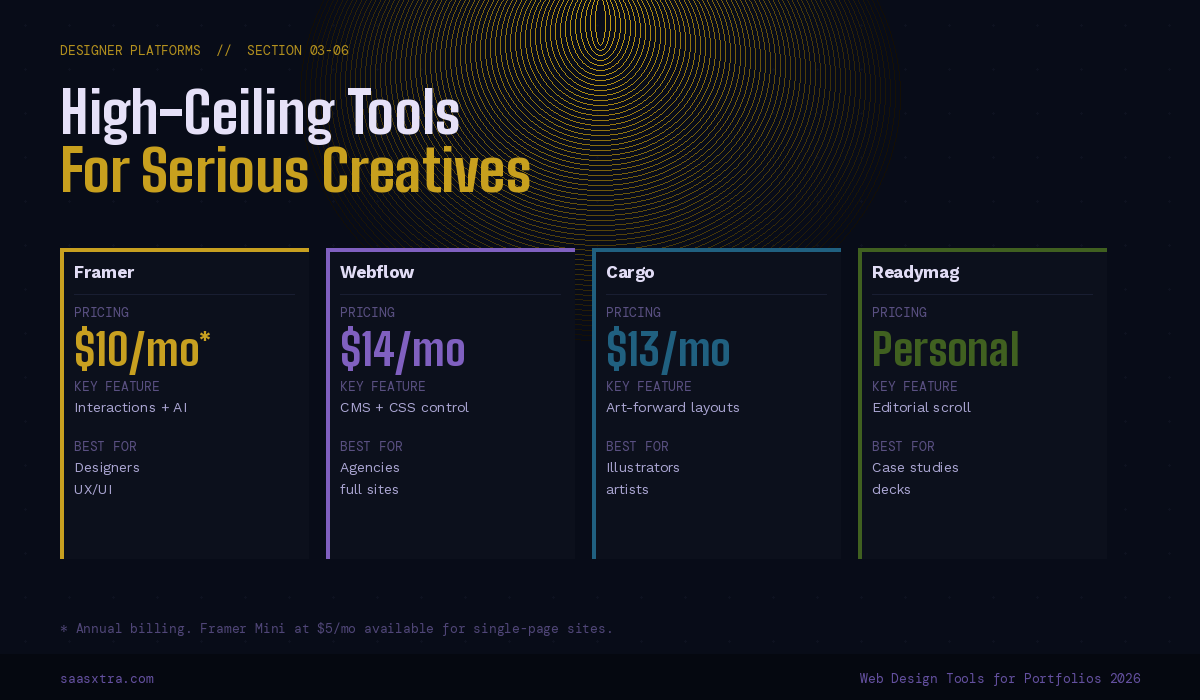
These web design tools for portfolio sites give you significantly more visual control than standard no-code builders. They reward design knowledge and produce output that looks custom-built because, to a meaningful degree, it is.
5. Framer
Best for: UX designers, product designers, and digital creatives who need a portfolio that demonstrates interaction design as well as visual design.
Framer is the best portfolio tool available for designers in 2026. The gap between what Framer can produce and what other no-code builders can produce is significant and visible. Framer handles micro-interactions, scroll-driven animations, component states, and physics-based motion at a level that makes most competing tools look static by comparison.
The AI generation capability is genuinely useful as a starting point. Describe your portfolio structure, and Framer produces a layout with proper typographic hierarchy, purposeful whitespace, and interaction design built in. Every element is then fully editable at the property level. The CMS handles case study collections with custom fields for project details, tools used, timeline, and outcomes.
Key features:
- AI-assisted layout generation with full post-generation control
- Interactions and animations built natively (no code required for most effects)
- CMS for managing case studies, projects, and blog posts
- Component system for consistent design across pages
- SEO controls, including custom meta, Open Graph, and sitemap generation
Pricing (2026): Free plan for one site on a Framer subdomain. Mini at $5/month for single-page portfolios with a custom domain. Basic at $10/month (annual) for full multi-page sites. Pro at $30/month adds higher bandwidth, more CMS items, and password protection for client work previews.
One thing competitors do not mention: Framer’s free plan is genuinely usable for portfolio testing. You can build your complete portfolio, share the Framer subdomain URL for feedback, and only pay when you are ready to attach your custom domain. The feedback-before-paying workflow is unique among tools in this category.
Honest limitation: Framer has a learning curve that other no-code builders do not. The interface is powerful but not immediately intuitive for people who have not used design tools like Figma. Budget 4 to 8 hours of learning time before your first publishable result.
6. Webflow
Best for: Designers and agencies who need a portfolio site with serious CMS depth, custom animations, and the ability to hand off a site to a client who can manage their own content.
Webflow gives you the closest thing to building a custom-coded website without writing code. The visual CSS editor produces clean, exportable HTML and CSS.
The CMS is sophisticated enough to power editorial sites with hundreds of items. The interaction system handles complex scroll-triggered animations and multi-step transitions without plugins.
For portfolio use, Webflow’s power shows up most in a case study presentation. You can build a CMS collection for projects with custom fields for each piece of information (client name, role, tools, outcomes, embedded prototypes) and generate consistently structured case study pages automatically. Updating the portfolio means adding a new CMS item, not rebuilding a page.
Key features:
- Visual CSS editor that outputs clean, exportable code
- CMS collections for managing projects, case studies, and blog posts
- Advanced interactions and scroll animations with timeline editor
- Client Editor mode so non-technical clients can update their own content
- E-commerce for selling design assets, templates, or services
Pricing (2026): Free plan for two projects on a Webflow subdomain. Basic site plan at $14/month. The CMS-enabled plan (needed for project collections) is included in the updated Premium tier. Check current Webflow pricing at webflow.com as the tier structure continues to evolve through 2026.
Honest limitation: Webflow’s learning investment is significant. Most designers report 20 to 40 hours before feeling genuinely productive. If you want a portfolio live this week, this is not your tool. If you are willing to invest the time and want a result that no template-based builder can match, the investment pays off.
7. Cargo
Best for: Illustrators, artists, photographers, and visual creatives who want a portfolio that feels like a designed object, not a website template.
Cargo is the most visually adventurous portfolio platform available, and it is significantly underrepresented in mainstream web design tool lists.
The platform is built specifically for artists and designers who want their portfolio site to be as considered as the work it presents. Layouts can be asymmetric, overlapping, experimental, and deliberately anti-grid in ways that other builders simply do not allow.
The design community that uses Cargo is worth paying attention to. Browse the Cargo gallery, and you will see portfolios from working designers, illustrators, and artists at studios like Pentagram, Sagmeister & Walsh, and similar. That is not a coincidence. The platform attracts serious practitioners because it takes visual experimentation seriously.
Key features:
- Highly flexible layout system including overlap, asymmetry, and unconventional grids
- Purpose-built for image and video-heavy creative portfolios
- Password protection for work-in-progress and client-facing previews
- Custom domain support on all paid plans
- Active community of working designers and artists using the platform
Pricing (2026): Free plan available with limited projects and a Cargo subdomain. Personal plan at $13/month (annual) for unlimited projects and a custom domain. Studio plan at $26/month adds team access and priority support.
Honest limitation: Cargo’s flexibility cuts both ways. The same freedom that allows genuinely distinctive portfolios also allows genuinely bad ones. The platform does not enforce the design discipline that Squarespace does. Without strong design instincts, a Cargo portfolio can look chaotic rather than intentional.
8. Readymag
Best for: Designers and art directors who need to present case studies, editorial work, or interactive documents as polished, scroll-driven experiences.
Readymag sits at the intersection of portfolio builder and digital publication tool. The platform excels at creating scroll-driven, typographically rich presentations that feel closer to a designed magazine than a standard portfolio page.
Case studies built in Readymag have a considered, editorial quality that case studies built in generic builders simply lack.
The interface is canvas-based with precise control over every typographic and layout decision. Readymag handles web fonts, custom animations, video backgrounds, and full-width imagery with the visual quality of a custom-coded site. The publishing output is equally clean.
Key features:
- Canvas-based layout with precise typographic and spatial control
- Scroll-driven animation and interactive storytelling tools
- Web fonts and custom typeface support
- Password protection for case studies shared with specific clients
- Embeds for Figma prototypes, videos, and interactive content
Pricing (2026): Personal plan available (check readymag.com for current 2026 pricing as tiers have been restructured). Free projects available with Readymag branding. Paid plans remove branding and add custom domains.
Honest limitation: Readymag’s interface has a steeper learning curve than most tools on this list. It rewards designers who already have a strong editorial sensibility and know what they want to achieve. If you are still figuring out your portfolio structure, start with a simpler tool and migrate to Readymag once you have clarity.
9. Adobe Portfolio
Best for: Creative professionals already paying for Adobe Creative Cloud who want a clean, fast portfolio without an additional monthly expense.
Adobe Portfolio is effectively free if you already pay for any Creative Cloud plan. The tool is simple, clean, and deeply integrated with Behance, meaning your Behance projects automatically populate your Adobe Portfolio site. For photographers, illustrators, and motion designers already living in the Adobe ecosystem, this is the lowest-friction path to a published portfolio.
The design options are deliberately limited. You pick a layout, set your typography and colors, connect your custom domain, and publish. There is no visual editor, no drag-and-drop canvas, and no complex CMS. That simplicity is the point.
Key features:
- Included at no extra cost with any Adobe Creative Cloud subscription
- Automatic Behance integration (Behance projects populate the portfolio)
- Password protection for client-specific project previews
- Custom domain support included
- Clean, fast-loading output with no performance overhead
Pricing (2026): Included with any Adobe Creative Cloud plan. The cheapest CC plan as of 2026 is the Photography plan at approximately $9.99/month, which includes Lightroom and Photoshop alongside Portfolio. Standalone access to Portfolio alone is not available.
Honest limitation: Adobe Portfolio’s design flexibility is minimal. If you want visual differentiation from other Adobe Portfolio sites, the platform will frustrate you. It is a functional, clean portfolio host, not a design tool. Think of it as a polished Behance profile with a custom domain.
Best Photography-First Web Design Tools for Portfolio Sites
Standard website builders handle images adequately. These web design tools for portfolio sites are built specifically for photographers and visual artists, where image presentation quality, gallery management, and client delivery features are the primary requirements.
10. Pixpa
Best for: Photographers, visual artists, and creative professionals who need a portfolio, client gallery, and online store under one platform.
Pixpa is a portfolio platform built specifically for photographers and visual artists. The distinction matters. Where a general website builder treats galleries as one feature among many, Pixpa treats galleries as the entire product. Image loading is optimized, gallery layouts are varied and visually strong, and client proofing workflows are built natively into the platform.
The client gallery feature is a standout capability that competing portfolio tools lack. You can create password-protected galleries for specific clients, allow them to mark favorites, download images, and even purchase prints.
For photographers who need to deliver work professionally without a separate client management tool, this eliminates a meaningful workflow gap.
Key features:
- Purpose-built gallery management for photographers and visual artists
- Client proofing with password-protected galleries, favorites, and download controls
- Integrated e-commerce for print sales and digital downloads
- Blog and SEO tools for discovery beyond social media
- Mobile-responsive galleries with multiple layout options
Pricing (2026): Basic plan at $8/month (annual). Creator plan at $15/month adds e-commerce. Advanced plan at $25/month for professional photographers with high-volume client delivery needs. 15-day free trial available.
Honest limitation: Pixpa’s design flexibility outside the gallery context is limited. The non-gallery pages (About, Contact, Services) look competent but not distinctive. If your portfolio needs to be as visually considered as your photography, the platform’s design ceiling will frustrate you.
11. Format
Best for: Professional photographers who need a portfolio with integrated client delivery, proofing, and business management tools.
Format positions itself as the platform for professional photographers rather than hobbyists or generalist creatives. The portfolio templates are clean and image-forward. The client management tools include proofing, contracts, invoicing, and project delivery in one place. For photographers running a client-facing business, Format replaces several separate tools.
The platform’s image handling is excellent. Full-width galleries, grid layouts, and horizontal-scrolling slideshows all render cleanly, without the performance issues that plague image-heavy sites built on general-purpose builders. The mobile experience is equally strong.
Key features:
- Photography-optimized portfolio templates with strong image presentation
- Client proofing and gallery delivery tools
- Contract and invoice management for client workflows
- Print sales and digital download e-commerce
- SEO optimization tools specifically for photographer search visibility
Pricing (2026): Portfolio plan at $12/month (annual). The Professional plan at $20/month adds client management tools. Advanced at $36/month for high-volume studios. 14-day free trial available.
Honest limitation: Format is photographer-specific. Illustrators, UX designers, writers, and other creatives will find the templates and feature set too narrowly focused on photography workflows. If photography is not your primary medium, look elsewhere on this list.
Best Web Design Tools for Developers
Developers building portfolio sites have a different set of priorities. Full control over the codebase, no platform fees at scale, and the ability to showcase technical skills through the portfolio itself rather than despite it.
12. GitHub Pages
Best for: Developers who want a free, fast, fully custom-coded portfolio hosted directly from their GitHub repository.
GitHub Pages is free. Full stop. You push a repository containing HTML, CSS, and JavaScript (or a static site generator build), and GitHub serves it as a live website with HTTPS on your own custom domain. There are no hosting fees, no platform subscriptions, and no design constraints beyond your own code.
For developers, the portfolio site itself is a portfolio item. A custom-coded GitHub Pages site tells a hiring manager or client something about your technical capability before they have read a single line of your resume. A site built on a no-code platform template tells them nothing. That signal is worth the additional time to build.
Key features:
- Completely free hosting with custom domain support
- Full codebase ownership with no vendor lock-in
- Static site generator support (Jekyll built-in, Hugo, Eleventy, Astro, and others via CI/CD)
- HTTPS is included automatically via GitHub’s certificate management
- Version control built into the hosting workflow
Pricing (2026): Free for public repositories. GitHub Pro at $4/month unlocks GitHub Pages for private repositories. The effective cost for most developers is zero.
Honest limitation: GitHub Pages requires you to build your own site. If you are not comfortable with HTML, CSS, and at least basic JavaScript, this is not the right tool. The setup, even with a static site generator, requires meaningful technical investment compared to the no-code builders on this list.
13. WordPress.org (Self-Hosted)
Best for: Developers and technical creatives who want maximum flexibility, plugin ecosystem access, and full data ownership.
Self-hosted WordPress gives you complete control over your portfolio at the cost of managing your own infrastructure. You choose your hosting provider, your theme, your plugins, and your database. Nothing is dictated by a platform. Nothing is locked behind a tier upgrade.
For portfolio sites specifically, WordPress has a substantial ecosystem of portfolio themes (Astra, OceanWP, Neve, and dozens of commercial options) and portfolio plugins (the native Portfolio post type, plus dedicated portfolio plugins like Essential Addons and Jetpack Portfolio).
The combination of theme and plugin flexibility means you can build a portfolio that looks genuinely custom without custom development.
Key features:
- Complete codebase ownership with no platform dependency
- 60,000+ plugins covering every conceivable portfolio feature
- Portfolio-specific themes with case study and gallery templates
- Full SEO control, including custom schemas and meta structures
- Self-hosted means your data never lives on a third-party platform
Pricing (2026): WordPress.org software is free. Hosting costs typically range from $3 to $10/month for quality managed WordPress hosting (Kinsta, WP Engine, SiteGround, or similar). Domain at approximately $15/year. Total effective cost of approximately $5 to $10/month.
Honest limitation: Self-hosted WordPress requires maintenance. Security updates, plugin updates, database backups, and occasional debugging are part of the ongoing commitment. For a portfolio that needs to “just work” without technical upkeep, a managed platform like Squarespace or Framer is a better fit.
14. Notion + Super.so
Best for: Writers, researchers, journalists, and knowledge workers who want a clean, fast portfolio that is easy to update and doubles as a personal knowledge base.
Notion has become a surprisingly strong portfolio tool for text-forward creatives when paired with Super.so, which converts a Notion workspace into a fully styled, custom-domain website. The combination allows you to maintain your portfolio as a Notion document with all of Notion’s easy editing, embedding, and organizational features while presenting it publicly as a polished website.
For writers and journalists specifically, the workflow is excellent. Add a new writing sample to Notion; it appears on your portfolio immediately. No CMS login, no publishing workflow, no separate content management step. Your portfolio and your working notes live in the same tool.
Key features:
- Notion as the content management layer (familiar, fast to edit)
- Super.so converts Notion to a styled website with a custom domain
- Instant content updates (Notion edits appear on the live site immediately)
- Super.so theme system for visual customization beyond default Notion styling
- Embed support for videos, Figma prototypes, and other media
Pricing (2026): Notion Personal plan is free. Notion Plus at $10/month for unlimited blocks. Super.so Starter at $16/month for custom domain and basic styling. Super.so Pro at $24/month for full theme customization.
Honest limitation: Notion + Super is not a design tool. The visual ceiling is lower than that of every other platform in the designer and no-code categories. If your portfolio needs to showcase visual design sensibility, this combination works against you. It is the right choice when your content is the portfolio, not the visual presentation of it.
Discovery Platforms
These platforms function as portfolio hosts and discovery engines simultaneously. Your work lives on the platform; the platform surfaces it to potential clients and employers. No custom domain required, no hosting to manage.
15. Carbonmade
Best for: Illustrators, graphic designers, and visual artists who want a beautifully presented portfolio with built-in discovery and a community of creative professionals.
Carbonmade is one of the oldest dedicated portfolio platforms (founded in 2005) and remains genuinely excellent for visual creatives. The interface is clean, image presentation is strong, and the platform has evolved meaningfully in recent years with improved gallery tools and a refreshed design system. The community and discovery features mean your portfolio is findable within Carbonmade’s ecosystem, not just through search engines.
The platform strikes a useful balance between design quality and ease of use. You get significantly better visual results than a generic website builder template, without the learning curve of Framer or Webflow.
Key features:
- Portfolio-specific gallery tools optimized for visual work
- Project organization with categories and tags
- Custom domain support on paid plans
- Password-protected projects for work under NDA
- Community discovery features within the Carbonmade ecosystem
Pricing (2026): Free plan with five projects. Whoa, plan at $9.99/month for unlimited projects and a custom domain. Annual billing discount available.
Honest limitation: Carbonmade’s SEO performance is modest compared to self-hosted portfolio sites. If organic search discovery is a priority for your portfolio strategy, a platform where you control the SEO fully (Framer, Webflow, WordPress) will outperform Carbonmade over time.
16. Journo Portfolio
Best for: Journalists, writers, content marketers, and PR professionals who need a clean, credibility-first portfolio that showcases published work.
Journo Portfolio is purpose-built for writers and journalists, and it does its specific job exceptionally well. The platform’s killer feature is automatic clip importing: paste a URL to any published article and Journo Portfolio fetches the headline, publication name, date, and preview image automatically. Building a portfolio of published work takes minutes rather than hours.
The design is clean and professional without being generic. Writing-focused layouts prioritize headline, publication, and excerpt over large imagery. That hierarchy is correct for writing portfolios. A tool that treats a writer’s portfolio like a photographer’s gallery is making the wrong visual choice.
Key features:
- Automatic article importing from any published URL
- Writing-specific layouts that prioritize text and publication hierarchy
- Filterable clips by category, publication, and date
- Custom domain support on paid plans
- Analytics showing which clips are viewed most often
Pricing (2026): Free plan with up to 10 clips and Journo Portfolio subdomain. Standard at $8/month for unlimited clips and a custom domain. Premium at $12/month adds analytics and priority support.
Honest limitation: Journo Portfolio is a writing portfolio tool and nothing else. Designers, photographers, developers, and other visual creatives will find the platform’s text-first approach works against their needs. It is the right tool for exactly one audience.
17. Behance
Best for: Graphic designers, photographers, illustrators, and motion designers who want built-in discovery by creative directors, hiring managers, and potential clients.
Behance is Adobe’s creative community platform and the largest dedicated creative portfolio network in existence. Over 50 million creatives publish work on Behance, and the platform is actively used by creative directors, recruiters, and art directors to discover talent.
Your Behance profile is a portfolio that is already indexed, already visible, and already in front of an audience that wants to hire creative professionals.
For many creatives, Behance is not a replacement for a standalone portfolio site but a complement to it. You maintain your custom domain portfolio for direct outreach and your Behance profile for inbound discovery. The two serve different buyer journeys.
Key features:
- Built-in audience of 50M+ creative professionals and discovery by hiring managers
- Project presentation tools with slide-by-slide case study format
- Integration with Adobe Portfolio (Behance projects auto-populate a Portfolio site)
- Work-in-progress shots for community feedback before final posting
- Mood board and creative process documentation tools
Pricing (2026): Free. A Pro plan was trialed briefly, but Behance returned to a free model. Full portfolio features, including custom cover images, project presentation, and community access, are free.
Honest limitation: Behance’s algorithm rewards recent posting and engagement. A static portfolio with infrequent updates will receive less discovery than one that posts actively. Treating Behance as a one-time upload and forgetting about it is a common mistake. The platform rewards ongoing creative output and community participation.
18. Dribbble
Best for: UI designers, graphic designers, and brand designers who want to build visibility in the product design and tech startup hiring community.
Dribbble’s community is more specific than Behance’s. Where Behance attracts a broad creative audience (photography, illustration, motion, branding), Dribbble’s audience skews heavily toward UI design, product design, and the technology companies that hire them. If your target employer or client is a startup, SaaS company, or product team, Dribbble visibility is worth investing in.
The platform’s portfolio format is image-forward and project-by-project. Single shots (small image previews) are the atomic unit of Dribbble content. Case study presentations are less developed than Behance’s slide-based format. Dribbble works best as a teaser platform that drives interested viewers to your full portfolio site for case studies and context.
Key features:
- Strong visibility within the product design and startup hiring community
- Team and agency profiles for studio-level portfolios
- Job board with design-specific roles accessible directly from your portfolio
- Pro Analytics shows who is viewing and engaging with your work
- Shot collections for organizing work by project type or client category
Pricing (2026): Free profile with limited shots. Pro plan at $5/month (annual) adds unlimited shots, enhanced analytics, and priority job board access.
Honest limitation: Dribbble’s audience values polished, finished-looking work over process and thinking. Case studies, research synthesis, and strategic design work, the things that actually get senior designers hired, are harder to communicate on Dribbble than on a standalone case study site. Use Dribbble for visibility and your custom portfolio site for depth.
Which Web Design Tool for Portfolio Sites Fits Your Situation?
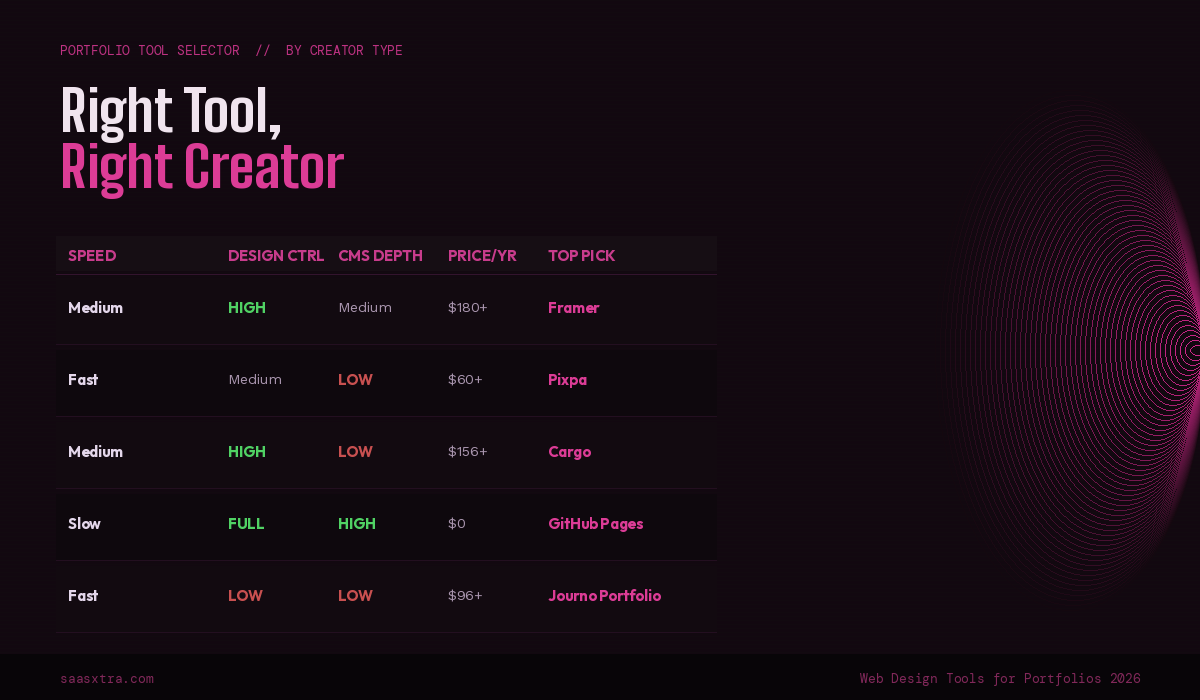
You are a UX or product designer: Framer is the clearest recommendation. The interaction design capabilities let you demonstrate your skills through the portfolio itself, not just describe them. If you want a faster start and are not ready for Framer’s learning curve, Squarespace Blueprint produces a professional result immediately.
You are a photographer: Pixpa for client delivery and print sales in one platform. Format if you need more sophisticated client management and contract tools. Adobe Portfolio if you are already paying for Creative Cloud and want a clean, functional portfolio at no extra cost.
You are an illustrator or visual artist: Cargo for maximum visual experimentation and a design-forward community. Behance as a complement for discovery. Carbonmade, if you want a balance of design quality and ease of use without Cargo’s learning curve.
You are a writer or journalist: Journo Portfolio is purpose-built for your use case and does it better than any general-purpose tool. Notion + Super if you want your portfolio to live in your existing writing workflow.
You are a developer: GitHub Pages for full code ownership and zero hosting cost. Self-hosted WordPress if you want more flexibility without writing everything from scratch. Framer or Webflow if you want a strong design outcome without writing the entire front-end yourself.
Budget is your primary constraint: GitHub Pages (free). Carrd at $19/year for single-page portfolios. Behance and Dribbble free tiers for discovery without any hosting cost. Adobe Portfolio if you are in the Creative Cloud ecosystem.
You need a portfolio live today: Squarespace Blueprint or Wix ADI both produce publish-ready results within a few hours. Carrd in under an hour for a single-page presentation.
Full Comparison: Best Web Design Tools for Portfolio Sites
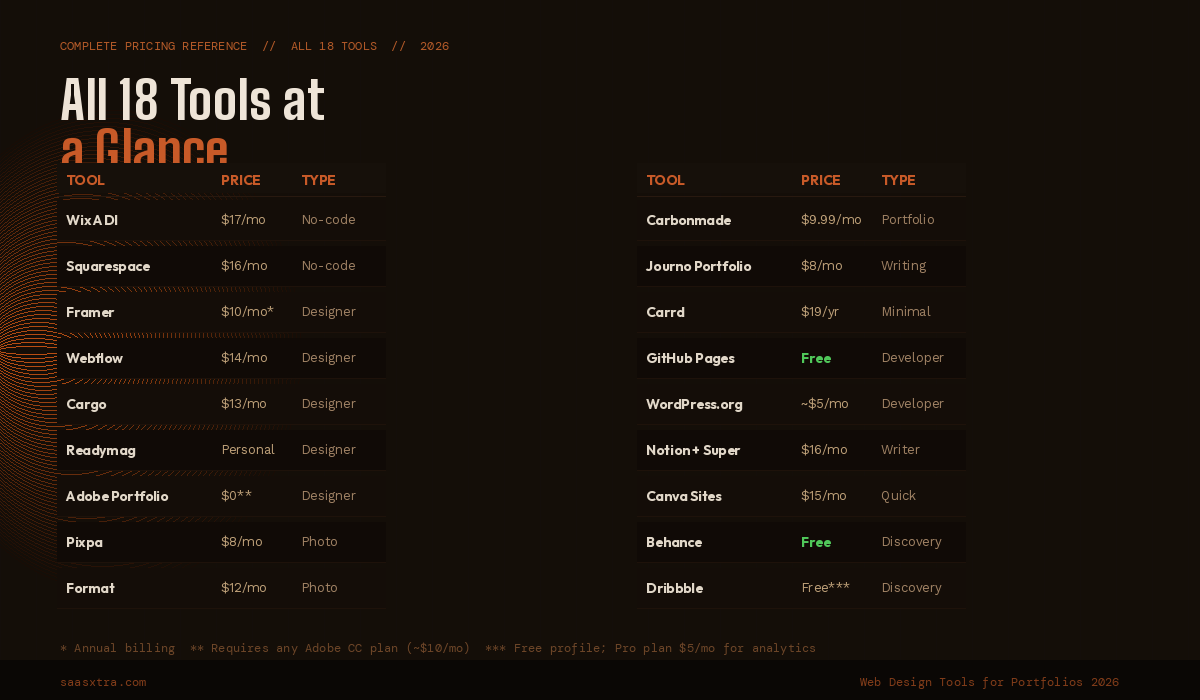
| Tool | Category | Free Plan | Starting Price | Best For |
|---|---|---|---|---|
| Wix ADI | No-code | YES | $17/mo | All-purpose creative portfolios |
| Squarespace | No-code | NO | $16/mo | Visual creatives, photographers |
| Canva Sites | No-code | YES | $15/mo (Pro) | Designers already using Canva |
| Carrd | No-code | YES | $19/yr | Single-page minimal portfolios |
| Framer | Designer | YES | $5/mo (Mini) | UX/product designers |
| Webflow | Designer | YES | $14/mo | Agencies, complex CMS portfolios |
| Cargo | Designer | YES | $13/mo | Artists, illustrators |
| Readymag | Designer | YES | Varies | Editorial case studies |
| Adobe Portfolio | Designer | YES* | $0 extra** | Adobe CC subscribers |
| Pixpa | Photography | NO | $8/mo | Photographers + client delivery |
| Format | Photography | NO | $12/mo | Professional photography studios |
| GitHub Pages | Developer | YES | Free | Developers (custom code) |
| WordPress.org | Developer | YES | ~$5/mo | Technical creatives |
| Notion + Super | Developer | YES | $16/mo | Writers, knowledge workers |
| Carbonmade | Discovery | YES | $9.99/mo | Illustrators, graphic designers |
| Journo Portfolio | Discovery | YES | $8/mo | Journalists, writers |
| Behance | Discovery | YES | Free | All visual creatives |
| Dribbble | Discovery | YES | $5/mo (Pro) | UI/product designers |
*Requires Adobe CC login. **Included with any Creative Cloud plan from ~$9.99/month.
What the Web Design Tools for Portfolio Sites Market Looks Like in 2026
The biggest structural shift in this market over the past 18 months is Framer pulling decisively ahead of the general no-code builder field for design-quality portfolio output. Squarespace remains the best default for non-designers.
Webflow remains the most powerful option for those willing to invest in the learning curve. But Framer is now the clear recommendation for working designers in a way it was not two years ago.
The discovery platform side of the market is consolidating around Behance and Dribbble for visual creatives, with Journo Portfolio holding a strong niche for writing professionals. The mid-tier discovery platforms that existed in 2022 and 2023 have mostly lost ground to the established networks, where audience size creates a compounding advantage that smaller platforms cannot match.
The code-first movement is relevant here too. An increasing number of developers and technically inclined designers are using Lovable, Bolt.new, or v0 (covered in the AI Web Design Tools guide) to generate custom portfolio sites rather than using no-code builders.
The output is a real codebase they own, customizable without platform constraints, and deployable to any host. As these web design tools for portfolio sites improve, the line between no-code and custom-coded portfolios will continue to blur.

Adeyemi Adetilewa is a digital marketing specialist focused on SaaS, marketing, and online business. He leads the editorial direction at SaaSXtra.com and has driven over 10M+ content views through strategic content marketing. His work has been published and trusted by platforms including HackerNoon, HuffPost, Addicted2Success, and others.