The best free grammar check online tools in 2026 do not make you pay before you can use them properly. This list covers 22 tools with genuinely usable free tiers, documenting the exact word limits, character caps, and daily restrictions per tool so you know what you are actually getting before you sign up.
Most comparison articles mention whether a free plan exists. None of them tells you that one tool caps you at 450 words per check while another gives you unlimited checking with no account required. That distinction entirely changes which tool is right for you.
How We Evaluated These Free Grammar Check Tools
Every tool on this list was evaluated on one non-negotiable criterion: the free tier must be genuinely functional for real writing tasks. A free plan that gives you three checks before hitting a paywall is not a free grammar checker. It is a trial with an aggressive conversion funnel.
Evaluation criteria applied to every entry:
- Exact free tier word or character limits documented (not just “limited” or “basic”)
- Whether an account or signup is required to use the free version
- Accuracy on standard grammar errors, punctuation, and style issues
- Platform coverage: browser-based, extension, Google Docs, Word integration
- What the paid upgrade actually adds and whether it is worth the cost
Tools are organised across five categories: unlimited free checkers, freemium tools with meaningful free tiers, readability and style tools, multilingual free checkers, and specialist tools for specific writing contexts.
Unlimited Free Grammar Checkers
These tools impose no word count or character limit on their core grammar checking functionality. Use them as often as you want, on documents of any length, without hitting a gate.
1. Grammarly Free
Best for: Any writer who needs reliable real-time grammar correction across every platform they write on, at no cost.
Grammarly’s free tier is the most widely used free grammar checker in the world, and the word limit situation is important to clarify. There is no word count limit on real-time grammar checking in the Grammarly editor or browser extension. You can paste a 5,000-word document, and Grammarly will check every sentence. What the free tier gates is the quality and category of suggestions: advanced style, tone, and clarity analysis require a Pro subscription.
For writers who need grammar and spelling correction, the free tier covers the job completely. For writers who want sentence-level rewriting suggestions, readability scoring, and plagiarism detection, the paid tier is necessary. That distinction is clear and the free tier delivers real value on its own terms.
What the free tier includes:
- Unlimited grammar, spelling, and punctuation checking
- Basic tone detection
- Browser extension for Chrome, Firefox, Safari, and Edge
- Google Docs integration
- Microsoft Word plugin (Windows and Mac)
- Mobile keyboard for iOS and Android
Free tier limits: No word limit on checking. Advanced suggestions (style, clarity, vocabulary, plagiarism) require Grammarly Pro.
Paid upgrade: Pro at $12/month (annual). Adds style suggestions, clarity rewrites, vocabulary enhancement, and plagiarism detection across 16 billion web pages.
Honest limitation: The free tier’s suggestions are accurate but shallow. Grammarly flags grammatical errors reliably. It does not tell you that your paragraph is structured weakly or that your sentence variety is poor without a paid plan. For deep writing quality improvement, the free tier shows you the problem but not always the path to a better version.
2. Hemingway Editor (Browser Version)
Best for: Writers who want to cut weak prose and improve readability without paying anything.
The browser version of Hemingway Editor at hemingwayapp.com is fully unlimited and requires no account. Paste any length of text, receive immediate colour-coded feedback on sentence complexity, passive voice, adverb overuse, and reading grade level. The interface is one of the cleanest and most immediately useful in this category.
Hemingway does not check grammar in the traditional sense. It has no comma correction, no subject-verb agreement checking, and no spelling detection. What it does is identify structural weaknesses that make writing hard to read. That specific function is genuinely useful for anyone who writes for an audience and wants their writing to land.
What the free tier includes:
- Unlimited text analysis on the web version
- Sentence complexity highlighting (yellow = hard, red = very hard)
- Passive voice detection and percentage count
- Adverb frequency flagging
- Reading grade-level score updated in real time
- No account or signup required
Free tier limits: Truly unlimited on the web. The desktop app ($19.99 one-time) adds offline use and direct publishing to WordPress and Medium, but the web version covers the core function entirely.
Paid upgrade: Desktop app at $19.99 one-time purchase. Not a subscription.
Honest limitation: Hemingway’s colour-coded system can feel punishing on complex subject matter where long sentences are sometimes necessary. Academic, legal, and technical writers will find its readability targets calibrated for general audiences rather than domain-specific readers. Use it as a signal, not a rulebook.
3. Slick Write
Best for: Writers who want detailed statistical analysis of their writing style with no signup, no account, and no cost ever.
Slick Write is the most comprehensive free tool on this entire list. No account. No word limit. No paid tier with gated features. The full tool is available to everyone at all times. It analyses grammar and punctuation errors, generates detailed writing statistics including word frequency, sentence length distribution, vocabulary variety, and readability scores, and flags style issues like clichés, passive voice, and redundant phrasing.
The interface is more technical than Grammarly or Hemingway. Slick Write produces reports and graphs rather than inline highlights, which suits writers who want to understand patterns across their writing rather than fix individual sentences. A blogger auditing their long-form style, a novelist checking whether their chapters have varied sentence rhythm, or a copywriter analysing vocabulary density will get more from Slick Write than from a basic correction tool.
What the free tier includes:
- Unlimited grammar and style checking
- Detailed writing statistics with graphs
- Sentence length and readability analysis
- Passive voice and cliché detection
- Browser extensions for Chrome and Firefox
- Customisable feedback settings by writing genre
- No account required, no data stored
Free tier limits: None. The entire tool is free with no restrictions.
Paid upgrade: None available. Slick Write has no paid tier.
Honest limitation: Slick Write’s inline grammar correction is less polished than Grammarly’s. The suggestions require more interpretation than a plain “change this to that” correction. Writers who want a tool that fixes errors automatically rather than reporting on them will find the workflow slower than Grammarly or LanguageTool.
4. GrammarCheck.me
Best for: Writers who need a fast, no-frills grammar check with no account and no word limit in a browser tab.
GrammarCheck.me is built on LanguageTool’s grammar engine, which means the underlying accuracy is strong for a free tool. The interface strips away everything except the text field and the results. Paste your text, click check, and receive highlighted errors with correction suggestions. No sidebar menus, no upgrade prompts embedded in every suggestion, no distraction.
The tool supports English grammar checking across multiple English variants: US, UK, Australian, and Canadian English are all available from a dropdown. This makes it one of the few free web-based tools that explicitly acknowledges that “organisation” and “organisation” are both correct depending on where you are writing for.
What the free tier includes:
- Unlimited grammar and spell checking powered by LanguageTool
- English variant selection (US, UK, AU, CA)
- Punctuation and sentence structure checking
- No account or signup required
- Copy-corrected text button for fast workflow
Free tier limits: No word limit documented. Effectively unlimited for standard web use.
Paid upgrade: None on GrammarCheck.me itself. The underlying LanguageTool Premium is a separate product at $4.99/month.
Honest limitation: GrammarCheck.me has no integrations. It is a standalone web tool with no browser extension, no Google Docs plugin, and no Word integration. Copy-paste is the entire workflow. For writers who need in-context checking rather than a separate tab, this is a meaningful constraint.
5. Virtual Writing Tutor
Best for: ESL learners, students, and non-native English writers who want free grammar checking designed specifically around common language learner errors.
Virtual Writing Tutor runs on a modified LanguageTool engine with thousands of additional error detection rules specifically targeting ESL grammar mistakes. The tool checks grammar, spelling, and punctuation, but its real value is its ESL-specific detection layer. It catches errors that standard grammar checkers miss because they are not looking for the specific patterns that second-language writers produce, such as article misuse, preposition errors, and tense inconsistency patterns common in specific language groups.
Beyond grammar checking, Virtual Writing Tutor includes essay scoring against IELTS and TOEFL rubrics, a vocabulary profiler that analyses word frequency and academic vocabulary level, and an error correction game for grammar practice. No other free tool on this list doubles as a language learning platform.
What the free tier includes:
- Unlimited grammar and spelling checking with ESL-specific rules
- Essay scoring with IELTS and TOEFL alignment
- Vocabulary profiler showing word frequency levels
- GPT detection for identifying AI-generated content
- Pen pal exchange for language practice
- No account required for basic checking
Free tier limits: Core grammar checking is unlimited and free. Some advanced essay scoring features may require a free account.
Paid upgrade: A low-cost API plan is available for institutional users. The consumer tool remains free.
Honest limitation: Virtual Writing Tutor’s suggestions are calibrated for language learners. Native English writers with advanced style needs will find the feedback less relevant. The tool is purpose-built for a specific audience and works well within that context.
6. Scribens
Best for: Writers who want unlimited grammar checking for English and French text with synonym suggestions built in.
Scribens is a genuinely free grammar checker that covers both English and French without a word limit on the free version. The tool checks grammar, spelling, conjugation, and punctuation while also providing synonym suggestions for word choice improvement. The interface is clean, and the synonym feature is integrated directly into the correction flow rather than requiring a separate dictionary lookup.
The browser extensions for Chrome, Firefox, and Internet Explorer (yes, still listed) allow in-context checking across Gmail, LinkedIn, Facebook, and other web platforms. For writers who work primarily in web forms and email rather than a word processor, Scribens covers the surfaces that matter.
What the free tier includes:
- Unlimited grammar, spelling, and punctuation checking
- English and French language support
- Synonym suggestions integrated into correction flow
- Browser extensions for Chrome and Firefox
- Works inside Gmail, LinkedIn, and other web platforms
- No account required for the web version
Free tier limits: No word limit on the free version.
Paid upgrade: A premium plan is available for enhanced features, but the free tier covers the core grammar checking comprehensively.
Honest limitation: Scribens is not recommended for advanced editing needs. Plagiarism checking, structural analysis, and detailed style reports are outside its scope. It is a grammar and spelling corrector, not a full writing quality tool.
7. After the Deadline
Best for: WordPress users and developers who want free grammar and style checking via plugin or API with no word limits.
After the Deadline is an open-source grammar, style, and spell checker originally developed for WordPress and now available as a standalone web tool. It checks for grammar errors, misused words, complex phrases, passive voice, and hidden verbs with accuracy that competes meaningfully with more commercially prominent tools. The open-source foundation means no paywall exists by design.
WordPress.com integrates After the Deadline directly into its editor. Self-hosted WordPress users can install the Jetpack plugin to access it. Developers can integrate it via API. Writers who build their workflow around WordPress get the most value here since the checking happens natively inside their publishing tool.
What the free tier includes:
- Grammar, spelling, and style checking
- Passive voice and hidden verb detection
- Complex phrase and cliché flagging
- WordPress integration via Jetpack
- Open-source API for developer integration
- No word limit and no account required
Free tier limits: None. Fully open-source and free.
Paid upgrade: None. The tool is free by design.
Honest limitation: After the Deadline’s development has been largely static compared to commercially funded competitors. Its grammar rules are solid, but its AI sophistication is below Grammarly or LanguageTool. For basic grammar correction in a WordPress workflow, it covers the job. For style and clarity analysis, more actively developed tools are stronger.
8. Zoho Writer’s Grammar Check
Best for: Writers already using Zoho’s productivity suite who want grammar checking integrated directly into their word processor at no additional cost.
Zoho Writer is a free online word processor, and its built-in grammar checking is included at no cost with any Zoho account, which is free to create. The grammar checker works directly inside the document without requiring copy-pasting to a separate tool. Zoho’s free plan includes 5GB of storage and full access to Zoho Writer’s editing features, including the grammar check.
For small teams and individuals who want a Google Docs alternative with grammar checking built in, Zoho Writer is an underrated option. The grammar accuracy is comparable to Microsoft Editor and more than sufficient for business and professional writing.
What the free tier includes:
- Grammar and spelling checking inside Zoho Writer
- 5GB storage on Zoho’s free plan
- Collaboration features for shared documents
- Export to Word, PDF, and other formats
- Mobile apps for iOS and Android
Free tier limits: Grammar checking is unlimited within Zoho Writer. The free Zoho plan covers the tool’s core functionality.
Paid upgrade: Zoho Workplace plans from $3/user/month add more storage and advanced collaboration. Grammar checking remains available on the free plan.
Honest limitation: Zoho Writer’s grammar checking is functional but lacks the depth of style and clarity analysis that Grammarly or ProWritingAid provide. Writers who need detailed writing quality improvement rather than error correction will reach the tool’s ceiling quickly.
Freemium Grammar Checkers With Meaningful Free Tiers
These tools have word limits or daily restrictions on the free tier, but the free version is still functional enough to be genuinely useful for the right use cases.
9. LanguageTool
Best for: Writers who need free grammar checking across 30+ languages with a generous character allowance per check.
LanguageTool’s free plan allows checking of up to 20,000 characters per request, which covers approximately 3,000 to 3,500 words. For most individual writing tasks, that covers the entire document. The tool checks grammar in 30+ languages with native rule sets, not English rules adapted for other languages. That accuracy difference in non-English checking is significant.
The free browser extension works inside Google Docs, Gmail, LinkedIn, Twitter, Facebook, and most web-based writing surfaces. The free plan includes access to LanguageTool’s standard rule set, which catches the majority of grammar and style errors without requiring an upgrade.
What the free tier includes:
- Grammar and style checking in 30+ languages
- Up to 20,000 characters per check (approximately 3,000-3,500 words)
- Browser extension for all major browsers
- Google Docs and LibreOffice integration
- Basic picky mode for stricter style suggestions
Free tier limits: 20,000 characters per single check. No daily check limit documented.
Paid upgrade: Premium at $4.99/month (annual). Removes character limit, adds advanced style rules, and increases suggestion depth significantly.
Honest limitation: LanguageTool’s English-language style suggestions on the free tier are less nuanced than Grammarly’s. The tool shines in multilingual contexts. For English-only writing quality, the gap between free LanguageTool and free Grammarly is noticeable in favour of Grammarly.
10. QuillBot Grammar Checker
Best for: Students and academic writers who want grammar checking combined with paraphrasing and citation generation in one free workflow.
QuillBot’s grammar checker is part of a broader writing suite that includes a paraphraser, summariser, citation generator, and translator. The free grammar checking is unlimited for basic errors. The free paraphrasing is limited to one mode and shorter text lengths before a word limit applies. For grammar checking specifically, QuillBot’s free tier is generous.
The paraphrasing integration is what makes QuillBot distinct. After checking grammar, a writer can immediately rephrase a flagged sentence in multiple tones without switching tools. For academic writers who need both correction and reformulation to avoid plagiarism in their own drafts, this one-stop workflow has genuine value.
What the free tier includes:
- Unlimited grammar and spelling checking
- One paraphrasing mode (Standard) with a word limit
- Summariser with limited monthly usage
- Citation generator for APA, MLA, and Chicago
- Translator for basic language conversion
- Chrome extension and Google Docs integration
Free tier limits: Grammar checking unlimited. Paraphrasing limited to Standard mode and shorter text. Summariser has monthly usage limits on the free plan.
Paid upgrade: Premium at $8.33/month (annual). Adds all seven paraphrasing modes, unlimited summarising, and faster processing.
Honest limitation: QuillBot’s grammar checker is strong for standard prose but less effective on complex academic or technical sentence structures. Writers producing highly specialised domain content will find errors that QuillBot misses. For general writing, the free tier is a strong option.
11. ProWritingAid Free
Best for: Long-form writers who want a deep analytical report on their writing style and are willing to check in 500-word segments.
ProWritingAid’s free tier is one of the most analytical free grammar experiences available, despite the 500-word check limit. Within that limit, the tool produces reports covering grammar and spelling errors, overused words, sentence length variation, readability scores, passive voice percentage, and pacing analysis. The depth of analysis per check exceeds what Grammarly’s free tier offers.
The workflow for long documents is to check in 500-word sections, which is slower but still useful for writers who want to understand structural patterns in their writing rather than just fix surface errors.
What the free tier includes:
- Grammar and spelling checking up to 500 words per check
- 20+ writing style report dimensions within the word limit
- Style, readability, and pacing analysis
- Google Docs, Word, and browser extension integration
- Scrivener integration (extension available)
Free tier limits: 500 words per check. Unlimited checks on the free plan, so long as documents require multiple passes.
Paid upgrade: Premium at approximately $10/month (annual). Removes word limit and adds real-time AI rewrite suggestions.
Honest limitation: The 500-word limit is the single most significant constraint on the free tier. Writers working on documents of 2,000+ words will spend meaningful time managing the segmented check workflow. If the word limit is a dealbreaker, Grammarly’s free tier with unlimited checking is the alternative.
12. Wordvice AI
Best for: Academic writers and students who want free grammar checking with academic writing conventions respected.
Wordvice AI provides free grammar checking with a contextual understanding of academic writing that most general-purpose tools lack. The tool does not penalise passive voice in methodology sections, where it is expected. It does not flag disciplinary terminology as potential errors.
The free tier allows checking without a word limit on basic grammar, making it one of the more generous free academic tools available.
What the free tier includes:
- Grammar and punctuation checking without a stated word limit
- Academic writing convention awareness
- Research terminology tolerance
- APA and MLA formatting guidance
- Browser-based interface with no installation required
Free tier limits: Basic grammar checking is available without a documented word limit. Advanced style and paraphrase features may require registration.
Paid upgrade: Premium at $9.99/month for full feature access, including paraphrasing and advanced style suggestions.
Honest limitation: Wordvice AI’s brand recognition is lower than Grammarly or QuillBot, which means its integration coverage is narrower. No widely used browser extension exists as of 2026. The tool works best as a standalone web check rather than an embedded workflow tool.
13. PaperRater
Best for: Students who need free grammar checking combined with plagiarism detection and automated essay grading in one pass.
PaperRater is purpose-built for academic writing, and it combines three functions that students typically need: grammar checking, plagiarism detection, and automated essay scoring with a letter grade. The free tier allows checking documents up to 3,000 words, which covers the majority of undergraduate essays and papers, with both grammar and plagiarism reports generated simultaneously.
The plagiarism detection on the free tier is a meaningful differentiator. Most free grammar checkers do not include plagiarism checking. Getting both in one free pass on a 3,000-word document is a genuine advantage for student writers working under budget constraints.
What the free tier includes:
- Grammar and style checking up to 3,000 words
- Plagiarism detection included on free plan
- Automated essay scoring with a letter grade
- Vocabulary analysis and word choice suggestions
- No account required for basic checks
Free tier limits: 3,000 words per check. Documents must be submitted rather than checked in real time.
Paid upgrade: Basic premium plan at $7.95/month for 6,000-word checks and faster processing.
Honest limitation: PaperRater’s plagiarism database and grammar engine are less sophisticated than paid academic tools like Turnitin or Grammarly Pro. The automated essay grading should be treated as a rough benchmark, not a prediction of actual academic performance. Use it as a self-check tool, not a final editorial pass.
Free Readability and Style Tools
These tools focus on writing quality improvement beyond grammar correction. Best used after a grammar check pass or alongside one.
14. Readable
Best for: Content marketers, SEO writers, and bloggers who need to hit specific readability targets for their audience or platform.
Readable calculates multiple readability scores simultaneously, including Flesch-Kincaid, Gunning Fog, SMOG, Coleman-Liau, and Automated Readability Index. It presents them alongside keyword density analysis, sentence length reports, and passive voice percentage. For content writers optimising for specific audiences, having five readability formulas rather than one gives a more complete picture of how accessible the writing is.
The free tier is functional for short content up to approximately 1,000 words on the web version. For blog posts, email newsletters, and short-form content, the free tier covers the core use case.
What the free tier includes:
- Multiple readability formula scores (Flesch-Kincaid, Fog, SMOG, Coleman-Liau)
- Keyword density analysis
- Sentence length and paragraph length reports
- Passive voice percentage
- Free web tool for documents up to approximately 1,000 words
Free tier limits: Approximately 1,000 words on the free web version. Paid plans remove the limit.
Paid upgrade: Plans from $8/month for unlimited document analysis and API access.
Honest limitation: Readable does not check grammar. It is a readability and analysis tool only. Writers who use it as a standalone tool still need a separate grammar checker to catch errors. It works best as a complement to Grammarly or LanguageTool, not a replacement.
15. Wordtune Free
Best for: Writers who want AI-powered sentence rewriting suggestions and are comfortable with a 10-rewrite daily limit.
Wordtune’s free tier gives 10 sentence rewrite suggestions per day, which is restrictive for heavy use but functional for focused editing sessions on high-priority content. The rewriting quality is strong: suggestions are natural, tonally appropriate, and regularly improve on the original phrasing in ways that feel genuinely intelligent rather than template-generated.
The Chrome extension and Google Docs integration make the workflow fast. Highlight a sentence, see alternatives, pick one, move on. The daily limit means writers need to prioritise which sentences matter most rather than rewriting everything.
What the free tier includes:
- 10 sentence rewrite suggestions per day
- Casual and formal tone options per suggestion
- Shorten and expand modes
- Chrome extension and Google Docs integration
- Basic summariser feature
Free tier limits: 10 rewrites per day. Resets every 24 hours.
Paid upgrade: Advanced at $13.99/month for unlimited rewrites and all rewriting modes.
Honest limitation: 10 rewrites per day is genuinely limiting for professional content production. Writers who publish daily or work on long-form content will exhaust the free tier within minutes. The free plan is most useful for occasional editing rather than daily production workflows.
Multilingual Free Grammar Checkers
16. Reverso
Best for: Multilingual writers and translators who need free grammar checking with context-aware corrections in multiple languages.
Reverso provides free grammar and spell checking in English, French, Spanish, Italian, German, and other languages via its web-based interface. The grammar checking engine is powered by Ginger Software’s core technology, which means the correction quality is comparable to what Ginger offers on its paid tier, delivered free. Reverso’s primary business is translation, and its grammar checker is positioned as a companion to that service.
The free grammar checking has a character limit of approximately 2,000 to 3,000 characters per check, which is enough for emails, short articles, and social media posts but constraining for long-form documents.
What the free tier includes:
- Grammar and spell checking in 6+ languages
- Context-aware corrections powered by Ginger’s engine
- Rephraser for alternative sentence suggestions
- Integration with Microsoft Word via a plugin
- Translation features in 15+ language pairs
Free tier limits: Approximately 450 words per check (around 2,700 characters). No daily check limit.
Paid upgrade: Reverso’s core translation service has paid plans. The grammar checker itself is free with the character limit.
Honest limitation: The character limit makes Reverso impractical for long-form document checking. It is the right tool for emails, messages, and short-form multilingual content. For long documents in multiple languages, LanguageTool’s 20,000-character free tier is a more practical option.
17. Ginger Software Free
Best for: Non-native English speakers who want context-aware grammar correction with sentence rephrasing and translation included in the free plan.
Ginger’s free tier provides grammar and spelling correction with contextual sentence rephrasing in English, plus translation features across 40+ languages. The daily limit on the free plan restricts heavy use, but the quality of corrections within the limit is strong.
Ginger’s ESL-specific detection logic catches errors that standard grammar checkers miss, making it the most practically useful free tool for non-native English writers who need corrections that account for their source language’s interference patterns.
What the free tier includes:
- Grammar and spell checking with ESL-specific error detection
- Sentence rephrasing suggestions
- Text-to-speech for hearing writing, read aloud
- Translation across 40+ languages
- Browser extension and mobile keyboard
Free tier limits: Daily usage limit applies (not publicly specified in exact numbers). Core grammar checking is available on the free plan.
Paid upgrade: Premium at $13.99/month for unlimited checking and full translation depth.
Honest limitation: The daily limit on Ginger’s free tier is its biggest constraint, and the exact cap is not published clearly. Heavy users will hit the limit faster than they expect. Writers who need more than occasional checking should plan for the paid tier or use LanguageTool’s more generously limited free plan for multilingual needs.
18. DeepL Write Free
Best for: European professionals who write in German, French, Spanish, Italian, Portuguese, Dutch, Polish, or Japanese and want natural-sounding free grammar corrections.
DeepL Write’s free tier provides grammar and style improvement in eight languages with the natural-language quality that DeepL’s translation is known for.
The free version is limited to approximately 1,500 characters per check, which covers short emails and paragraphs but not full articles. For the specific languages it supports, the correction quality is meaningfully better than that of English-first tools that extended multilingual support as a secondary feature.
What the free tier includes:
- Grammar and style improvement in 8 languages
- Tone and register adjustment suggestions
- Multiple rephrasing alternatives per sentence
- Browser-based interface, no account required for basic use
Free tier limits: Approximately 1,500 characters per check on the free version.
Paid upgrade: DeepL Pro from $8.74/month (annual) includes Write with expanded limits as part of the full DeepL suite.
Honest limitation: Eight-language coverage means DeepL Write is not useful for writers working in languages outside its support list. For broader multilingual coverage, LanguageTool’s 30+ language free tier is the practical alternative.
Specialist Free Grammar Tools
19. Microsoft Editor Free
Best for: Writers who use Microsoft Edge or Microsoft 365 and want grammar checking at no extra cost, integrated directly into their existing tools.
Microsoft Editor is embedded in the Edge browser and included with Microsoft 365 subscriptions. For Edge users, the grammar checking is available at zero cost with no additional installation: it works inside Gmail, Google Docs, LinkedIn, social media platforms, and any web-based text field. The accuracy is comparable to Grammarly’s free tier for standard grammar and spelling errors.
For Microsoft 365 subscribers, Editor works inside Word and Outlook natively, making it the zero-friction option for anyone already in the Microsoft ecosystem.
What the free tier includes:
- Grammar and spelling checking inside Microsoft Edge (all websites)
- Tone and clarity suggestions in Edge
- Word and Outlook integration for Microsoft 365 users
- Works on Windows, macOS, iOS, and Android within the M365 ecosystem
Free tier limits: Full grammar checking in Edge at no cost. Full M365 integration requires a Microsoft 365 subscription ($69.99/year).
Paid upgrade: Microsoft 365 Personal at $69.99/year adds Copilot AI integration, advanced Editor features, and the full Office suite.
Honest limitation: Microsoft Editor’s suggestions are less nuanced than Grammarly Pro’s for style and clarity analysis. It is the right default for casual and business writing correction. Writers who need structural writing quality improvement rather than error catching will find the ceiling lower than that of dedicated grammar tools.
20. Writer.com Free Plan
Best for: Solo content creators and freelancers who want a brand-voice-aware grammar checker with a functional free tier.
Writer.com’s free plan allows individual users to access the platform’s grammar checking and style suggestions without a paid subscription. The free tier includes the core writing assistant, which flags grammar errors, style inconsistencies, and clarity issues in real time.
The brand style guide features that make Writer.com valuable for teams require a paid plan, but the grammar checking capability alone is useful for individual writers.
What the free tier includes:
- Real-time grammar and spelling checking
- Basic style and clarity suggestions
- Google Docs and Word plugin
- Web-based editor with document storage
Free tier limits: Individual use only. Team features and style guide enforcement require a paid plan.
Paid upgrade: Team plan at $18/month per user for brand style guide enforcement and team management.
Honest limitation: Writer.com’s free plan is a gateway to a team product. The individual free experience is functional, but the platform’s strongest features are designed for multi-user environments. Solo writers get a capable grammar checker, not the full product experience.
21. Linguix Free
Best for: Business writers who need grammar checking across multiple languages with a clean interface and browser integration.
Linguix provides grammar and spelling checking with 2,700+ advanced correction rules covering grammar, style, and common business writing errors. The free plan covers basic grammar checking with some advanced suggestions included.
The tool supports seven languages and has a secret mode for checking sensitive content without storing any data, which is a useful privacy feature for writers handling confidential material.
What the free tier includes:
- Grammar, spelling, and punctuation checking
- Advanced corrections across 2,700+ rule categories
- Secret mode for privacy-sensitive content
- Browser extension with Gmail and LinkedIn integration
- Content templates for emails, blogs, and social posts
Free tier limits: Basic grammar checking is free. Advanced business writing features require the paid tier.
Paid upgrade: Business plans from $10/month for full advanced correction depth and team features.
Honest limitation: Linguix’s free tier accuracy in identifying fundamental errors is solid but trails Grammarly on nuanced contextual corrections. For business email writing specifically, it performs well within its stated use case.
22. Zoho Writer + Grammar Check (Standalone)
Best for: Writers who want a free online word processor with grammar checking built in, without paying for Google Workspace or Microsoft 365.
Zoho Writer deserves a dedicated entry as a standalone alternative to Google Docs with native grammar checking included. The free Zoho account gives access to Zoho Writer with grammar and spell checking, collaboration tools, and document storage.
For freelancers and independent writers who want a full word processor workflow without a subscription, Zoho Writer provides everything Google Docs does (for most use cases) at zero cost.
What the free tier includes:
- Full-featured online word processor
- Built-in grammar and spell checking
- Real-time collaboration
- 5GB storage
- Export to Word, PDF, and ODT formats
- Mobile apps for iOS and Android
Free tier limits: Grammar checking is unlimited. Storage is 5GB on the free plan.
Paid upgrade: Zoho Workplace from $3/user/month adds more storage and advanced features.
Honest limitation: Zoho Writer’s grammar checking engine is less sophisticated than Grammarly or LanguageTool. It catches standard errors reliably, but its style and clarity analysis is minimal. Think of it as the spelling and grammar check feature of a word processor, not a dedicated writing quality tool.
Which Free Grammar Checker Is Right For You?
You want truly unlimited checking with no account
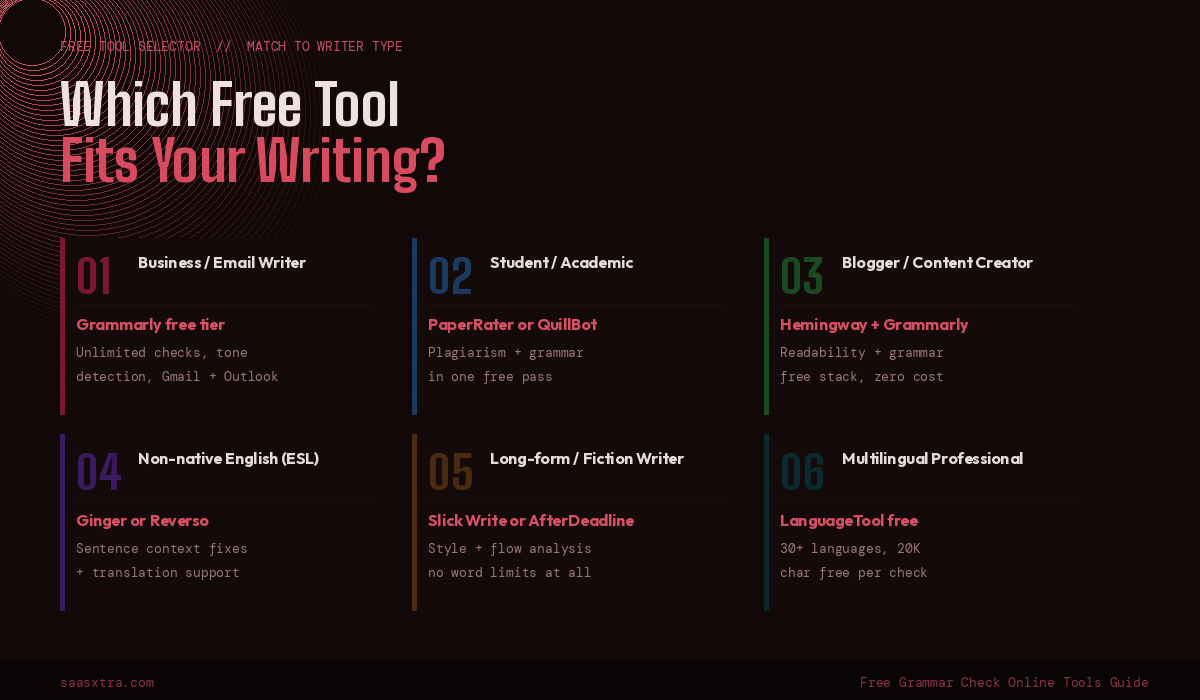
Slick Write, Hemingway Editor (web), GrammarCheck.me, After the Deadline, and Virtual Writing Tutor all provide unlimited checking with no signup. Grammarly free also has no word limit but requires an account.
You write mostly in English for business
Grammarly’s free tier is the clearest recommendation. Unlimited checking, platform coverage across all surfaces you use, and reliable accuracy on standard business writing errors.
You are a student who needs plagiarism checking too
PaperRater gives you grammar checking and plagiarism detection together on documents up to 3,000 words, all free. QuillBot adds citation generation to the mix. Either one covers the academic writing toolkit without cost.
You need to check writing in multiple languages
LanguageTool’s free tier (20,000 characters, 30+ languages) is the best free multilingual option. DeepL Write for higher-quality corrections in its eight supported languages. Reverso or Ginger for ESL support with sentence rephrasing.
You want to improve clarity and readability, not just catch errors
Hemingway Editor (free, unlimited) plus Slick Write (free, unlimited) cover readability and style analysis completely. Use them after a grammar check pass with Grammarly or LanguageTool.
You already use Microsoft Edge or Microsoft 365
Microsoft Editor is built in. Use it first before signing up for anything else.
You want the best free-to-paid upgrade value
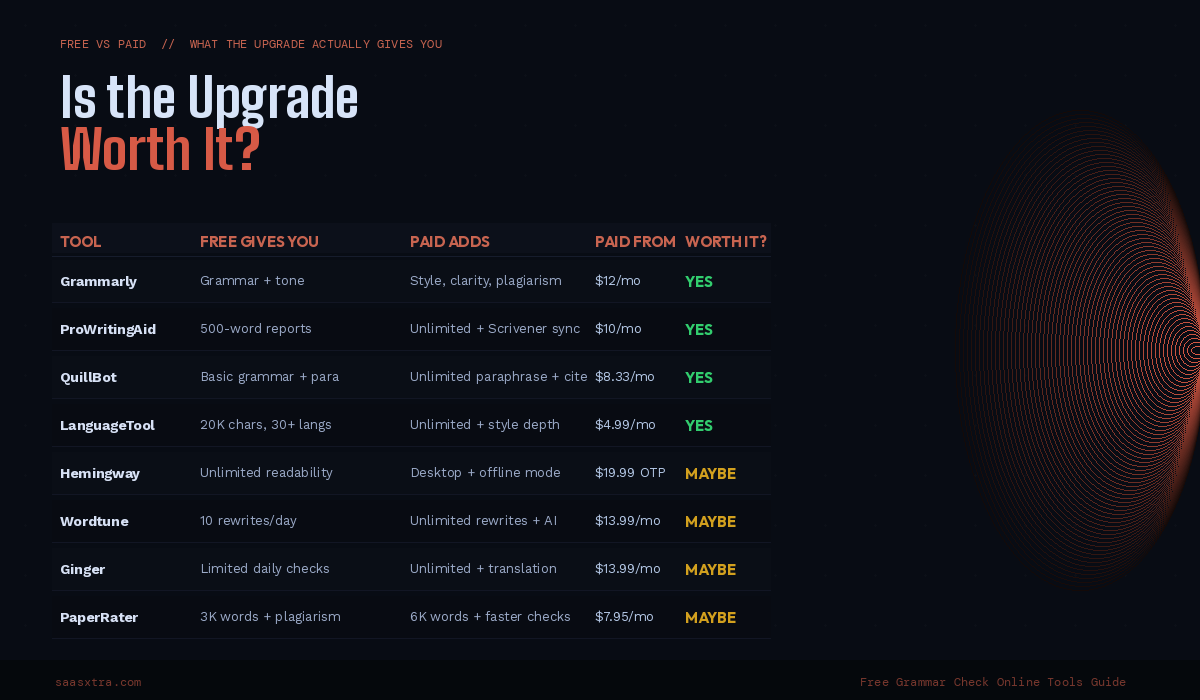
LanguageTool Premium at $4.99/month is the highest-value upgrade on this list. Removes the character limit, adds advanced style rules, and costs less than a coffee.
Full Comparison: All Free Grammar Check Online Tools
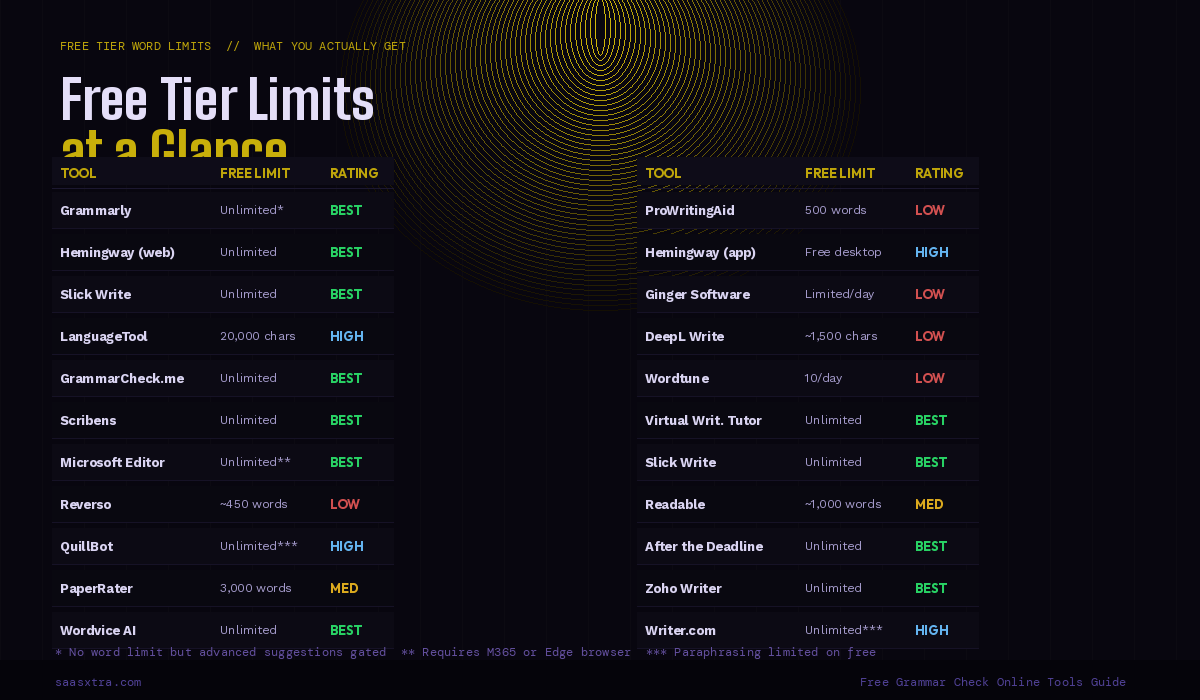
| Tool | Category | Word/Char Limit | Account Needed | Upgrade From |
|---|---|---|---|---|
| Grammarly Free | Unlimited free | No limit on checking | YES | $12/mo |
| Hemingway (web) | Unlimited free | Unlimited | NO | $19.99 OTP |
| Slick Write | Unlimited free | Unlimited | NO | Free only |
| GrammarCheck.me | Unlimited free | Unlimited | NO | Free only |
| Virtual Writing Tutor | Unlimited free | Unlimited | NO | Free only |
| Scribens | Unlimited free | Unlimited | NO | Paid plan |
| After the Deadline | Unlimited free | Unlimited | NO | Free only |
| Zoho Writer (word proc.) | Unlimited free | Unlimited | YES (free) | $3/mo |
| LanguageTool | Freemium | 20,000 chars | NO | $4.99/mo |
| QuillBot | Freemium | Unlimited grammar | YES | $8.33/mo |
| ProWritingAid | Freemium | 500 words | YES | $10/mo |
| Wordvice AI | Freemium | No stated limit | NO | $9.99/mo |
| PaperRater | Freemium | 3,000 words | NO | $7.95/mo |
| Readable | Readability | ~1,000 words | NO | $8/mo |
| Wordtune | Readability | 10 rewrites/day | YES | $13.99/mo |
| Reverso | Multilingual | ~450 words | NO | Free core |
| Ginger Free | Multilingual | Daily limit | YES | $13.99/mo |
| DeepL Write Free | Multilingual | ~1,500 chars | NO | $8.74/mo |
| Microsoft Editor | Specialist | Unlimited (Edge) | NO (Edge) | $69.99/yr |
| Writer.com Free | Specialist | Individual only | YES | $18/mo |
| Linguix Free | Specialist | Basic only | YES | $10/mo |
| Zoho Writer (grammar) | Specialist | Unlimited | YES (free) | $3/mo |
Three Free Stacks That Cost Nothing
The most effective free grammar workflow is not one tool. It is two tools used in sequence, covering different dimensions of writing quality.
Stack 1: The Zero-Signup Stack Slick Write (style analysis, no account) followed by GrammarCheck.me (grammar correction, no account). Both are unlimited, both are free, neither requires registration. Total cost: zero. Total setup time: none.
Stack 2: The Student Stack Grammarly free (unlimited grammar, real-time in Google Docs) plus PaperRater (plagiarism check on final draft up to 3,000 words). Covers grammar correction during writing and plagiarism checking before submission. Total cost: zero.
Stack 3: The Readability Stack Grammarly free (grammar correction) followed by Hemingway Editor web (readability and clarity check). Grammar first, then structure. Both unlimited, both free. The combination covers what most paid grammar tools charge $10 to $30 per month to deliver.

Adeyemi Adetilewa is a digital marketing specialist focused on SaaS, marketing, and online business. He leads the editorial direction at SaaSXtra.com and has driven over 10M+ content views through strategic content marketing. His work has been published and trusted by platforms including HackerNoon, HuffPost, Addicted2Success, and others.