

A lead list can look impressive and still be almost useless. A freelancer might collect 200 company names, send a handful of messages, and return a week later unable to remember why those businesses looked promising.
The problem is rarely the number of tools available. It is the absence of a reliable process for moving from research to a meaningful business conversation.
For small B2B teams, client acquisition is not a single marketing activity. It is a chain of decisions: whom to approach, what is actually known about them, whether a service fits, how to initiate contact, when to follow up, and how to preserve the relationship after an agreement. Each decision needs enough context to support the next.
Prospect-to-Client Workflow for Small B2B Teams
This guide offers a practical prospect-to-client workflow that a solo professional or a lean agency can run with a spreadsheet, a CRM, or a local-first desktop workspace.
It deliberately avoids promising a particular response rate or a fixed number of new clients. The purpose is to make the work clear, reviewable, and repeatable.
1. Define a market narrow enough to research properly
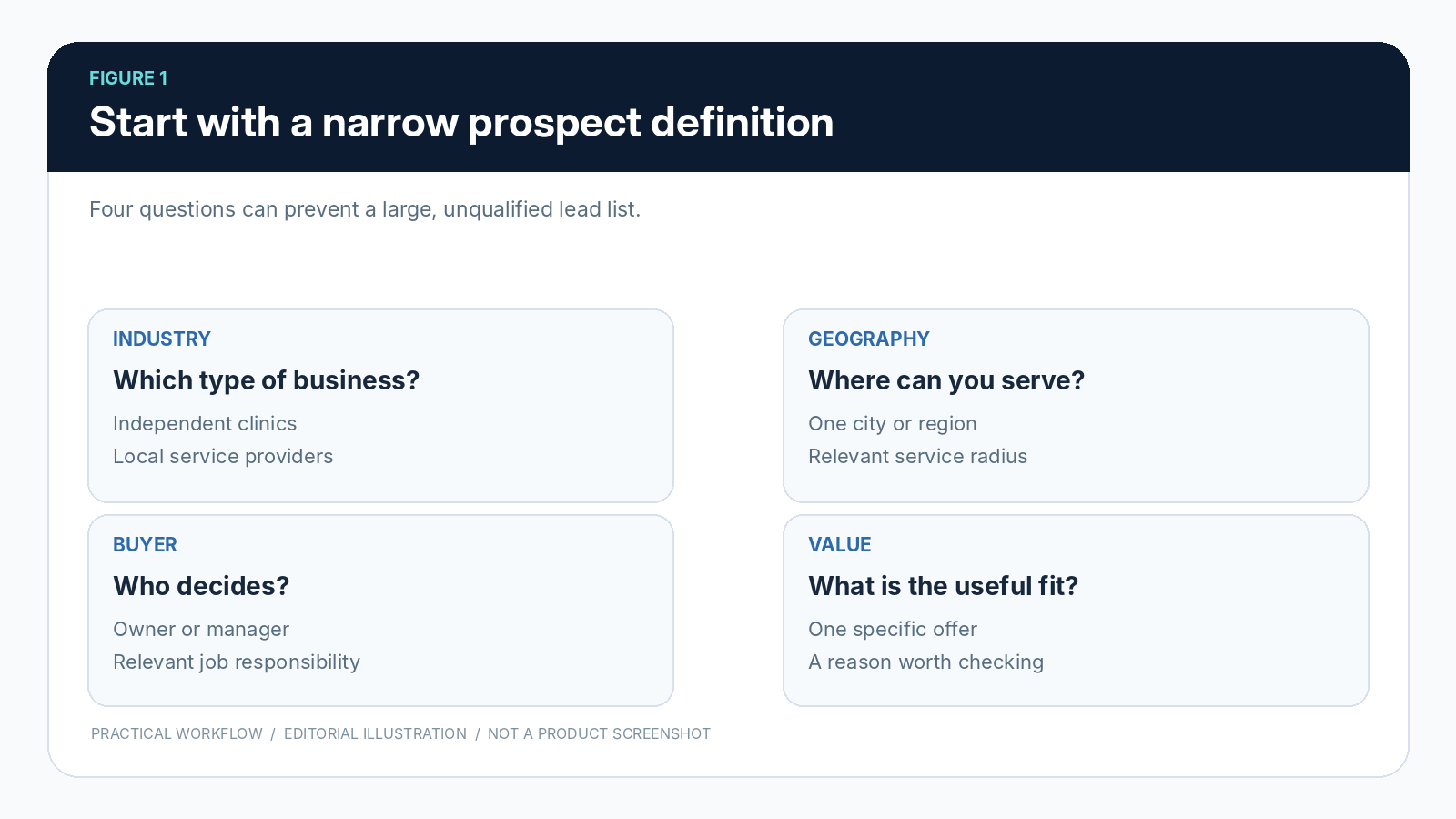
Before collecting prospects, write a simple ideal-customer description. Start with four constraints: the kind of organization you serve, the geography you can realistically cover, the buyer or role involved, and the specific service you can provide.
A broad audience such as “small businesses worldwide” offers little guidance for daily research. “Independent dental practices in one metro area that may need appointment-page improvements” is an actionable starting hypothesis.
Notice the word “may.” You cannot infer a business problem simply because a company belongs to a category. A narrow definition helps you choose where to look; research determines whether a particular prospect actually matches. Record your assumptions separately from verified facts so they can be challenged later.
For a small team, it is often useful to choose one segment for two weeks rather than switching industries every day. Keep the target small enough that each entry can be reviewed. There is no universal ideal daily quota: capacity depends on research complexity, service value, and the time needed for responsible outreach.
2. Treat each candidate as a research question, not a sales opportunity
A company name, a directory result, and a public email address are starting points, not permission to make confident claims.
Open the organization’s own website where possible, confirm its location and current services, and look for evidence that your offer might be relevant. Check whether the contact route belongs to the correct organization and whether a person’s role is current.
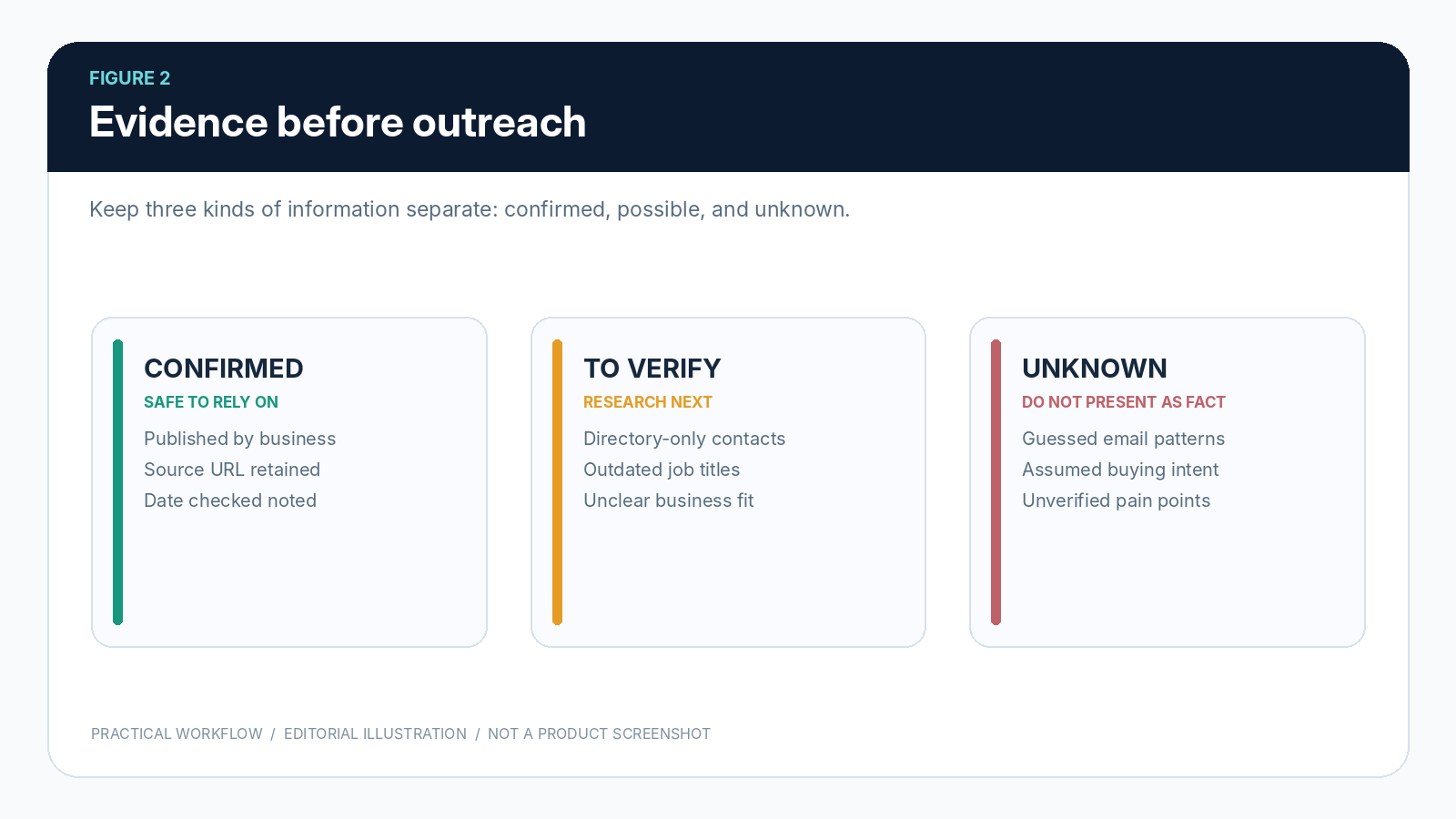
A useful research record distinguishes three information types: confirmed facts with a source, reasonable possibilities that still need checking, and missing details that should remain blank. This simple distinction prevents a common mistake: allowing a guess from one search result to become a supposedly verified fact in a later outreach draft.
Save the source URL and the date you checked it. When multiple directories describe the same company, verify identity before creating duplicate records. Public search providers can have incomplete data and rate limits, so do not treat a requested search count as a guaranteed set of valid prospects.
3. Qualify for fit, not for the illusion of precision
Lead scoring can help small teams decide where to spend attention, but a score is not a probability of winning a sale.
A simple model is often more useful than a complicated one: rate four factors from zero to two, customer-type fit, relevance of the proposed service, confidence in the evidence, and the presence of a legitimate contact path. That produces a transparent working score between zero and eight.
Use the score to organize follow-up research rather than to justify mass messaging. A business with excellent industry fit but no verified decision-maker may belong in “Research further,” not “Contact now.” A moderately sized prospect with a clear, relevant problem and trustworthy source information may deserve more attention than a famous company with a weak match.
Write one plain-language sentence explaining the decision. For example: “Relevant regional business, online booking page confirmed, contact route verified; decision-maker still unclear.” This explanation is more useful than a score whose inputs no one remembers.
4. Make the first message useful and easy to answer
Good outreach starts with relevance, not with the volume of claims. A first message should show that you understand the organization at a factual level, explain the specific service you provide, and propose a low-friction next step. Avoid invented compliments, unsupported statements about lost revenue, and personal details collected without a legitimate reason.
One structure works across many service businesses: state the reason for contacting them, refer to one verified observation, describe a narrowly defined way you might help, and give the recipient a simple option to decline or ask for more information. Keep the message short enough to read without needing a meeting first.
Review names, company details, the offer, and the recipient address before anything is sent. Follow applicable email and privacy rules in the relevant jurisdictions, including identification, opt-outs, and rules concerning personal data. Automation may prepare or schedule work, but consequential messages still deserve clear owner controls and an auditable sending record.
5. Decide on follow-up before sending the first email
A meaningful percentage of sales activity is operational rather than persuasive: remembering who was contacted, what was said, whether anyone replied, and when the next action is due. Without that continuity, promising conversations fade simply because they were not recorded.
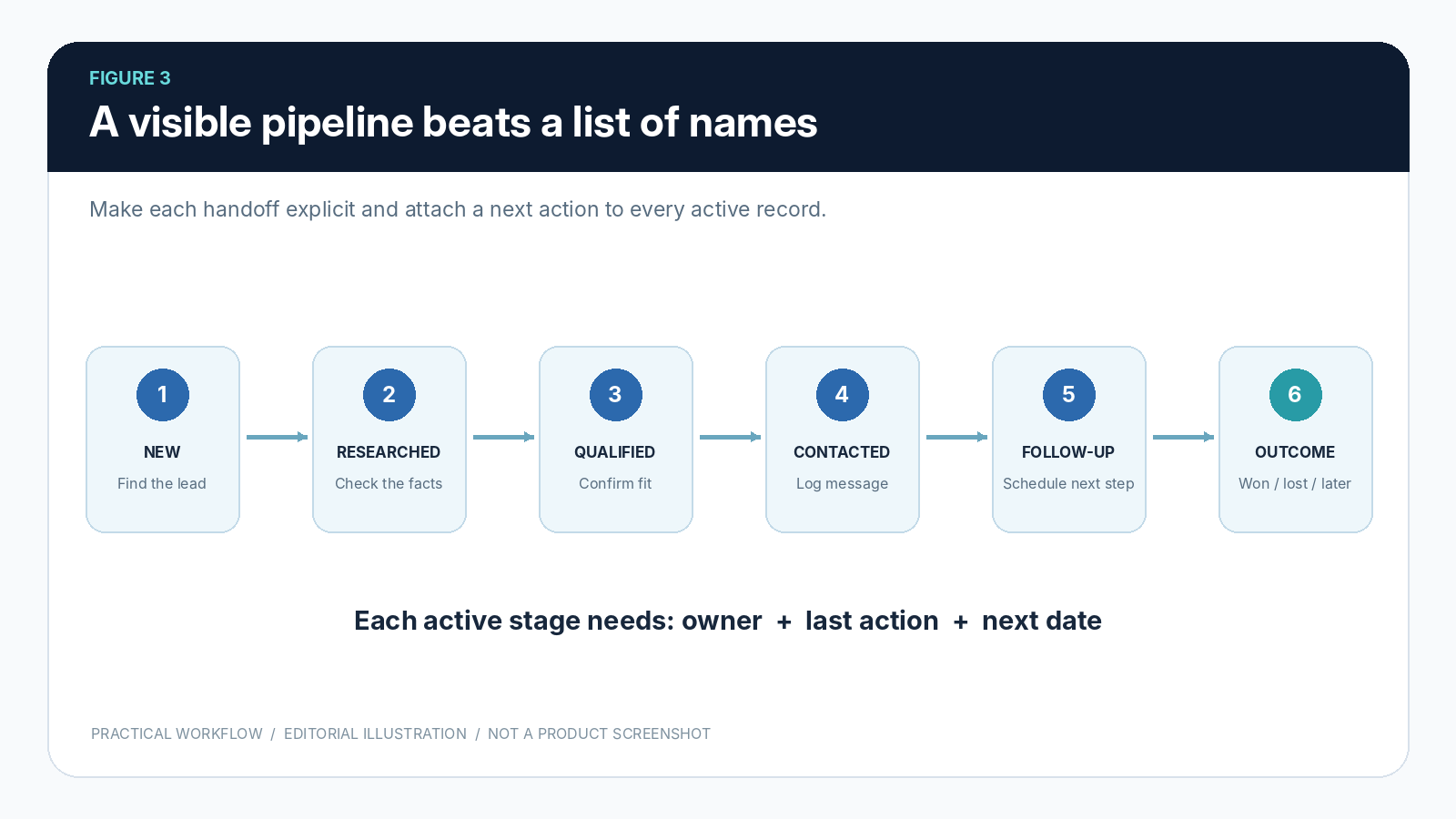
Create a next-action field for every active prospect: the action itself, a responsible person, and a target date. Examples include “check reply,” “send requested details,” “confirm decision-maker,” and “close out after no response.” When someone asks not to be contacted, record that instruction and honor it.
Do not automate endless reminders. Set a modest, respectful follow-up policy appropriate to your audience and local requirements. Distinguish a message draft from a successfully delivered message; authentication problems, provider limits, and failed sends can interrupt a sequence. A system is useful only when it records what actually happened.
6. Use pipeline stages as a shared language
A spreadsheet of names tells you who exists. A pipeline should tell you what each relationship needs. A basic set of stages might be New, Researched, Qualified, Contacted, Follow-up Due, and Outcome. The outcome can be won, lost, or deferred. Rename stages if necessary, but define the entry criteria for each one.
For example, “Qualified” could mean that the organization fits a defined customer profile and the research evidence has been reviewed. “Contacted” should mean an actual send or conversation was recorded, not merely that a message was drafted. “Won” should reflect a genuine commercial agreement, not an optimistic reply.
Keep activities attached to the same company or relationship record, including notes, communications, objections, next steps, proposals, and relevant documents. Otherwise, each stage change forces a colleague to reconstruct the history from several different apps.
7. Do not discard the relationship when a deal closes
Client acquisition is often described as a funnel that ends at a signed agreement.
Service businesses know the work continues: scope is confirmed, proposals become active documents, delivery milestones matter, and clients may have future needs. Keeping the original research and commitments in view reduces the chance of a confusing handoff.
A lightweight client record should retain the agreed scope, key contacts, the proposal or contract reference, communication preferences, and the next service commitment. Apply sensible access controls and avoid collecting or retaining information you do not need. “Local-first” software can keep primary working records on the user’s device, but teams still need appropriate backup and security practices.
8. Build a weekly rhythm that fits the available time
The best prospecting routine is one a person can sustain.
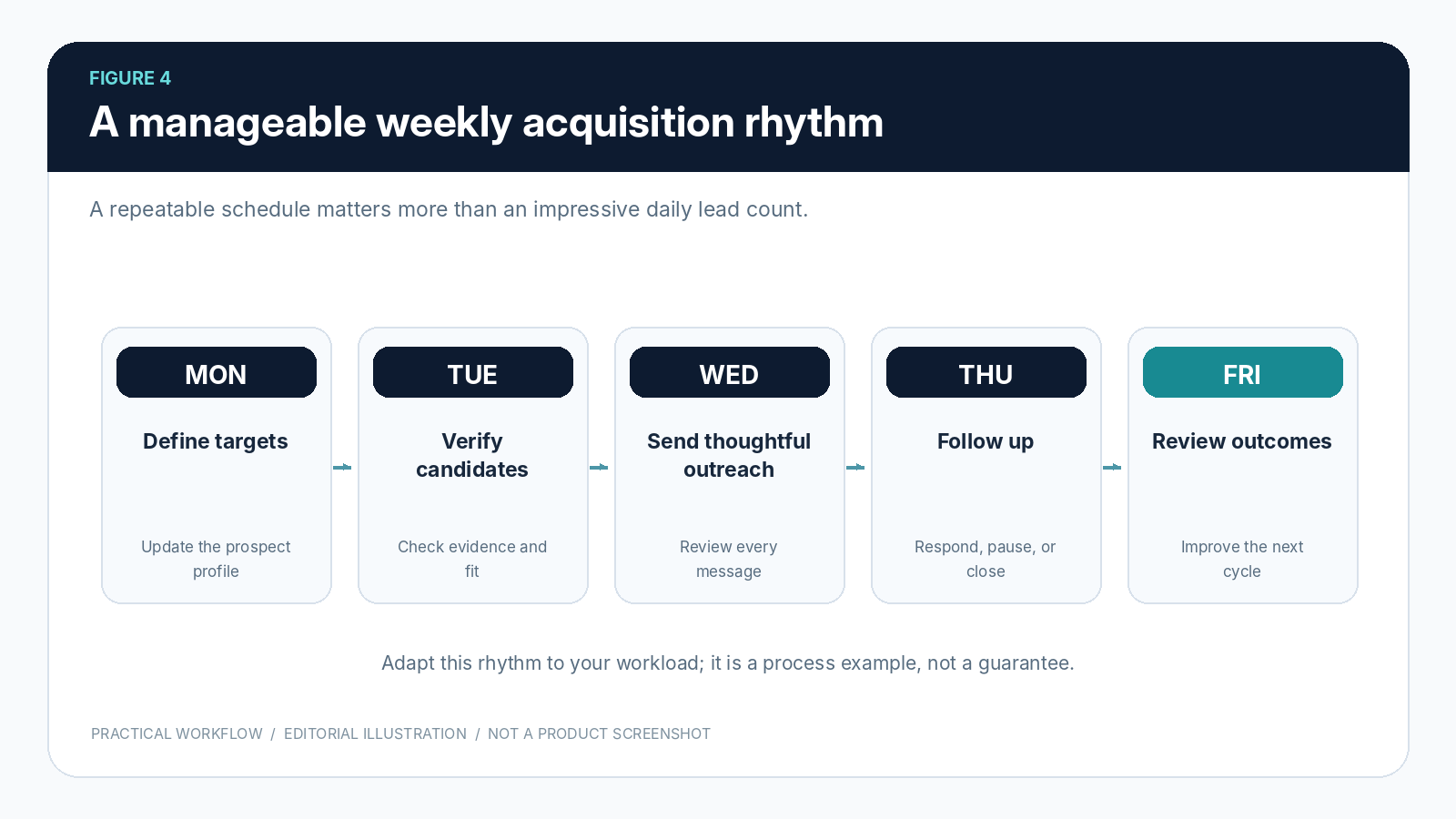
One practical model is to reserve Monday for defining or refining the target segment, Tuesday for confirming research, Wednesday for relevant first outreach, Thursday for responses and follow-ups, and Friday for reviewing outcomes. These are planning prompts rather than mandatory calendar rules.
Track a few operational measures: researched candidates with verified sources, qualified prospects, properly sent messages, replies requiring action, scheduled follow-ups completed, and opportunities moving forward. Separating these measures helps spot the real bottleneck. If the team researches carefully but rarely contacts anyone, another discovery tool may not solve the problem.
Set review questions before collecting more data. Which source produced useful records? Which assumptions proved wrong? What information did prospects ask for? Where did follow-ups stall?
The next week’s workflow should be slightly better because of what the previous week revealed, not because a dashboard displays more charts.
9. Choose software that preserves context and human judgment
Software should make the process easier to inspect, not hide important decisions.
Useful capabilities include source-linked prospect research, duplicate checks, editable qualification notes, accountable sending controls, a visible pipeline, follow-up reminders, exports, backups, and straightforward records that remain understandable after the initial search.
Some teams prefer a connected cloud CRM, while others want working records stored primarily on their computers. A local-first approach can provide useful control over primary data and offline recordkeeping, but it does not make web discovery, email delivery, licensing, or all integrations independent of the internet. Nor does optional local AI make source verification unnecessary.
P2COS (Prospect2Client OS) is one example of a local-first workspace organized around this prospect-to-client sequence. As of October 2026, its developer lists Early Access desktop builds for Windows and macOS, with public Windows distribution and separate Mac installers for Apple Silicon and Intel.
The Mac builds are not yet Apple Developer ID signed or notarized, and Mac runtime validation is still ongoing. Those limitations matter for anyone evaluating deployment today; readers should consult the current release-status and documentation pages rather than assuming platform parity or production readiness.
The same principle applies to any tool in this category: a product tour can show how a workflow is organized, but it is not proof of sales results. Test what matters to your business, confirm current limitations, and verify details that change across releases.
The underlying advantage is a clear next step
A small team does not need to imitate a large sales department to operate professionally. It needs a specific market, verifiable evidence, a defensible qualification decision, respectful communication, and a next action that does not get lost.
The system works when someone can open a record on Monday morning and immediately understand what happened, why the relationship matters, and what should happen next.
Begin with a manageable segment and a handful of properly researched records. Review the process before expanding the volume. Better client acquisition starts with continuity and judgment, not with a bigger list.

Omarion works with the marketing team at P2COS (Prospect2Client OS), an independently developed, local-first prospecting and client-acquisition desktop platform currently in Early Access for Windows and macOS. The article reflects practical workflow guidance and does not constitute an independent product review. Learn more at https://p2cos.com/.